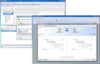
Screenshot Preview

ApexSQL Log - Summary

by ApexSQL

Summary

ApexSQL Log by ApexSQL

URLs: apexsql-log, apexsql log, apexsqllog, apexsql

Audit data changes, rollback and reconstruct transactions. ApexSQL Log is an advanced Microsoft SQL Server log auditing tool that analyzes SQL Server's own transaction log to display information on data changes, including user (nt user), computer and application where the change originated. Since ApexSQL Log reads the transaction log, there's no database overhead. Database triggers are not used and audits can be done on changes made even before the tool was installed. ApexSQL Log supports all SQL Server versions including 7, 2000, 2005, and 2008.

ApexSQL Log Features

Support for SQL Server 2008 New Features

New Data Types: fully supported for auditing, undoing and redoing of DML operations and exporting DDL feature

Date and Time - simplifying your work with date and time data, providing increased date range, fractional seconds precision, and time zone support.

Hierarchyid - represents position in a hierarchy and sets the desired relationship between rows

Spatial - predefined CLR data types in SQL Server allowing you to represent information about the physical location and shape of geometric objects

Audit to determine who did what and when

Read online transaction logs, detached logs, and even transaction log backups

ApexSQL Log reads the following forms of the transaction log:

Online transaction Log

Detached transaction Log

Transaction Log backup

Audit DDL operations

ApexSQL Log performs DDL command reconstruction and supports the following DDL commands for SQL Server 2000.

CREATE/ALTER/DROP TABLE

CREATE/DROP INDEX

CREATE/DROP FUNCTION

CREATE/DROP PROCEDURE

CREATE/DROP TRIGGER

CREATE/DROP VIEW

GRANT/DENY/REVOKE

EXEC sp_adduser

EXEC sp_dropuser

EXEC sp_rename

View Detailed Audit History

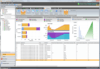
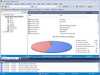
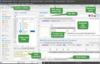
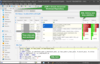
More details about the row, like what columns were updated or what record was inserted, can be found in the Row Details tab.

The Row History tab shows more details on the changes that occurred: the date the change occurred, the type of operation (Insert, Update or Delete), the user who performed the change, etc.

Rollback or Reconstruct transactions

Easily rollback or reconstruct committed insertions, deletions, or updates. Transactions read from your transaction log can be "un-done" or "re-done". Just select the transaction(s) and click 'Create Undo Script' or 'Create Redo Script' from the menu.

Export Audit trail data

Audit trails can easily be exported to CSV, SQL, and XML formats.

Drill down to the exact log records you want to see with a filter wizard

Log Selection Wizard- guides you through the process of auditing and customizing your audit information using filters

Schedule and Run jobs unattended, overnight etc.

ApexSQL Log offers a powerful console application allowing the tool to be used in automated processes, to be run nightly, scheduled, unattended etc. All relevant GUI operations can be performed via command line interface. The Command Line Interface offers scores of option switches, support for XML argument files as well as standard switches like Test and Help.

Run on SQL Server 2005 and SQL Server 2008 as well as 64-bit platforms

What's New in ApexSQL Log 2011.01

Enhancements:

Application now supports auditing of SQL Server Denali databases

Application now fully supports auditing of the following SQL Server Denali DDL operations: CREATE/ALTER/DROP SEQUENCE

CREATE/ALTER/DROP TABLE … AS FILETABLE

CREATE/DROP COLUMNSTORE INDEX

Application will now run as 64-bit process under 64-bit OS

Server Activation Center dialog has been redesigned for improved usability

Connection Monitor Manager dialog has been redesigned for improved usability

Application stability has been improved when auditing transaction logs larger than 32 GB

Memory consumption has been improved when auditing transaction logs larger than 2 GB by preventing memory overuse

Performance has been improved by 40% when auditing transaction logs with more than 1,000,000 operations

Auditing of page and row compressed tables is now supported

Auditing of SPARSE columns is now supported

Application can now reconstruct changes made with SELECT INTO statements

Application can now reconstruct changes to numeric data stored in the vardecimal storage format

What's New in ApexSQL Log 2010.02

Enhancements:

Application now fully supports auditing of the following DDL operations: CREATE/DROP SCHEMA

Progress dialogs have been redesigned across the application for improved accuracy and usability

Server Side Components can now be uninstalled through Server Activation Center dialog

Connection Monitor Manager dialog has been redesigned for improved usability

Performance of UPDATE reconstruction has been improved for rarely updated rows (up to 400% depending on internal state of the operation)

Performance of data export has been improved up to 100% for BLOBs larger than 64 Kb

The following new switches have been added to CLI: /ifl [/intermediary_files_location] - Specifies location of intermediary files created during auditing

Delay in opening Filter step of Connection Wizard with lots of hosts, applications or user data has been eliminated

Amount of memory required for UPDATE reconstruction has been reduced by 10% on average

What's New in ApexSQL Log 2008?

Application is now able to export auditing results to HTML format

The original ApexSQL Log has been split into two products for auditing/transaction rollback (ApexSQL Log) and data recovery (ApexSQL Recover).

Fixed: Server-side components installation fails on Windows Vista/7 with UAC turned ON

Fixed: Server-side components installation fails if the application extended stored procedure DLL (ApexSqlLog2008Xprocs.dll) is locked by SQL Server

Audit data changes, rollback and reconstruct transactions.

Pricing: ApexSQL Log (Version 2011.01) 1 Server License, ApexSQL Log (Version 2011.01) 1 Server License per license from 10 to 19 Licenses, ApexSQL Log (Version 2011.01) 1 Server License per license from 20 to 39 Licenses, ApexSQL Log (Version 2011.01) 1 Server License per license from 40 to 69 Licenses, ApexSQL Log (Version 2011.01) 1 Server License per license from 70 Licenses, ApexSQL Log with 1 yr Maintenance (Version 2011.01) 1 Server License, ApexSQL Log with 1 yr Maintenance (Version 2011.01) 1 Server License per license from 10 to 19 Licenses, ApexSQL Log with 1 yr Maintenance (Version 2011.01) 1 Server License per license from 20 to 39 Licenses, ApexSQL Log with 1 yr Maintenance (Version 2011.01) 1 Server License per license from 40 to 69 Licenses, ApexSQL Log with 1 yr Maintenance (Version 2011.01) 1 Server License per license from 70 Licenses, ApexSQL Log with 2 yrs Maintenance (Version 2011.01) 1 Server License, ApexSQL Log with 2 yrs Maintenance (Version 2011.01) 1 Server License per license from 10 to 19 Licenses, ApexSQL Log with 2 yrs Maintenance (Version 2011.01) 1 Server License per license from 20 to 39 Licenses, ApexSQL Log with 2 yrs Maintenance (Version 2011.01) 1 Server License per license from 40 to 69 Licenses, ApexSQL Log with 2 yrs Maintenance (Version 2011.01) 1 Server License per license from 70 Licenses, ApexSQL Log with 3 yrs Maintenance (Version 2011.01) 1 Server License, ApexSQL Log with 3 yrs Maintenance (Version 2011.01) 1 Server License per license from 10 to 19 Licenses, ApexSQL Log with 3 yrs Maintenance (Version 2011.01) 1 Server License per license from 20 to 39 Licenses, ApexSQL Log with 3 yrs Maintenance (Version 2011.01) 1 Server License per license from 40 to 69 Licenses, ApexSQL Log with 3 yrs Maintenance (Version 2011.01) 1 Server License per license from 70 Licenses

Evals & Downloads: Read the ApexSQL Log help file, Read the ApexSQL End User License Agreement, Download the ApexSQL Universal Studio evaluation on to your computer - Expires after 30 days

Operating System for Deployment: Windows Vista, Windows XP, Windows Server 2003, Windows 2000

Architecture of Product: 32Bit, 64Bit

Compatible Containers: Microsoft SQL Server 2008, Microsoft SQL Server 2005, Microsoft SQL Server 2000, Microsoft SQL Server 7.0

Keywords: apexsql log, apex sql log, apexsql log 2008

ApexSQL Apex SQL

SQL query language

Database DB Management

Part numbers: PC-517567-435936 517567-435936 PC-517567-435938 517567-435938 PC-517567-435940 517567-435940 PC-517567-435942 517567-435942 PC-517567-435944 517567-435944 PC-517567-435946 517567-435946 PC-517567-435948 517567-435948 PC-517567-435950 517567-435950 PC-517567-435952 517567-435952 PC-517567-435954 517567-435954 PC-517567-435956 517567-435956 PC-517567-435958 517567-435958 PC-517567-435960 517567-435960 PC-517567-435962 517567-435962 PC-517567-435964 517567-435964 PC-517567-435966 517567-435966 PC-517567-435968 517567-435968 PC-517567-435970 517567-435970 PC-517567-435972 517567-435972 PC-517567-435974 517567-435974

Mfr. Part No: 183236 300073419 300073422 300073426

Product Search

Enter search words:

Quick Links

Publisher

Primary Category

Related Products

Related Categories

Award Award