by Xamarin - Product Type: Component
Xamarin take over support of MonoTouch and Mono for Android
Xamarin obtained a perpetual license to all the intellectual property of Mono, MonoTouch, Mono for Android, Mono for Visual Studio and will continue updating and selling those products. Xamarin will be providing the support for all of the existing MonoTouch, Mono for Android and Mono for Visual Studio customers.
Create C# and .NET applications for iPhone, iPod Touch and iPad while taking advantage of iPhone APIs, and reusing existing .NET code, libraries, and skills. MonoTouch is a software development kit that contains a suite of compilers, libraries and tools for integrating with Apple's iPhone SDK. MonoTouch includes Microsoft .NET base class libraries along with managed libraries for taking advantage of native iPhone APIs. Also included is a cross-compiler that can be used for turning .NET executable files and libraries directly into native applications for distribution on the Apple Apps Store or for deployment to enterprise iPhone users. In addition, Xcode integration enables application developers to test on the device or in Apple's iPhone Simulator and ship applications to the Apple Apps Store for distribution.
Our regular prices are shown below. Please logon to see your discounted prices.
| Add to Cart | $ 399.00 | 1 Developer License (1 Named User License, does not allow enterprise deployments, includes 1 year product updates) Mfr. Part No: MT PRO |
Download (79.7 MB) | |
| Add to Cart | $ 249.00 | 1 Developer Upgrade (Subscription Renewal) (1 Named User License, does not allow enterprise deployments, includes 1 year product updates) Mfr. Part No: MT PRO UPG |
Verify | Download (79.7 MB) |
| Add to Cart | $ 999.00 | 1 Developer Seat License (Corporate License, allows enterprise deployments, includes 1 year product updates) Mfr. Part No: MT ENT |
Download (79.7 MB) | |
| Add to Cart | $ 599.00 | 1 Developer Seat Upgrade (Subscription Renewal) (Corporate License, allows enterprise deployments, includes 1 year product updates) Mfr. Part No: MT ENT UPG |
Verify | Download (79.7 MB) |
| Add to Cart | $ 2,499.00 | 1 Developer Seat License with Priority Support (Corporate License, allows enterprise deployments, includes 1 year priority support and product updates) Mfr. Part No: MT PRI |
Download (79.7 MB) | |
| Add to Cart | $ 1,499.00 | 1 Developer Seat Upgrade with Priority Support (Subscription Renewal) (Corporate License, allows enterprise deployments, includes 1 year priority support and product updates) Mfr. Part No: MT PRI UPG |
Verify | Download (79.7 MB) |
Our prices include ComponentSource technical support and, for most downloadable products, an online backup and a FREE upgrade to the new version if it is released within 30 days of your purchase. All sales are made on our standard Terms and Conditions and subject to our Return Policy. Please contact us if you require any licensing option not listed, including volume licensing and previous versions.
Our regular prices are shown above. Please logon to see your discounted prices.

New features in MonoTouch 5.2
New APIs in MonoTouch 5.2
iOS Specific Updates
OpenTK Upgrade
With this release, Xamarin updated the OpenTK stack to version 1.0. This brings several bug fixes and improvements to OpenTK, but also introduces a couple of source-code level incompatible changes:
These two methods:
have changed return type (they return Vector4 and Vector4d, respectively, now). There is another Transform overload that can be used to get the old behavior:
These new overloads are also available in the latest stable version of MonoTouch, so you can use the new overloads and still be backwards compatible.
New Reference Counting System
This version features a preview of our new reference counting system that developers can enable to remove a series of problems that have existed historically in MonoTouch. To enable this new Reference Counting System, you must be using Mono's SGen Garbage Collector, and pass the "--new-refcount" flag in "Additional mtouch arguments" in your iPhone Build project tab. Historically there have been two kinds of objects managed by MonoTouch: those that were merely a wrapper around a native object (peer objects) and those that extended or incorporated new functionality (derived objects) usually by keeping extra in-memory state. Before it was possible that you could augment a peer object with state (for example by adding a C# event handler) but that it let the object go unreferenced and then collected. This would cause a crash later on. This new system automatically upgrades peer objects into objects that are managed by the runtime when they store any extra information.
What's New in MonoTouch 5.0
MonoTouch 5.0 introduces support for the new APIs and features found on iOS 5.
These are the new frameworks supported by MonoTouch 5.0 with strongly-typed C# bindings:
What's New in MonoTouch 4.0
Core Mono Runtime upgraded to Mono 2.10:
LLVM-backed optimizing compiler
Support for iOS SDK 4.3
What's New in MonoTouch 3.2.4
What's New in MonoTouch 3
MonoTouch 3.0.8 introduced support for Apple's iPhone 4 SDK and supports the following platforms:
Multitasking
MonoTouch 3.0 supports all the new APIs to allow your application to multi-task on iOS 4.0. As part of this effort, Novell introduced bindings to Grand Central Dispatch (see the class MonoTouch.CoreFoundation.Dispatch).
You can build applications that support:
Multitasking support builds also on top of the new binding to the Blocks API.
Integration Technologies
All of the new iOS =4.0 "Integration Technologies" features introduced by Apple are supported in this edition of MonoTouch.
Location Notifications
Local notifications, provided by the MonoTouch.UIKit.UILocalNotification
EventKit
EventKit framework, gives you access to the device calendar (MonoTouch.EventKit).
CoreMotion
CoreMotion gives you access to the gyroscope and accelerometer (MonoTouch.CoreMotion).
CoreTelephony
CoreTelephony gives you access to information about your cell provider (MonoTouch.CoreTelephony).
Apple iAd
iAd allows developers to integrate advertisements into their applications (MonoTouch.iAd)
Graphics and Multimedia
High Resolution APIs
Support for iPhone 4's Retina Display is accomplished through various extensions to the UIKit and CoreAnimation APIs. These new APIs are also exposed to MonoTouch developers (MonoTouch.UIKit.UIScreen.Scale, MonoTouch.UIKit.UIImage.CurrentScale, MonoTouch.UIKit.UIView.ContentScaleFactor).
Quick Look Framework
This new API has been bound allowing your application to preview the contents of foreign file formats. The APIs are available in MonoTouch.QuickLook.
AVFoundation
The AVFoundation framework gives developers more fine grainer control over music and video playback and with iOS 4.0 it got a significant boost in terms of functionality. The new classes are available under MonoTouch.AVFoundation.
These are some of the new additions:
Core Services
Transparent access to the Blocks API
For those familiar with both Objective-C and C# we mapped C# delegates and lambdas into Objective-C blocks, so all the new blocks-based API is available to developers. Developers in C# can continue to use lambda functions as well as anonymous methods, and those will be transparently exposed to Objective-C as Objective-C blocks.
Grand Central Dispatch
This task queue management system is used in iPhone OS and MonoTouch now exposes these APIs for application developers to use.
Accelerate Framework
This API is a flat C API and is only available to developers by manually using P/Invoke to call into these routines. No object-oriented binding has been provided for it.
UIKit and UI Improvements
All of the improvements that Apple introduced in iOS 4.0 for UIKit are exposed in MonoTouch 3.0, this includes the new multi-tasking methods in UIApplicationDelegate as well as its support for scheduling local notifications.
Multithreading improvements
In iOS4 it is possible to use a graphics context (MonoTouch.CoreGraphics.CGContext) in a multi-threaded application. Access to UIImage, UIColor and UIFont is now also thread safe.
Block Animations
The new Block-animation APIs in UIView which provide various callbacks for custom animations are exposed in the API. Blocks in the UIView are merely C# instances of NSAction, so you can just use delegates, anonymous methods or lambda functions as your block values.
Font Smoothing Support
CoreGraphics now supports fine grained control of font smoothing in MonoTouch.CoreGraphics.CGContext.
MessageUI
The new MFMessageComposeViewController now supports a compositing tool for SMS messages without leaving your application.
MapKit
Map overlays and draggable map annotations are now supported.
Foundation Bindings
Many new Foundation APIs were introduced with iOS 4.0, these have been bound, and the most interesting include:
GameKit
All the new APIs from GameKit (MonoTouch.GameKit) have been added.
What's New in MonoTouch 2.0
MonoTouch 2.0 introduces support for the Apple's iPad, the support includes:
This includes all of the improvements that were done on the 1.4.xx and 1.5 releases, including reduced startup time, reduced application footprint, reduced memory use as well as support for Apple's profiling tools.
MonoTouch is a software development kit for Mac OS X that lets you use .NET programming languages to create native applications for Apple iPhone, Apple iPod Touch and Apple iPad devices. MonoTouch allows developers to use the .NET framework and more efficient programming languages, such as C#, to create applications that run on the iPhone and can take advantage of native iPhone APIs. Developers can test MonoTouch applications on the iPhone simulator, as well as physical hardware, and can distribute MonoTouch applications on Apple's App Store.
MonoTouch Features:
MonoTouch is delivered as a static compiler that turns .NET executables and libraries into native applications. There is no JIT or interpreter shipped with your application, only native code. In addition to the core Base Class Libraries that are part of Mono, MonoTouch also ships with bindings for various iPhone APIs to allow developers to create native iPhone applications with Mono.
MonoTouch requires a Mac and Apple's iPhone SDK to test on the emulator and deploy on the device. And you will need to be an Apple iPhone developer to deploy on the device.
MonoTouch is a commercial product based on the open source Mono project and is licensed on a per-developer basis.
MonoTouch is based on a hybrid .NET 2.0 and Silverlight 2 API profile. If you want to use existing C# code, you will need to compile it from scratch using the MonoTouch compiler and tools to make sure that the proper assemblies are referenced.
MonoTouch supports garbage collection, multi-threading, and many features of .NET 3.5, including C# 3.0 and LINQ, with some exceptions due to the security system in the device.
You cannot reuse the 1.0 or 2.0 desktop/server assemblies from Mono or .NET with MonoTouch.
To reuse existing .NET code with MonoTouch, you must recompile your libraries with MonoTouch's compiler and base assemblies.
Monotouch is available in Professional Edition and Enterprise Editions:
Professional | Enterprise | Enterprise Priority | |
| Deploy to your devices | • | • | • |
| Publish to app stores | • | • | • |
| Enterprise distribution | • | • | |
| Priority support queue | • | ||
| Guaranteed response time | • | ||
| License expiration | Never | Never | Never |
| Update subscription | 1 Year | 1 Year | 1 Year |
| License Usage | Original User | Seat | Seat |
Other Features:
Automatic Memory Management
Mono comes with a garbage collector that allows developers to focus on their software and let the runtime take care of the bookkeeping required to release objects. This avoids common memory leaks and reduces the amount of code that needs to be written to avoid these leaks.
Type Safety
The C# language in combination with the ECMA runtime prevent a whole class of errors from your application. With C# the common errors of reusing disposed objects accidentally, overflowing a buffer, casting an object into the wrong type (leading to corruption), releasing the memory twice or keeping dangling objects are a thing of the past.
C# 3.0
The C# 3.0 language is a rich high-level language that brings many constructs that improve programmer productivity.
In addition to traditional object oriented languages, C# offers many interesting new constructs: type safe generic types, automatic state machines created with iterators, lambda functions and anonymous methods, built-in properties and built-in event systems as well as the System.Linq namespace that allows developers to create functional programming constructs.
The terse syntax allows configurations of objects in one pass:
var slider = new UISlider (new RectangleF (174f, 12f, 120f, 7f)){
BackgroundColor = UIColor.Clear,
MinValue = 0f,
MaxValue = 100f,
Continuous = true,
Value = 50f,
Tag = kViewTag
};
slider.ValueChanged += delegate {
Console.WriteLine ("New value {0}", slider.Value);
};
Use iPhone 3.1 APIs
MonoTouch binds the Objective-C APIs that developers use on the iPhone into C# APIs that expose the functionality and map this to any ECMA CIL powered language. Objective-C delegates are exposed to C# applications in a number of ways giving developers complete control of how to consume and integrate with native APIs.
MonoTouch provides a C#/ECMA binding for:
From the pure C#-based event model to the native Objective-C system, the two mechanisms are supported.
For example, to respond to events, programmers can just connect to the events they are interested in:
var page = new UIPageControl (new RectangleF (120f, 14f, 178f, 20f)){
BackgroundColor = UIColor.Gray,
Pages = 10,
Tag = kViewTag
};
page.TouchUpInside += delegate {
Console.WriteLine ("Current page: {0}", page.CurrentPage);
};
Access to .NET APIs
MonoTouch includes the .NET APIs that make sense in the iPhone device.
The assemblies shipped with MonoTouch include:
| Assembly | Added | API Compatibility |
| Mono.CompilerServices.SymbolWriter.dll | 1.0 | For compiler writers. |
| Mono.Data.Sqlite.dll | 1.2 | ADO.NET provider for SQLite; (has some limitations. See online product documentation for more information.) |
| Mono.Data.Tds.dll | 1.2 | TDS Protocol support; used for System.Data.SqlClient support within System.Data. |
| Mono.Security.dll | 1.0 | Cryptographic APIs. |
| monotouch.dll | 1.0 | This assembly contains the C# binding to the CocoaTouch API. |
| mscorlib.dll | 1.0 | Silverlight |
| OpenTK.dll | 1.0 | The OpenGL/OpenAL object oriented APIs, extended to provide iPhone device support. |
| System.dll | 1.0 | Silverlight, plus types from the following namespaces:
|
| System.Core.dll | 1.0 | Silverlight |
| System.Data.dll | 1.2 | .NET 3.5 , with some functionality removed. |
| System.Json.dll | 1.1 | Silverlight |
| System.ServiceModel.dll | 1.1 | WCF stack as present in Silverlight |
| System.Transactions.dll | 1.2 | .NET 3.5; part of System.Data support. |
| System.Web.Services | 1.1 | Basic Web services from the .NET 3.5 profile, with the server features removed. |
| System.Xml.dll | 1.0 | .NET 3.5 |
| System.Xml.Linq.dll | 1.0 | .NET 3.5 |
Additionally there is experimental support for WCF web services.
Access to Third Party .NET Libraries
You can tap into the extensive universe of .NET libraries and APIs that exist out there for Mono and .NET and use them with MonoTouch.
Access to third party iPhone/Objective-C Libraries
MonoTouch allows you to access libraries created in the Objective-C language for the iPhone easily and to create C#/.NET bindings to Objective-C libraries.
The new btouch tool simplifies binding an Objective-C API and does the heavy lifting for you: registering the selectors, taking care of invoking the proper handle for overwritten classes, doing parameter checking and doing some of the common marshaling required for your project.
MonoDevelop and XCode Integration
MonoTouch is an SDK that can be used with your favorite editor, be it a fully integrated development environment or a simple text editor.
The MonoDevelop integration helps developers get started by providing iPhone application templates that will get you from zero to your device in no time.
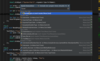
MonoDevelop's code completion helps you quickly explore the API as you write your application:
Tutorials are available which will walk you through creating your first MonoTouch application, testing it on the simulator and then deploying it to your iPhone.
Interface Builder Integration
Both MonoDevelop and the MonoTouch SDK allow you to use Interface Builder to create and customize your UIs. The Inteface Builder has been taken one step further than XCode by making MonoTouch automatically bind any outlets you define on your interface and any methods that you define in your interface to your C# code.
You will never have to manually bind any outlets from Interface Builder to your code as MonoTouch takes care of this.
Publisher
Primary Category
Related Products
Related Categories