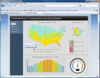
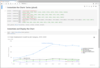
Screenshot Preview

Dundas Chart for Reporting Services - Summary

by Dundas Data Visualization - Product Type: Component / Add-In / ASP.NET WebForms / 100% Managed Code

Dundas Data Visualization has announced that Dundas Chart for Reporting Services is "End of Life", due to the acquisition of the codebase by Microsoft. You may buy new licenses for this product up to Oct 31, 2010, after that date new licenses will no longer be available. Dundas will then continue to support this product until Oct 31, 2011. Dundas plan to continue developing and supporting a new product range called Dundas Dashboard.

Summary

Dundas Chart for Reporting Services by Dundas Data Visualization

URLs: dundas-chart-reporting-services, dundas chart reporting services, dundaschartreportingservices, dundas

Enhance your reports in SQL Reporting Services 2005/2008. Dundas Chart for Reporting Services is based the Dundas Chart for .NET engine, it gives IT professionals working with Reporting Services access to an arsenal of new features and chart types. Instantly enhance reports with advanced charting visualizations, analysis capabilities and more. Dundas Chart for Reporting Services is also very easy to incorporate into reports and easy to use. Like any other reporting control, it is integrated directly within the Visual Studio Toolbox, side by side with the native controls. It has interfaces that are familiar and easy to navigate to make the learning curve very minimal.

What are the benefits to using Dundas Chart for Reporting Services?

Based on the feature set found within the current Enterprise Editions of Dundas Chart for .NET, Dundas Chart for Reporting Services will include a multitude of advanced features that will dramatically improve the Charting experience for users of Reporting Services 2005/2008. Benefits include:

Double the chart types, adding the following:

All standard chart types

Funnel Charts

Pyramid Charts

Pie Chart - Small Segments

Range Charts

Gantt Chart

Doughnut Chart

Radar Chart

Polar Chart

Pareto Charts

Histogram Charts

Easy Integration

Dundas Chart for Reporting Services is also very easy to incorporate into reports and easy to use. Like any other reporting control, it is integrated directly within the Visual Studio Toolbox, side by side with the native controls. It has interfaces that are familiar and easy to navigate to make the learning curve very minimal.

Other Features

Multiple chart area support

Multiple legend support

Multiple title support

Supports Combinational charts that share a common axis

Full control over all chart elements

SmartLabels(TM) for improved data point labeling

Component level Data Manipulation

Component level Data Filtering

Component level Data Grouping

Financial Formula Support

Statistical Formula Support

Design time Template Support

Palette Support

Empty Data Point Support

Annotation Objects

Forecasting

Using Dundas Charts unique scripting ability, easily write C# or VB.NET code against the charts object model. This allows for extremely advanced customization, such as custom painting, extending data analysis, and appearance customizations based on the charts data.

What's new in Dundas Chart for SQL Server Reporting Services V3.1?

Scorecard Chart Type - Create a balanced scorecard with bullet graphs, track inventory in a detailed grid, plus use this chart type side by side with the many other Dundas chart types.

Pie Plus Chart Type - Innovative new customization for the look and feel of your pie charts.

Additional chart types - Includes Contour, Tree Map, Wafer, Timeline charts and other enhancements

What's new in Dundas Chart for SQL Server Reporting Services V3.0?

Custom Chart Types - With its "custom chart type feature," Dundas Chart for Reporting Services gives developers the power to create entirely new chart types and use them just like any of the charts that have been created. Check out the custom charts: Column Plus, Heat Map, Sparkline and Waterfall.

Enhanced Templates Now Support Code Script - With the new release, any code you use in the Code Editor can be saved in a template. So if you write some code that you want to use in multiple reports, just create a template and go from there.

Expression Editor Buttons Added - Version 3.0 boasts new expression editor buttons added to many new chart properties - allowing many properties to support expressions for the first time - and making expression editing easier in properties that were previously missing the button. This allows even more dynamic reports than ever before.

New Features in V2.x Dundas Chart for Reporting Services

Now supports SQL Server 2008!

FastPoint Chart Type - If you have thousands, or even hundreds of thousands of data points or more, the new FastPoint chart type can help. Complimenting the FastLine chart type, the FastPoint charts are optimized to display large data sets quickly and efficiently

Custom Color Palettes - Designers and developers now have the option of creating their own custom color palettes to compliment the existing palettes. This allows companies to quickly define their own corporate colors for series data

2D and 3D Drawing Effects - Dundas Chart for Reporting Services now offers exciting, eye-catching effects for both 2D and 3D charts types. Choose from a variety of styles to add a further customizations to your charts

Simplified data binding through the Chart Wizard

Customizable No Data Message

Design-Time Formulas - Dundas Chart for Reporting Services allows for the specification of formulas and parameters of data values which will be executed at runtime

Grouping of stacked bar/column chart series Grouped Stack Bar/Column Series - You can now group stacked bar/column chart series data for easier interpretation and added customization

Axis Scale Breaks - Scale breaks allow you to customize your chart so that large differences between the high and low values of the data being plotted does not diminish the readability of your chart. If you have a data spike that makes your charts unreadable, Scale-Breaks can help

What's new in V1.5?

The latest version of Dundas Chart for Reporting Services is now available. With an improved code editor, properties for back images and much more.

Enhance your reports in SQL Reporting Services 2005/2008.

Operating System for Deployment: Windows 7, Windows Server 2008, Windows Vista, Windows XP, Windows Server 2003, Windows 2000

Architecture of Product: 32Bit, 64Bit

Product Type: Component, Add-In

Component Type: ASP.NET WebForms, 100% Managed Code

Compatible Containers: Microsoft Visual Studio 2010, Microsoft Visual Studio 2008, Microsoft Visual Studio 2005, Microsoft Visual Basic 2010, Microsoft Visual Basic 2008, Microsoft Visual Basic 2005, Microsoft Visual C++ 2010, Microsoft Visual C++ 2008, Microsoft Visual C++ 2005, Microsoft Visual C# 2010, Microsoft Visual C# 2008, Microsoft Visual C# 2005, Microsoft SQL Server 2008, Microsoft SQL Server 2005, .NET Framework 4.0, .NET Framework 3.5, .NET Framework 3.0, .NET Framework 2.0, .NET Framework 1.1

Keywords: Charting Reporting Services Graphing SQL rs SSRS

Dundas Data Visualization

Chart Charting Charts Graph Graphing Graphs

Product Search

Enter search words: