by ComponentArt - Product Type: Component / .NET WinForms / 100% Managed Code
ComponentArt WinChart for .NET by ComponentArt
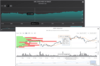
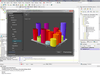
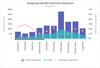
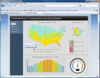
3D Charting for Windows Forms development. ComponentArt WinChart for .NET provides advanced charting and graphing functionality to your .NET applications. ComponentArt WinChart for .NET can be bound to a wide variety of sources such as relational databases, C# and VB arrays and more. Fully control the look of your charts is provided by fine tuning properties of axes, planes, labels and data points. End users can customize the look of charts, highlight series and change series order. Also, a large number of preloaded reusable chart styles enables quick creation of charts with ComponentArt WinChart for .NET.
ComponentArt WinChart for .NET Main Features
3D Rendering
Advanced image quality delivered by ComponentArt's 3D rendering engine.
The engine processes lights, reflection and transparency to produce near ray-tracing quality of graphics in a fraction of a second.
The original 3D rendering engine makes full use of 3D space for additional data presentation (for example variable segment heights in pie/doughnut charts)
Advanced features such as object intrusion produce great looking charts, not possible in traditional 2D rendering.
ComponentArt WinChart for .NET Flexible Chart Modelling
Tree-like series structure is combined with the API for fine-tuning axes, planes, labels and data points.
Chart contents such as series, axes, coordinate systems, annotations etc. are exposed through both the wizard and property view in design time, as well as through APIs for fine tuning at run-time .The Visual Studio property view provides full access to all chart properties available in design-time. The charting API allows for the finest run-time charting object model tuning, up to the finest detail of individual data points, individual axis labels, etc.
ComponentArt WinChart for .NET State-of-the-art Wizard Visual Studio design-time Support
Visual Studio design-time support makes creation of complex charts possible without coding. The wizard provides support for series type selection, series hierarchy building and data binding, view direction and coordinate system tuning, colour palette selection, titles, legends, and more. Many complex charts can be built entirely in the wizard without a single line of code.
ComponentArt WinChart for .NET Extensible and Customizable Chart Styles
All visual aspects of any chart are controlled through a concept of reusable styles for individual chart elements. Chart styles are controlled through a set of fully customizable, reusable and extensible style collections for each type of object that may appear in a chart, such as series, data point labels, axis annotations, etc.
Every type of object that may appear in a chart has its own style type including series, data point labels, 2D and 3D lines, markers and gradients. For every style type a collection of predefined styles is provided. Existing styles can be customized and/or new styles may be created and stored into corresponding style collections, making it easy to create a specific design template. Templates can be used to save and reuse chart styles. For example, a unified chart style can be defined on report and company level.
Pre-loaded with Features
A large number of preloaded reusable chart styles enables quick creation of charts.
51 predefined chart types
12 predefined colour themes
Unlimited number of series in a chart
Unlimited number of data points in a series
Multiple legends, title items and axes labels
Date and Time support
Extensive collection of predefined series styles is available in the following categories:
Bar: Cylinder, Block, Hexagon, Paraboloid, Cone, Prism, Pyramid, Rectangle
Area:Simple Area,Smooth Area,Step Area, Simple 2D Area, Smooth 2D Area, Step 2D Area,
Financial: Candlestick,High-Low-Open-Close
Line:Simple Line, Smooth Line,Step Line, Simple 2D Line, Smooth 2D Line, Step 2D Line
Pie/Doughnut Charts: Simple Doughnut, Thin Doughnut, Round Doughnut,Inverted Doughnut,Simple Pie, Thin Pie, Round Pie
Radar: Radar Line, Radar Area, Radar Marker
Marker:Bubble, 2D Bubble,Block,Circle,Diamond,Triangle,Inverted Triangle,Left Triangle,Right Triangle,Cross,X Shape,Arrows
Pie/Doughnut charts can have variable height to present additional data in true 3D
Bar objects can have variable width and/or depth to present additional data in true 3D
Predefined styles may be fully customized
Custom styles can be created and added to the series styles collection
Series styles can be freely combined within a single chart, for data presentation flexibility
Different styles can be applied to data points in the same series independently
ComponentArt WinChart for .NET Additional Chart Visual Features
Style collections, for various kinds of objects:
Palettes (12 predefined)
Data point label styles (18 predefined)
3D line styles (9 predefined)
2D line styles (10 predefined)
Marker styles (18 predefined)
Gradient styles (10 predefined)
Tick mark styles (4 predefined)
Label styles (2 predefined) and
Text styles (4 predefined)
All predefined styles can be customized
Custom styles can be created and added to all style collections
ComponentArt WinChart for .NET Chart and Data Organization
Chart can be divided into multiple areas; an area can contain a chart or it can be divided into smaller sub-areas
Series are organised in hierarchies of composite and simple series to represent relationship between data sets
All series properties can be set independently or share common attributes
Composite series can be displayed using the following composition kinds:
Sections (behind each other)
Merged (beside each other)
Stacked (on top of each other)
Stacked 100% (showing relative size on top of each other)
Concentric (for Pie/Doughnut)
Multiple Coordinate System
Multiple Area
Multiple composition kinds possible in a single chart
Integer, double, DateTime and string dimensions handled along both x- and y-axis
Users can define custom hierarchical data dimensions
ComponentArt WinChart for .NET Data Binding
Input variables data formats
Relational database objects
OleDbDataAdapter
SqlDataAdapter
XML without schema
XML with schema
Arrays
Structures
Any IEnumerable
A expression language can be used to compute new input variables from the existing ones. Charts can get populated by data from input variables
Free Annotations
Unlimited number of annotations can be added to the chart
Annotations can be attached to a data point, coordinate on an axis or any coordinate in a coordinate plane
Annotations formatting is flexible - you can control colors, fonts, background, etc.
ComponentArt WinChart for .NET Coordinate System
Multiple coordinate system in a single chart
Standard (vertical) and horizontal system orientation plus other four system orientations allow chart viewing in every possible angle
Reversed direction for all axes
PartNumbers: PC-518413-160593 518413-160593 PC-518413-160594 518413-160594 PC-518413-160595 518413-160595 PC-518413-160596 518413-160596 PC-518413-160597 518413-160597 PC-518413-160598 518413-160598 PC-518413-160600 518413-160600 PC-518413-160601 518413-160601 PC-518413-160604 518413-160604 PC-518413-160605 518413-160605 PC-518413-161122 518413-161122 PC-518413-160606 518413-160606 PC-518413-160607 518413-160607 PC-518413-161123 518413-161123 PC-518413-161124 518413-161124 PC-518413-161125 518413-161125 PC-518413-161126 518413-161126
Publisher PartNumbers: CHWIN_DEV CHWIN_SUB ENTERPRISE ENTERPRISE RENEWAL PRI_SUP5 RAP_SUP5 RENEWAL UPGRADE
PurchaseOptions: ComponentArt WinChart for .NET 2008.1 ComponentArt WinChart for .NET - 1 Developer License , ComponentArt WinChart for .NET Subscription 2008.1 ComponentArt WinChart for .NET Subscription - 1 Developer Subscription License , ComponentArt WinChart for .NET Enterprise License 2008.1 ComponentArt WinChart for .NET Enterprise License - 3-4 Developer License - Includes one year subscription - price per license , ComponentArt WinChart for .NET Enterprise License 2008.1 ComponentArt WinChart for .NET Enterprise License - 5-9 Developer License - Includes one year subscription - price per license , ComponentArt WinChart for .NET Enterprise License 2008.1 ComponentArt WinChart for .NET Enterprise License - 10-15 Developer License - Includes one year subscription - price per license , ComponentArt WinChart for .NET Enterprise License 2008.1 ComponentArt WinChart for .NET Enterprise License - 16-25 Developer License - Includes one year subscription - price per license , ComponentArt Support ComponentArt Support - 5 Pack of Rapid Response Support Requests , ComponentArt Support ComponentArt Support - 5 Pack of Priority Support Requests , ComponentArt WinChart for .NET Upgrades 2008.1 ComponentArt WinChart for .NET Upgrades - 1 Developer License - Upgrade from ComponentArt WinChart 2007 for .NET , ComponentArt WinChart for .NET Upgrades 2008.1 ComponentArt WinChart for .NET Upgrades - 1 Developer Subscription License - Upgrade from ComponentArt WinChart 2007 for .NET , ComponentArt WinChart for .NET Subscription Renewals 2008.1 ComponentArt WinChart for .NET Subscription Renewals - 1 Special Early Renewal License (can be purchased any time 60 or more days prior to subscription expiry date) , ComponentArt WinChart for .NET Subscription Renewals 2008.1 ComponentArt WinChart for .NET Subscription Renewals - 1 Early Renewal License (can be purchased during the 30-60 days prior to your subscription expiry date) , ComponentArt WinChart for .NET Subscription Renewals 2008.1 ComponentArt WinChart for .NET Subscription Renewals - 1 Standard Renewal License (can be purchased 30 days prior to subscription expiry date) , ComponentArt WinChart for .NET Enterprise License Renewals 2008.1 ComponentArt WinChart for .NET Enterprise License Renewals - 3-4 Developer License - price per license , ComponentArt WinChart for .NET Enterprise License Renewals 2008.1 ComponentArt WinChart for .NET Enterprise License Renewals - 5-9 Developer License - price per license , ComponentArt WinChart for .NET Enterprise License Renewals 2008.1 ComponentArt WinChart for .NET Enterprise License Renewals - 10-15 Developer License - price per license , ComponentArt WinChart for .NET Enterprise License Renewals 2008.1 ComponentArt WinChart for .NET Enterprise License Renewals - 16-25 Developer License - price per license
Resources: Read the ComponentArt WinChart help file, Read the ComponentArt Charting for .NET End User License Agreement, Download the ComponentArt WinChart 2008.1 evaluation on to your computer - Displays Nag Screens
Operating System for Deployment: Windows Vista, Windows XP, Windows Server 2003, Windows 2000
Architecture of Product: 32Bit, 64Bit
Product Type: Component
Component Type: .NET WinForms, 100% Managed Code
Built Using: Visual C# .NET
Compatible Containers: Microsoft Visual Studio 2008, Microsoft Visual Studio 2005, Microsoft Visual Studio .NET 2003, Microsoft Visual Studio .NET, Microsoft Visual Basic 2008, Microsoft Visual Basic 2005, Microsoft Visual Basic .NET 2003, Microsoft Visual Basic .NET, Microsoft Visual C++ 2008, Microsoft Visual C++ 2005, Microsoft Visual C++ .NET 2003, Microsoft Visual C++ .NET, Microsoft Visual C# 2008, Microsoft Visual C# 2005, Microsoft Visual C# .NET 2003, Microsoft Visual C# .NET, Microsoft SQL Server 2005, Microsoft SQL Server 2000, .NET Framework 3.5, .NET Framework 3.0, .NET Framework 2.0, .NET Framework 1.1, .NET Framework 1.0
Keywords: ComponentArt, Component Art, Cyberakt, Cyberact Chart Charting Charts Graph Graphing Graphs Professional Partner componentart winchart, componentart winchart .net, component art winchart