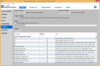
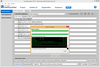
Deploy your application on any platform. InstallAnywhere Enterprise Edition is designed to install any kind of software -- desktop, enterprise, or multi-tiered Web services - onto any platform, and to configure those applications for optimal performance. Whether you're creating applications written in Java, C++, PERL, or C#, or deploying EJBs or .NET Web services, all of the installation details are handled automatically. InstallAnywhere Enterprise Edition simplifies complex installations and provides maximum developer customization, along with extensive user interaction, client/server features and localization for 31 languages.
Publisher: Software FX Primary Category: Charting and Graphing Product Type: Component / ASP.NET WebForms / .NET WinForms / .NET Class / Silverlight / 100% Managed Code / ActiveX OCX / ActiveX DLL / DLL / JavaBean / Java Class
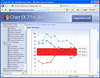
Three platforms, one charting solution. Chart FX Developer Studio is a collection of development only charting solutions for the COM, .NET and Java platforms, as well as most IDEs. Also included in the Developer Studio are the Chart FX Extensions, including OLAP, Maps, Financial, Statistical, Real-Time and Wireless, which add capabilities or provide specific functionality. This allows a developer to only include the functionality that is needed and maintain a high level of stability and performance. These non-expiring, full development versions of the entire Chart FX product line fit into one package that makes for a convenient way to develop for different environments and needs.
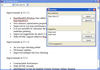
Deploy your application on any platform. InstallAnywhere Standard Edition enables developers to build highly customized deployment solutions. It's intuitive design brings intelligence to the process of deploying software onto any client or server platform. It automatically handles all of the installation details; it creates smaller installers that run faster than many other solutions, minimizes time-to-deployment and increases productivity.
Publisher: Pintexx Primary Category: Text and Word Processing Product Type: Component / ASP.NET WebForms / Java Servlet / Java Class
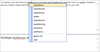
Add a WYSIWYG HTML editor to your browser based solutions or applications. pinEdit is a WYSIWYG HTML editor that runs in your browser without ActiveX, Applet or Plug-Ins or in your application as ActiveX or .Net WinForm. pinEdit offers a lot of interfaces to different technologies. There are rich formatting capabilities like fonts, colors, justifiying etc. Files can be loaded and saved from/to a server by dialogs. Text modules can be created by users and saved on the server.
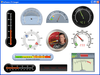
An advanced charting solution for Java. Chart FX 7 for Java provides developers an in-the-box solution for a wide variety of data visualization needs. Chart FX 7 for Java also includes 3 specialized data analysis tools: Chart FX Maps, Chart FX Statistical and Chart FX Gauges and design time plug-ins for both NetBeans and Eclipse IDEs. Adding mapping functionality to your project will enable you to combine cutting edge map representations with the dynamic functionality of Chart FX for Java. Chart FX 7 for Java's statistical capabilities include additional chart types, a myriad of pre-defined statistical studies, new classes for statistical calculations and much more and with Chart FX Gauges you will be able to easily create digital dashboards. Chart FX 7 for Java builds on the enterprise-quality technology base of Chart FX for Java 6.5 by adding a framework-independent, Ajax-based runtime UI which will allow your charts, maps and statistical representations to provide rich user interface elements that have zero footprint or plugin requirements. Chart FX 7 for Java is intended to be used by Java 1.5+ users.
Add advanced charts to your Java applications. TeeChart for Java is an charting component currently including 53 Chart styles (in 2D and 3D plus multiple combinations), 40 mathematical functions and 10 Chart Tool components for additional functionality including dragging of series marks, annotation objects, cursors and manual trend lines, coloring bands, etc. TeeChart for Java supports all major Java programming languages including Borland JBuilder, IBM Eclipse, Sun Netbeans, IntelliJ IDEA and Oracle JDeveloper. TeeChart for Java includes extensive demos and Online help. TeeChart for Java source code included.
Add tree, grid, menu, tab and input controls to your JavaServer Faces (JSF) applications. NetAdvantage for JSF is a set of rich, easily-styled AJAX Web UI components. The components include tree, grid, menu, tab, and numerous input controls. The core of the framework is AJAX-enabled and UI element-based for styling simplicity. You can quickly and easily deliver a polished, professional look and feel your users expect. Use the built-in UI styles simply by instantiating the components in your Web applications. The components deliver high performance and seamless data transfers to and from your end users. Leveraging AJAX technology with the convenience of effortless application styling, the collection of JavaServer Faces (JSF) components included with NetAdvantage for JSF ensures a great user experience.
Java Beans for compression and decompression, written in Pure Java for extreme portability across platforms. /n software IP*Works! Zip is an easy, fast, and effective, suite of compression components for web or desktop applications. /n software IP*Works! Zip supports the Zip, Tar, Gzip and Jar compression standards, and features support for streaming, passwords, file deletion within an archive, and more. Currently available as fully-managed 100% C# .NET components, or pure Java beans.
Publisher: Knowledge Dynamics Primary Category: Spreadsheet Product Type: Component / Add-In / ASP.NET WebForms / .NET Class / 100% Managed Code / COM Add-in for Office 2000 / Java Class
Generate enterprise web applications and executive dashboards from your Excel spreadsheets, including active charting, high-speed calculations, and rich interfaces. KDCalc converts your Excel spreadsheets into client or server applications that run without Excel. KDCalc compiles your Excel cell formulas and data into high-speed calculation engines, and also generates ASP.NET, ASP Classic, JSP, and HTML user interface applications that have the same look and interactivity as your formatted spreadsheets, now including forms controls and live charting! The most common use of KDCalc is to execute Excel spreadsheet models as server applications, free from the scalability and throughput limitations of Excel. KDCalc has built-in features that facilitate failover, load balancing, and XML-based recalculation. Designing, Building, and Testing your complex business applications and dashboards with Excel and KDCalc can be as much as 50 times faster than hand-coding in Java, C#, or VB.NET.
Add QR Codes (Numeric, Alphanumeric and Byte modes) to your Java projects. dBarcode Java Classes are platform-independent Java classes that allow barcode images to be created within a developer's own Java desktop application, applet or servlet. The product includes the class file, a JavaBean archive, and samples with source code illustrating a desktop application, an applet and a servlet. Supports QR Code in Numeric, Alphanumeric and Byte modes.