
 (2)
(2) (12)
(12)

Official Supplier
As official and authorized distributors, we supply you with legitimate licenses directly from 200+ software publishers.
See all our Brands.
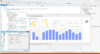
Release Notes: property. Added a new Sankey Series ISankeySeries visualizes the magnitude of flows between nodes as curved ... Read more Show more results from this product
Description: Bands, Close Location Value, CCI, Compression, Gator Oscillator, MACD, Money Flow, OBV, R.S.I, RVI, SAR, ... Read more
Release Notes: Updates in 2011 Unicode Support- Now supports Unicode input/output New Series Types- KnobGauge, Rose, Ternary, Treemap, ErrorPoint and ErrorPoint3D New Components- Custom Legend, Clustering and GDI+ New Functions- PercentageChange, Slope, MoneyFlow Skewness, Kurtosis, Smoothed Moving Average, ATR ... Read more

Release Notes: like its running on Windows 8 even in older operating systems. Flow Graph Updates- Flow Graph ... architecture has been extended to support XML, turning it into a fully featured diagram control. Chart Trend ... Read more Show more results from this product
Release Notes: styles to come. Multiple Diagram Charts The chart allows multiple diagrams of varying styles ... and export them to an xml file that can then be loaded into the chart control. Flow Graph Control The Flow ... of as a relationship diagram commonly used to display the relationships for a relational database. For more information ... Read more
Release Notes: Full SVG Support- Scalable SVG icons are now fully supported in CommandBars, Ribbon, and more, enhancing the visual fidelity of your applications. New Gauge Control- Bring your data to life with the new Gauge control, offering modern data visualization options and customizable light and dark themes ... Read more
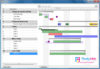
Customer Review: the object model and work flows. The results of the object are a 5 star control. The usability from a coders ... Read more
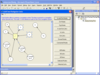
Description: Create interactive flowcharts and workflow diagrams. AddFlow is an ActiveX component ... colors, fonts, user data, and so on for each object of the diagram, metafile support, serialization, ... a ocx control to load/save diagrams in XML New versions of HFlow, TFlow, SFlow A new graph layout ... Read more Show more results from this product
Screenshots: AddFlow allows building a graph interactively (you can create a full diagram without any code, ... Read more
Release Notes: control to load/save diagrams in XML New versions of HFlow, TFlow, SFlow A new graph layout control: OFlow ... Read more

Release Notes: for.NET V26.5- May 12, 2026 Aspose.Diagram for.NET V26.5- May 12, 2026 Aspose.Drawing for.NET V26.5- May ... Read more Show more results from this product
Release Notes: for.NET V26.4- April 9, 2026 Aspose.Diagram for.NET V26.4- April 14, 2026 Aspose.Drawing for.NET V26.4- ... Read more
Release Notes: Aspose.Diagram for.NET V26.3- March 11, 2026 Aspose.Drawing for.NET V26.3- March 11, 2026 Aspose.Email for.NET ... Read more

Release Notes: Aspose.Cells for Python via Java V26.5- May 15, 2026 Aspose.Diagram for.NET V26.5- May 12, 2026 Aspose.Diagram ... for Java V26.5- May 12, 2026 Aspose.Diagram for Node.js via Java V26.5- May 11, 2026 Aspose.Diagram ... for Python via.NET V26.5- May 12, 2026 Aspose.Diagram for Python via Java V26.5- May 12, 2026 Aspose.Drawing ... Read more Show more results from this product
Release Notes: Java V26.4- April 10, 2026 Aspose.Diagram for.NET V26.4- April 14, 2026 Aspose.Diagram for Python ... Read more
Release Notes: March 12, 2026 Aspose.Cells for Python via Java V26.3- March 13, 2026 Aspose.Diagram for.NET V26.3- ... March 11, 2026 Aspose.Diagram for Java V26.3- March 11, 2026 Aspose.Diagram for Node.js via Java V26.3- ... March 10, 2026 Aspose.Diagram for Python via.NET V26.3- March 11, 2026 Aspose.Diagram for Python via ... Read more

Release Notes: components. Added archival timestamp V3 support in CAdES and ASiC. Added support for hybrid flows and HTTPS ... Read more Show more results from this product
Release Notes: Updates in Q2 2011 IP*Works! & E-business Integrator products for Android OS- Now available for Android OS. Pure Java Beans optimized for Android OS provide fast connectivity for mobile application development. Azure Integrator- Quickly connect any desktop, Web or mobile application to Windows ... Read more
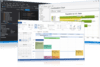
Release Notes: like its running on Windows 8 even in older operating systems. Flow Graph Updates- Flow Graph ... architecture has been extended to support XML, turning it into a fully featured diagram control. Chart Trend ... Read more Show more results from this product
Release Notes: styles to come. Multiple Diagram Charts The chart allows multiple diagrams of varying styles ... and export them to an xml file that can then be loaded into the chart control. Flow Graph Control The Flow ... of as a relationship diagram commonly used to display the relationships for a relational database. For more information ... Read more
Release Notes: Full SVG Support- Scalable SVG icons are now fully supported in CommandBars, Ribbon, and more, enhancing the visual fidelity of your applications. New Gauge Control- Bring your data to life with the new Gauge control, offering modern data visualization options and customizable light and dark themes ... Read more
Release Notes: for.NET V26.5- May 12, 2026 Aspose.Diagram for.NET V26.5- May 12, 2026 Aspose.Drawing for.NET V26.5- May ... Read more Show more results from this product
Release Notes: for.NET V26.4- April 9, 2026 Aspose.Diagram for.NET V26.4- April 14, 2026 Aspose.Drawing for.NET V26.4- ... Read more
Release Notes: Aspose.Diagram for.NET V26.3- March 11, 2026 Aspose.Drawing for.NET V26.3- March 11, 2026 Aspose.Email for.NET ... Read more


Release Notes: lines. Wrapped legend text. Wrapped normal text in some flow diagrams. Lost shapes when saving PDF. ... Read more Show more results from this product
Release Notes: Issue with flow chart auto layout. VSDM to HTML- Links are not working in the output. Scale Visio ... diagram issue. Getting less attachment from.vsd file. ... Read more
Release Notes: diagram. Updates in V26.6 1 ... Read more
Tel: (888) 850 9911
Fax: +1 770 250 6199


