ComponentOne Blazor Charts
Comprehensive Blazor charts offer versatile, high-performance data visualization.
- Includes 50+ chart types like bar, line, pie, and specialized charts.
- Supports interactive features such as selection, zooming, and tooltips.
- Offers flexible customization, including palettes, labels, and annotations.

Prices from:
| Available in | |
|---|---|
| ComponentOne Studio Blazor Edition | Loading |
| ComponentOne Studio Enterprise | Loading |
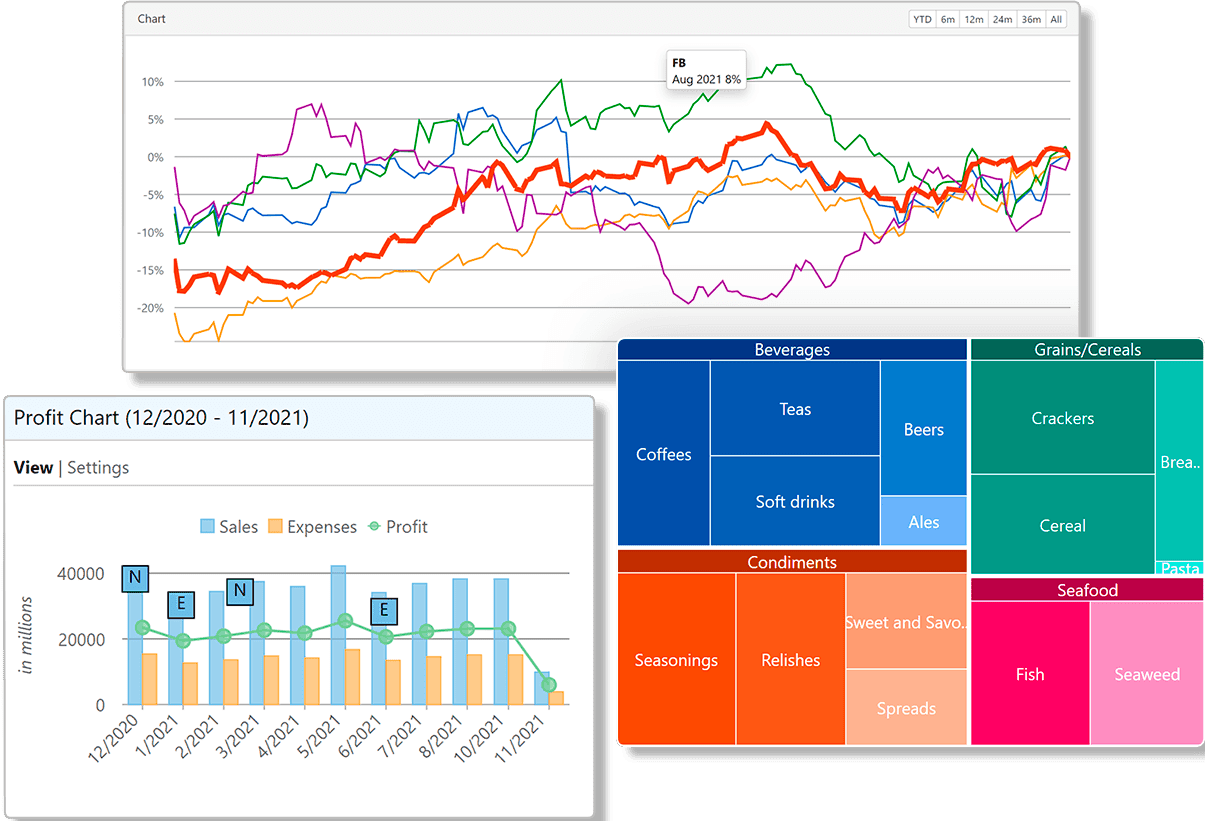
Wide Range of Chart Types
Includes over 50 chart types and variations such as bar, column, line, area, pie, scatter, bubble, financial, radar, polar, funnel, sunburst, treemap, Gantt, waterfall, and break-even charts, supporting diverse data visualization scenarios.
Interactive Features
Provides interactive capabilities like data point and series selection, zooming, panning, scrolling with axis range scrollbars, hit-testing, and line markers to enhance data exploration and user engagement.
Flexible Customization
Allows detailed configuration of chart elements including color palettes, label formatting, gridlines, tick marks, axes orientation, and trendlines, enabling developers to customize the visual style and presentation.
High Performance Rendering
Employs native development techniques and SVG rendering to deliver smooth, high-performance chart updates suitable for both Blazor Server and WebAssembly applications, even with large datasets.
Specialized Chart Components
Offers specialized APIs for pie, radar, polar, sunburst, and treemap charts, optimized for their unique data structures and visual requirements.
Composite and Multi-Plot Charts
Supports combining multiple Cartesian chart types into single plots and defining multiple plot areas to display horizontally or vertically stacked series, facilitating complex data presentations.
Annotations and Data Labels
Includes support for adding annotations like text, images, and shapes tied to data points or plot coordinates, as well as customizable data labels and tooltips for clearer data communication.
Selection Modes and Styles
Enables enabling selection modes for points or series, with customizable selection styles to visually highlight chosen data elements during user interaction.
Export and Presentation Features
Allows exporting charts as images in various formats (PNG, JPG, SVG), and supports axis breaks for improved readability of charts with large gaps.
Comprehensive Documentation and Samples
Provides extensive documentation, sample demos, and learning resources to assist developers in integrating and utilizing chart components effectively within Blazor applications.
Product Compatibility
Review the details below to ensure this product is supported within your environment.
Component Type
- .NET
.NET Version
- .NET 10 LTS
- .NET 9 STS
- .NET 8 LTS
- .NET 6 LTS
.NET Platform
- .NET Blazor / WebAssembly
How to Buy
Available as part of ComponentOne Blazor Edition, and ComponentOne Studio Enterprise.

- Included19+ Blazor Components
- Not included120+ WinForms Controls
- Not included100+ WPF Controls
- Not included30+ WinUI & .NET MAUI Controls
- Not included40+ ASP.NET MVC & Core Controls
- Not included40+ ASP.NET WebForms Controls
- Not includedData Services/Web API
- Not included80+ JavaScript Controls
- Enterprise Controls
- Not includedFinancialChart
- Not includedFlexSheet
- Not includedFlexPivot/OLAP
- Not includedFlexReport Designer
- Not includedReportViewer
- Additional Features
- Not includedIntelliSpell
- Not included2200+ Icons/Images

- Included19+ Blazor Components
- Included120+ WinForms Controls
- Included100+ WPF Controls
- Included30+ WinUI & .NET MAUI Controls
- Included40+ ASP.NET MVC & Core Controls
- Included40+ ASP.NET WebForms Controls
- IncludedData Services/Web API
- Included80+ JavaScript Controls
- Enterprise Controls
- IncludedFinancialChart
- IncludedFlexSheet
- IncludedFlexPivot/OLAP
- IncludedFlexReport Designer
- IncludedReportViewer
- Additional Features
- IncludedIntelliSpell
- Included2200+ Icons/Images
About MESCIUS
MESCIUS, formerly known as GrapeCity, is a leading developer-focused brand established in Japan, with a history spanning over 30 years. It is recognized for its extensive suite of software components, including reporting frameworks, spreadsheet libraries, and Japanese market-oriented input controls. Popular products such as ActiveReports, SPREAD, InputMan, and ComponentOne support both .NET and JavaScript ecosystems and are widely used in business-critical applications. MESCIUS offers distinctive advantages such as proven reliability, comprehensive Japanese localization, and strong technical support, making it a trusted choice for IT professionals and software developers building complex and localized systems.

As official and authorized distributors since 1996, ComponentSource supplies you with legitimate licenses directly from MESCIUS.