ComponentOne WPF Scheduler
Integrate Outlook-style scheduling into WPF applications.
- Offers multiple calendar views including day, week, month, and timeline.
- Supports rich appointment management with drag-and-drop and dialog editing.
- Features extensive data binding, printing, import/export, and localization options.

Prices from:
| Available in | |
|---|---|
| ComponentOne Studio WPF | Loading |
| ComponentOne Studio Enterprise | Loading |
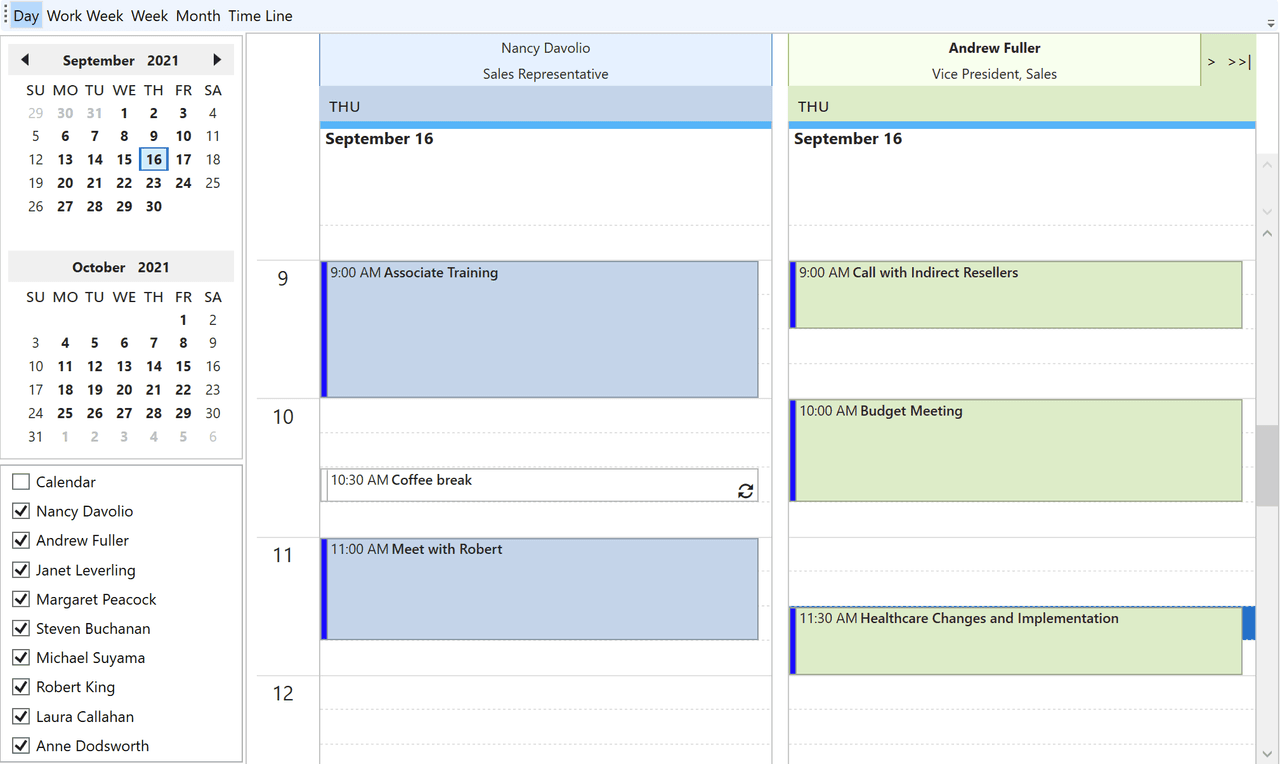
Outlook-Style Scheduler Control
The control replicates Microsoft Outlook's calendar experience, allowing users to manage appointments in a familiar, intuitive interface with built-in day, week, work week, month, timeline, table, and agenda views.
Flexible Appointment Management
Users can add, edit, or delete appointments directly within the scheduler using inline editing, drag-and-drop support, and detailed pop-up dialogs. Appointments can include rich details such as categories, contacts, labels, recurrence rules, reminders, and importance levels.
Multiple Calendar Views
The scheduler provides five distinct views: day, week, work week, month, and timeline. Each offers different layouts - from hourly vertical and horizontal displays to multi-day and multi-user grouped appointments.
Robust Data Binding and Storage
Supports binding to standard ADO.NET data sources, custom object collections, and XML. It manages multiple data storages including appointments, resources, contacts, categories, labels, statuses, and calendar owners.
Resource and Multi-User Grouping
Allows grouping of appointments by resources, contacts, or categories to enable multi-user calendar scenarios. Resources can be added programmatically or at runtime and assigned to appointments.
Comprehensive Appointment Editor
Includes a fully customizable appointment editor supporting detailed input such as subject, location, start/end times, recurrence, reminders, HTML content, and private flags.
Printing and Export/Import Functions
Offers built-in printing capabilities through integration with ComponentOne PrintDocument, supporting daily, weekly, monthly, and detailed appointment print templates. Data can be imported and exported in various formats including XML, iCalendar (.ics), and binary files.
Additional Features
Features include quick in-line editing for appointment subjects, draggable appointment edges for duration changes, reminders with dismiss or snooze options, and customizable built-in dialogs.
Product Compatibility
Review the details below to ensure this product is supported within your environment.
Component Type
- .NET
.NET Version
- .NET 10 LTS
- .NET 9 STS
- .NET 8 LTS
- .NET 6 LTS
- .NET 4.8 or earlier
.NET Platform
- .NET Assembly
- .NET Class
- .NET WPF
IDE Support
- Visual Studio
How to Buy
Available as part of ComponentOne WPF Edition and ComponentOne Studio Enterprise.

- Included100+ WPF Controls
- Not included120+ WinForms Controls
- Not included30+ WinUI & .NET MAUI Controls
- Not included40+ ASP.NET MVC & Core Controls
- Not included40+ ASP.NET WebForms Controls
- Not included19+ Blazor Components
- Not includedData Services/Web API
- Not included80+ JavaScript Controls
- Enterprise Controls
- Not includedFinancialChart
- Not includedFlexSheet
- Not includedFlexPivot/OLAP
- Not includedFlexReport Designer
- Not includedReportViewer
- Additional Features
- Not includedIntelliSpell
- Not included2200+ Icons/Images

- Included100+ WPF Controls
- Included120+ WinForms Controls
- Included30+ WinUI & .NET MAUI Controls
- Included40+ ASP.NET MVC & Core Controls
- Included40+ ASP.NET WebForms Controls
- Included19+ Blazor Components
- IncludedData Services/Web API
- Included80+ JavaScript Controls
- Enterprise Controls
- IncludedFinancialChart
- IncludedFlexSheet
- IncludedFlexPivot/OLAP
- IncludedFlexReport Designer
- IncludedReportViewer
- Additional Features
- IncludedIntelliSpell
- Included2200+ Icons/Images
About MESCIUS
MESCIUS, formerly known as GrapeCity, is a leading developer-focused brand established in Japan, with a history spanning over 30 years. It is recognized for its extensive suite of software components, including reporting frameworks, spreadsheet libraries, and Japanese market-oriented input controls. Popular products such as ActiveReports, SPREAD, InputMan, and ComponentOne support both .NET and JavaScript ecosystems and are widely used in business-critical applications. MESCIUS offers distinctive advantages such as proven reliability, comprehensive Japanese localization, and strong technical support, making it a trusted choice for IT professionals and software developers building complex and localized systems.

As official and authorized distributors since 1996, ComponentSource supplies you with legitimate licenses directly from MESCIUS.