ComponentOne Xamarin Charts
Versatile Xamarin.Forms chart component with multiple chart types.
- Supports most popular chart types.
- Enables mixed charts with multiple series and independent chart types.
- Optimized for native iOS, Android, and UWP Xamarin mobile applications.

Prices from:
| Available in | |
|---|---|
| ComponentOne WinUI and MAUI Edition | Loading |
| ComponentOne Studio Enterprise | Loading |
Wide Range of Chart Types
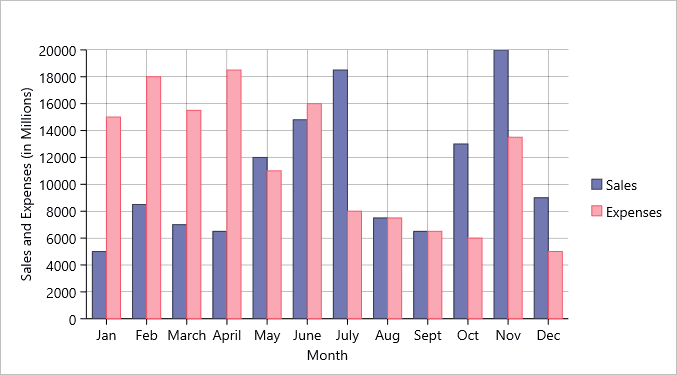
Includes popular chart types such as line, line symbol, area, bar, column, bubble, scatter, candlestick, high low open close, histogram, spline, step, spline area, sunburst, and treemap charts to cover various data visualization needs.
Mixed Series Charting
Allows adding multiple data series to a single chart with each series having its own chart type. This flexibility helps developers present related data with diverse visualizations on a single canvas.
Customizable Data Series
Each chart series supports distinct styling, including fill and stroke colors, enabling visually distinct representation for multiple data sets within one chart control.
Advanced Financial Chart Types
Supports specialized financial charts like candlestick and high low open close charts that display detailed stock price information including opening, closing, high, and low values.
Hierarchical Data Visualization
Provides sunburst and treemap charts designed to showcase hierarchical data via concentric circles or nested rectangles, aiding in demonstrating relationships within complex datasets.
Native Mobile Optimization
Built specifically for Xamarin architecture to ensure native performance, speed, and reduced application size without relying on additional external libraries.
Interactive and Animated Visuals
Supports touch interactions and superior animation effects in charts like FlexGrid, FlexChart, and gauges to offer engaging user experiences on mobile devices.
Integration with Xamarin.Forms and Visual Studio
Fully compatible with Xamarin.Forms, enabling code reuse across iOS, Android, and UWP platforms. Visual Studio designer support and XAML Previewer simplify UI construction.
Flexible Data Binding and Display
Supports binding data sources easily and customized axes, labels, tooltips, and legends, allowing rich and interactive data presentations tailored to application requirements.
Product Compatibility
Review the details below to ensure this product is supported within your environment.
Component Type
- .NET
.NET Version
- .NET 5 / .NET Core 3.1
.NET Platform
- Xamarin Extension
IDE Support
- Visual Studio
How to Buy
Xamarin is no longer supported by MESCIUS however you can get the controls as part of ComponentOne WinUI & MAUI Edition, or ComponentOne Studio Enterprise.

- Included30+ WinUI & .NET MAUI Controls
- Not included120+ WinForms Controls
- Not included100+ WPF Controls
- Not included40+ ASP.NET MVC & Core Controls
- Not included40+ ASP.NET WebForms Controls
- Not included19+ Blazor Components
- Not includedData Services/Web API
- Not included80+ JavaScript Controls
- Enterprise Controls
- Not includedFinancialChart
- Not includedFlexSheet
- Not includedFlexPivot/OLAP
- Not includedFlexReport Designer
- Not includedReportViewer
- Additional Features
- Not includedIntelliSpell
- Not included2200+ Icons/Images

- Included30+ WinUI & .NET MAUI Controls
- Included120+ WinForms Controls
- Included100+ WPF Controls
- Included40+ ASP.NET MVC & Core Controls
- Included40+ ASP.NET WebForms Controls
- Included19+ Blazor Components
- IncludedData Services/Web API
- Included80+ JavaScript Controls
- Enterprise Controls
- IncludedFinancialChart
- IncludedFlexSheet
- IncludedFlexPivot/OLAP
- IncludedFlexReport Designer
- IncludedReportViewer
- Additional Features
- IncludedIntelliSpell
- Included2200+ Icons/Images
About MESCIUS
MESCIUS, formerly known as GrapeCity, is a leading developer-focused brand established in Japan, with a history spanning over 30 years. It is recognized for its extensive suite of software components, including reporting frameworks, spreadsheet libraries, and Japanese market-oriented input controls. Popular products such as ActiveReports, SPREAD, InputMan, and ComponentOne support both .NET and JavaScript ecosystems and are widely used in business-critical applications. MESCIUS offers distinctive advantages such as proven reliability, comprehensive Japanese localization, and strong technical support, making it a trusted choice for IT professionals and software developers building complex and localized systems.

As official and authorized distributors since 1996, ComponentSource supplies you with legitimate licenses directly from MESCIUS.