CodeRush for Roslyn 17.1.5

Añade la función XPO Fields, nueva regla Braces Code Style y herramienta de selección anterior/siguiente.
Junio 27, 2017
Nueva versión

Características

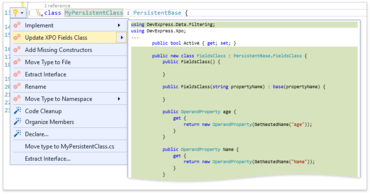
  • Refactorings and Code Providers - Added new XPO Fields feature based on the XPO EasyFields community plugin for CodeRush Classic. It is helpful for those who work with eXpress Persistent Objects as it enables you to automatically generate and update the XPO FieldsClass based on the existing class members.
  • Code Generation - The Declare Menu is now accessible from Visual Studio's Light Bulb action menu. New configuration options for members generated by the following features:
    • Declare Menu
    • Add to Interface
    • Add Getter/Setter
    • Declare Providers
  • Code Style - Added a new Code Style rule named Braces in statements. You can now configure CodeRush for Roslyn to add block delimiters to places where they are not obligatory. The Force braces and Remove redundant braces Code Cleanup rules were replaced by a single rule Apply 'Braces in statements' style.
  • Selection Tools - Added a new Selection Tool called Include Previous/Next Element. You can use this tool to select code blocks above and beyond the currently selected code block. Use Ctrl + Alt + Shift + Up Arrow or Ctrl + Alt + Shift + Down Arrow to select text from the current caret position to the end of the next code element. This is especially useful in combination with the Selection Expand/Reduce feature.
XPO Fields feature.

CodeRush

Visualice código y depure intuitivamente.

¿Alguna pregunta?

Chatee en vivo ahora mismo con nuestros especialistas en licencias de DevExpress.