Syncfusion Essential Studio ASP.NET Core 2017 Volume 3

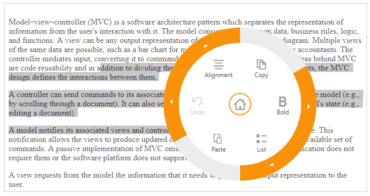
Nuevo control Radial Menu que permite colocar los elementos en una disposición circular.
Agosto 16, 2017
Nueva versión

Características

  • Radial Menu
    • New control - A contextual control that represents the menu. Items are arranged in a circular layout with a centric button element. Displays root level menu items with rotational animation effects upon clicking the center menu button.
  • Chart
    • StackingSplineArea and 100% StackingSplineArea series - New series types, stacking spline area and 100 % stacking spline area, are added to the chart.
    • Datalabel Saturation - Support has been added for displaying the data label text according to its background color.
    • Multiple Spline Types - The chart control now supports multiple spline types for spline series.
  • Data Manager
    • Web API batch edit - The data manager supports Web API batch operations. Web API batch editing is a unique feature where requests to add, remove, and change are handled altogether at once rather than as separate requests for each operation.
    • Queryable data operations - The data manager allows a query to be executed against a specific data source by using queryable data operations. It can perform IQueryable server-side operations such as filtering, paging, and sorting.
  • Diagram
    • Ruler support - Ruler support has been added to the diagram control.
    • Drag limit option for labels - Support has been added to align labels when dragging them so their relative position is retained after resizing their host objects. An option to restrict dragging labels within a certain limit has also been added.
    • Multiple parent layout - Visual representation and performance of layouts with multiple parents have been improved.
  • DocIO
    • Content Control Support - DocIO now allows creating and modifying content controls in Word documents and provides a way to design documents with the following features:
      • Create a form-like user interface.
      • Prevent users from editing the contents of a content control.
      • Bind content to XML data.
  • Gantt
    • Work week - The Gantt control now provides support for changing the work week in a project.
    • Validate taskbar editing - It is now possible to validate the editing of the taskbars linked with predecessors.
    • Resource units - It is now possible to map the resource units at initial load for the resources assigned to a task.
  • Kanban
    • Status show/hide option - Feature to show/hide cards based on key value mapping. It can group cards using key value and can toggle the display.
  • PDF
    • Digital Signature - Digitally sign documents such as .pfx files using PKCS#12 certificates with private keys.
    • Tagged PDF - Provide accessibility support by allowing users to create PDF/Universal Accessibility (PDF/UA) or section 508 compliant PDF documents.
  • Pivot Grid
    • Load on demand (Relational DB) - Load on demand support allows data to be retrieved only on drill-down operations, improving the performance of the control.
    • Paging (Relational DB) - Paging splits large records into separate segments to view data easily. It also improves the performance of the pivot grid.
    • Group by date type (Relational DB) - The pivot grid categorizes date-type fields and groups them based on year, quarter, month, and day formats.
    • Sort by date type (Relational DB) - The pivot grid supports sorting date-type fields in ascending or descending order.
  • Presentation
    • Support to insert columns - Presentation now allows inserting columns in tables in PowerPoint presentations.
  • Radial Slider
    • Localization support - Radial slider ticks and values can be localized based on culture. Can customize culture-based values.
  • Schedule
    • Add/Edit Appointments Inline - The user can now create or edit appointments inline through a single click made either on the scheduler cells or on the existing appointment’s subject text. Pressing the enter key after the new subject text is typed into the inline-created text box will save/update the appointments appropriately.
  • Spreadsheet
    • Support for charts with discontinuous ranges - The spreadsheet control can now import charts with series as discontinuous ranges or as series of points.
  • Tree Grid
    • Text wrap - The tree grid control now provides support for text wrapping in cells.
    • Load On Demand data binding - The tree grid control now provides support for data binding using the “Load on Demand” approach.
    • Command columns - It is now possible to perform CRUD actions and custom actions using the command column in tree grid.
    • Printing - It is now possible to print the tree grid content.
    • Edit template - The tree grid control provides support for editing cell values with custom editors using edit template.
    • Column priority - The tree grid columns are now made responsive using column priority.
  • Treemap
    • Text Overflow - Text overflow support is provided for the labels in the Treemap control.
  • XlsIO
    • Filter Enhancements - XlsIO now allows the user to sort filtered data by text, number, cell color, and font color. It provides the ability to filter data based on custom text filter.
    • Support to auto fit rows and columns - XlsIO now allows users to apply row height and column width to fit the contents for a range of cells automatically.
New Radial Menu control.

Syncfusion Essential Studio ASP.NET Core

Una completa biblioteca de controles de interfaz de usuario para ASP.NET Core.

¿Alguna pregunta?

Chatee en vivo ahora mismo con nuestros especialistas en licencias de Syncfusion.