CodeRush 18.2.7

Añade salto de navegación a elemento XAML, además de mejorar la compatibilidad con JavaScript y TypeScript.
Febrero 6, 2019
Nueva versión

Características

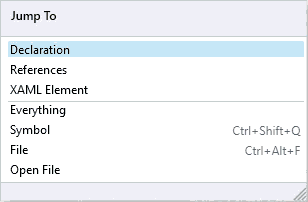
  • Navigation - Jump to XAML Element - You can jump to a named element from any place of your XAML code. Just press the Ctrl+Alt+N shortcut (or Num Del if enabled via the CodeRush Setup Wizard) to invoke the Jump To window, choose the XAML Element item in this window, and select the desired element from the 'Available locations' list with the Enter key. CodeRush will move the caret to the specified element, bringing it into view. You can also type an element name in the search field, and CodeRush will filter locations dynamically as you type.
  • JavaScript & TypeScript Support - The following features are now available in JavaScript and TypeScript code:
    • Declare Local
    • Smart Semicolon
Jump to XAML Element

CodeRush

Visualice código y depure intuitivamente.

¿Alguna pregunta?

Chatee en vivo ahora mismo con nuestros especialistas en licencias de DevExpress.