PowerShell Studio 2019 (v5.6.159)

Añade nueva configuración para el instalador de servicios, nueva variable de retorno para controles DataGridView y un nuevo comando de caché.
Febrero 27, 2019
Nueva versión

Características

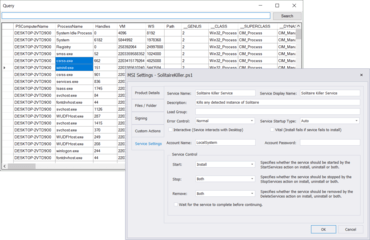
  • New Service Installer Settings
    • You now have more control over your service installer's behavior.
    • You can now specify which account the service will run under, and also control whether the service is stopped or started during installation.
    • You can enable the service to interact with the desktop via the installer.
    • Note: The Service Settings tab will only appear when the Project Type is set to Windows Service.
  • New DataGridView Return Variable
    • This build introduces a new return variable for the DataGridView in projects, when invoking a psf form file: $FormName_DataGridViewName_SelectedObjects
    • The SelectedObjects return variable will contain an array of the data bound objects pertaining to the selected rows / cells.
    • When you invoke the form in a project, PowerShell Studio will automatically generate the return variables.
    • Special Considerations
      • If you use a DataTable to bind to the DataGridView, then it will contain DataRowView objects for the SelectedObjects variable.
      • If you manually built the contents of the DataGridView, the SelectedObjects variable will contain null values.
  • Now includes two cache related commands:
    • Rebuild Local Cache
      • This command rebuilds the cache, including any new modules installed.
      • If you modified the cache with Cache Editor, PowerShell Studio will now prompt you before rebuilding the cache (Press Yes, to override the manual changes. / Press No, to cancel.) This safety check will help prevent accidentally undoing any manual changes made to the cache.
    • Reload Cache
      • This command will reload the cache without making any changes.
      • Use this command to reload the cache after making changes with the Cache Editor.
PowerShell Studio

PowerShell Studio

Entorno de scripting integrado.

PowerShell Studio también está disponible en:

¿Alguna pregunta?

Chatee en vivo ahora mismo con nuestros especialistas en licencias de SAPIEN Technologies.