FastCube.Net 2019.4

Añade compatibilidad con expresiones en FastCube.Net.
Noviembre 18, 2019
Nueva versión

Características

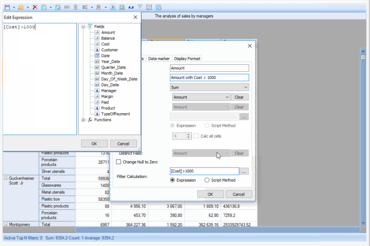
  • Expressions
    • This release brings expressions support to FastCube.Net. Before it was only possible to add calculated measures or totals using the scipt on C# or VB.Net, which was inconvenient for people who did not handle reports on daily basis.
  • Cube options dialog
    • New 'Cube Options' dialog replaces 'Information' dialog and adds the ability to switch script language and add assemblies to particular cubes.
  • DisplayFormat for dimensions
    • Added the ability to set display format to dimensions. This is useful when the dimension data type is not a string (e.g. date, 15/11/2019). Use 'AxisField.DisplayFormat' to get/set format value or use the Dimension Editor.
  • Bind dimension caption with dimension content
    • It is now possible to bind dimension caption width with its content in axis. Added property 'AxisContainer.BindCaptionWidth' and 'Slice.BindCaptionWidth' to control this behavior.
  • Ignore case option for range expressions
    • Range expressions are used for custom dimension filters and measure highlight rules. You can now ignore case for text comparisons in range expressions. You can either do it in code, using 'Range.IgnoreCase' property, or in the Range Editor.
  • Other changes
    • Added methods 'PopupWindow.ExpandAll()', 'PopupWindow.CollapseAll()', property 'CustomGrid.AutoExpandPopups' (true by default) which defines whether to expand/collapse all PopupWindow automatically on show.
    • Added an ability to set own context menu (ContextMenuStrip) for grid zones.
    • Added clear buttons to the measure editor form.
    • Added axis menu item to delete measure when clicked on measure header.
Adds support for Expressions to FastCube.Net.

FastCube .NET

Herramienta de análisis de datos eficaz para .NET.

¿Alguna pregunta?

Chatee en vivo ahora mismo con nuestros especialistas en licencias de Fast Reports.