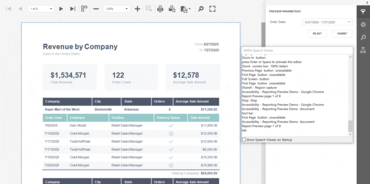
Actualización de DevExpress Reporting

Mejora la compatibilidad con la accesibilidad dentro del componente Web Document Viewer.
Marzo 24, 2021
Nueva versión

Características

  • The Web Document Viewer component includes an AccessibilityCompliant boolean property that activates accessibility compliant usage mode.
  • Keyboard Support - Accessibility compliant mode enables keyboard navigation within the Document Viewer and displays a keyboard-focus indicator. The following UI elements are accessible when using a keyboard:
    • Toolbar.
    • Tab Panel.
    • Tabs in the Tab Panel: Parameters, Export Options, Search and Document Map.
    • A report page.
  • Proper HTML Semantics - The Document Viewer includes support for the WAI-ARIA standard. This allows users to leverage assistive technologies such as screen readers (e.g., NVDA) to obtain information about the Document Viewer’s user interface elements and associated purpose. When you select a report page, press Enter to activate Document Read mode. This mode allows you to navigate through the page and ascertain content information:
  • Visual Accessibility - Visual accessibility allows you to modify style options (colors, font size, and family) so that impaired users can better perceive information. The Web Document Viewer respects browser font size settings. In addition, Document Viewer UI elements use font sizes relative to the font size specified at the document root. As such, you can enlarge all fonts with one setting. The contrast application theme is available out-of-the-box. You can also modify color schemes (for any theme) to meet accessibility guidelines related to color contrast.
Leverage assistive technologies such as screen readers (e.g., NVDA)

DevExpress Reporting

Informes para WinForms, WPF, Blazor, ASP.NET Core, MVC y .NET MAUI.

¿Alguna pregunta?

Chatee en vivo ahora mismo con nuestros especialistas en licencias de DevExpress.