EdrawMax v12.0.0

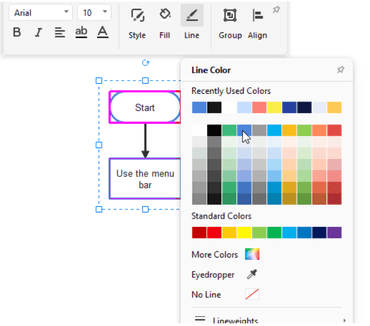
Formatee formas fácilmente con menús emergentes que se pueden anclar, arrastrar y contraer.
Junio 27, 2022
Nueva versión

Características

  • Added a new user interface, start menu and more.
  • Added the ability to easily format shapes with pop-up menus that can be pinned, dragged and collapsed.
  • Added "Design" tab which contains commands like auto-formatting, preset themes and page setup.
  • Added "Advance" tab which contains commands like recovering files, encrypting files and viewing data properties.
  • All right side panels are now hidden, and you need to find specific options to open them:
    • Click Home > Fill Options/Line Options/Shading Options, and you will see the Style panel.
    • Click View > Slideshow to open the Slideshow panel.
    • Click Advance > Shape Data to open the Data Properties panel.
    • Click Advance > Version History to open the Version History panel.
    • Find the layer menu on the footer of the workspace.
  • Optimized the symbol library categories to make it easier to find symbols.
  • Added support for dragging symbols on the canvas and dropping them into custom symbol libraries.
  • The files to be recovered are now categorized according to the original files, making it easier to find them.
Easily format shapes

EdrawMax

Software de diagramas multiplataforma.

¿Alguna pregunta?

Chatee en vivo ahora mismo con nuestros especialistas en licencias de Edraw.