Released: Nov 28, 2023
Actualizaciones en 2023.11
Características
Matrix Build
- In TeamCity, you can leverage build parameters to replace raw values across build scripts, configuration/project settings, command-line arguments, and so on. Normally, each a parameter stores only one value. Starting with this release, you can add the Matrix Build feature to your configurations to specify a range of possible parameter values.
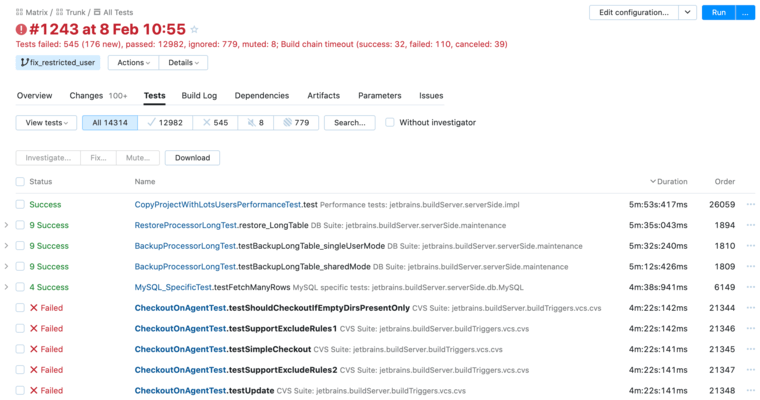
- Adding multiple parameters, each with its own set of values, forms a matrix. TeamCity will run a build for each cell of this matrix, and report the results to the Overview page that allows you to identify at a glance which parameter/value combinations are failing.
- The Matrix Build feature offers multiple pre-configured options that allow you to quickly set up your build configuration so that it runs in environments that differ by the installed operating systems, default Java versions, and architectures.
AWS Connection Improvements
- Added new 'Available for sub-projects' and 'Available for build steps' settings in AWS connections which allow you to ensure these connections are not used by unwanted TeamCity projects and features (for example, AWS Credentials).
VCS Integrations
- Seamless GitHub App Registration - Introduced new type of connections to GitHub and GitHub Enterprise. These connections utilize GitHub Apps, instead of the traditional OAuth-based access to repositories. Starting with this release, you will be able to create these connections much faster, without manually setting up and registering new apps in GitHub.
- Reusing Perforce Sources on Cloud Agents - You can now reuse sources that are present on (or copied from) persistent storages mounted to your cloud agents.
Schedule Custom Builds
- When invoking new builds from the Run Custom Build dialog, you now have an option to specify the specific date and time when this build should run.
Agents with Bundled JDKs
- Starting with this release, you can build distributions of TeamCity agents bundled with custom JDKs. These distributions allow you to install both an agent and a JDK it requires to operate in one go.
Versioned Settings: Load Additional Settings From a VCS
- Starting from this release, TeamCity can load custom snapshot dependencies, VCS roots and checkout rules from settings stored in a version control system.
- When detecting these previously ignored settings, TeamCity dynamically creates required hidden entities (such as virtual build configurations) that are in effect only for the current build and remain hidden for other revisions/branches that use different settings.
Token-Based Authentication
- Your Pull Request features can now utilize tokens to access repositories hosted on Bitbucket Cloud and Server/Data Center.
- For Bitbucket Server/Data Center repositories, the Pull Requests feature can now use refreshable OAuth tokens issued via TeamCity connections.
- For Bitbucket Cloud, you can specify permanent access tokens issued for a specific repository, project, or workspace.
- For Azure DevOps projects, the Commit Status Publisher and Pull Requests features can now utilize refreshable tokens obtained via configured OAuth connections.
Additional ReSharper Plugins for the Inspections Runner
- The Inspections (ReSharper) runner now features the R# CLT Plugins field that allows you to add your favorite ReSharper plugins (such as StyleCop, CleanCode, or Unity Support) downloaded from JetBrains Marketplace or installed from a local storage.
REST API
- Previously, you could send the DELETE request to a running cloud agent to terminate it. Starting with this release, you can stop cloud instances via POST requests to the following endpoints:
- /app/rest/cloud/instances/<cloudInstanceLocator>/actions/stop.
- /app/rest/cloud/instances/<cloudInstanceLocator>/actions/forceStop.
- Use the ...actions/stop endpoint to issue a "soft" stop request: if the target agent is currently busy, it will stop after the build finishes.
- The ...actions/forceStop endpoint allows you to stop a cloud instance even if it is busy.
Sakura UI and UX Enhancements
- You can now bookmark required agent pools to easily access them from the top of the agents and pools list.
- The Interactive Agent Terminal introduced in version 2023.05 now opens in a panel docked to the bottom of the agent details page. You can move it to a separate browser tab by clicking Open in a separate tab.
- You can now switch Build Log timestamps from absolute values to relative to quickly analyze how long it took the build to reach a specific stage.
- You can now view and copy connection IDs from the Connection pages in TeamCity UI. This minor enhancement facilitates writing Kotlin DSL code for objects that utilize connections (for example, AWS Credentials features).
- Cloud images' Build History tab now displays a search box that allows you to find all builds of a specific cloud agent, even if this instance is no longer available.
- The navigation bar now paints the changes indicator bold for favorite projects with changes from the current TeamCity user.
Miscellaneous
- EC2 Cloud Images now feature the Image priority setting that allows you to specify which images should spin up new cloud agents first. Images with higher priority values are prioritized over images with lower priorities.
- If your build runs a large amount of parallel tests in each batch, TeamCity can automatically switch to an alternative test filtering mode that reduces potential performance issues.
- The Build Cache feature is no longer in experimental stage.