by VirtoSoftware - Product Type: Component / Add-In / ASP.NET WebForms / ASP.NET AJAX (ATLAS) / Web Part / .NET Web Service
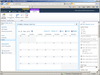
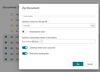
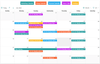
View all your SharePoint Events in a Single Calendar View. Virto Ajax Web Part Calendar enables users to view all of their events from different SharePoint lists in one single calendar. Virto Ajax Calendar surpasses the existing SharePoint calendar view's functionality by allowing users to specify the list or view, color code the displayed items by category of events such as internal or external, view day, week, month, year, and Gantt view. Virto Web Part Calendar for SharePoint also provides users with the ability to create any new event with just a single click. Included with Virto Ajax Web Part Calendar are editing features that will make working with SharePoint easy and pleasant. If you need to change the date of the event, simply drag and drop it to the appropriate calendar cell.
Our regular prices are shown below. Please logon to see your discounted prices.
| Add to Cart | $ 553.70 | 1 Commercial Server License (Standard Edition, Full Software License, per 1 server) | Download (1.6 MB) | |
| Add to Cart | $ 192.57 | Standard Technical Support and Major Update Subscription (Package includes technical support over e-mail or forum, 1 business days response time and major updates subscription for 1 year) | Verify | Download (124 KB) |
| Add to Cart | $ 681.10 | 1 Commercial Server License (Professional Edition, Full Software License, per 1 server) | Download (1.6 MB) | |
| Add to Cart | $ 204.33 | Professional Technical Support and Major Update Subscription (Package includes technical support over e-mail or forum, 1 business days response time and major updates subscription for 1 year) | Verify | Download (124 KB) |
| Add to Cart | $ 779.10 | 1 Commercial Server License (Pro Exchange Edition, Full Software License, per 1 server) | Download (1.6 MB) | |
| Add to Cart | $ 233.73 | Pro Exchange Edition Technical Support and Major Update Subscription (Package includes technical support over e-mail or forum, 1 business days response time and major updates subscription for 1 year) | Verify | Download (124 KB) |
| Add to Cart | $ 205.80 | 1 Developer License (Developer License for any Edition, Full Software License, per 1 developer seat - Requires Commercial License) | Verify | Download (1.6 MB) |
| Add to Cart | $ 553.70 | 1 Commercial Server License (Standard Edition, Full Software License, per 1 server) | Download (1.6 MB) | |
| Add to Cart | $ 192.57 | Standard Technical Support and Major Update Subscription (Package includes technical support over e-mail or forum, 1 business days response time and major updates subscription for 1 year) | Verify | Download (124 KB) |
| Add to Cart | $ 681.10 | 1 Commercial Server License (Professional Edition, Full Software License, per 1 server) | Download (1.6 MB) | |
| Add to Cart | $ 204.33 | Professional Technical Support and Major Update Subscription (Package includes technical support over e-mail or forum, 1 business days response time and major updates subscription for 1 year) | Verify | Download (124 KB) |
| Add to Cart | $ 779.10 | 1 Commercial Server License (Pro Exchange Edition, Full Software License, per 1 server) | Download (1.6 MB) | |
| Add to Cart | $ 233.73 | Pro Exchange Edition Technical Support and Major Update Subscription (Package includes technical support over e-mail or forum, 1 business days response time and major updates subscription for 1 year) | Verify | Download (124 KB) |
| Add to Cart | $ 205.80 | 1 Developer License (Developer License for any Edition, Full Software License, per 1 developer seat - Requires Commercial License) | Verify | Download (1.6 MB) |
Our prices include ComponentSource technical support and, for most downloadable products, an online backup and a FREE upgrade to the new version if it is released within 30 days of your purchase. All sales are made on our standard Terms and Conditions and subject to our Return Policy. Please contact us if you require any licensing option not listed above including volume licensing and previous versions.
Our regular prices are shown above. Please logon to see your discounted prices.

What's new in Virto Ajax Web Part Calendar V4.3.1?
What's new in Virto Ajax Web Part Calendar V3.0?
What's new in Virto Ajax Web Part Calendar V2.1.1?
What's new in Virto Ajax Web Part Calendar V2.0? - Previous versions included the ability to filter items based only on List View Settings. Now Virto Ajax Calendar is capable of creating custom terms and conditions for filtering. Filtering options allow you to display only items which satisfy the filter. The filter can be set for every data source. You can define special conditions according to which items from this list will be displayed. For example, you can display only tasks created yesterday.
Virto Ajax Web Part Calendar all Your SharePoint Events into Single View
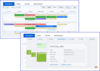
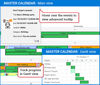
Virto Calendar enables users to view all of their events from different SharePoint lists in one single calendar. Virto Ajax Calendar surpasses the existing SharePoint calendar view's functionality by allowing users to specify the list or view, color code the displayed items by category of events such as internal or external, view day, week, month, year, and Gantt view.
Virto Web Part Calendar for SharePoint also provides users with the ability to create any new event with just a single click! Included with Virto are editing features that will make working with SharePoint easy and pleasant. If you need to change the date of the event, simply drag and drop it to the appropriate calendar cell.
Virto Web Part Calendar also supports MOSS Audience Targeting. This is an easy way to distinguish information between your different departments. Users who do not belong to this audience will not see the Items from this data source on their calendar page. Optional Tooltip is another useful feature of the Virto web part Calendar. It allows the user to get a quick preview of any additional information of the SharePoint Event, e.g., Title, Time, Location, Description and any field you wish, including attached images preview.
Virto Calendar is built on Ajax technology and is designed for Windows SharePoint Services 3.0 and Microsoft .NET Framework 3.5. Installation is simple and only requires a small amount of time. Currently, Virto supports English, German, Spanish, French, Russian and Chinese Simplified languages.
Key Features of Virto Web Part Calendar
Virto Web Part Calendar can be used instead of built-in SharePoint Calendar. It provides you with powerful capabilities for more convenient events calendaring, e.g.:
Virto Ajax Web Parts is available in 3 Editions
The features of each edition are shown below:
| Features / Editions | Standard Edition | Professional Edition | Professional Exchange Edition |
| Day, Year, Month, Week, Work Week, Task (Days), Task (Hours) Views | • | • | • |
| Gantt Chart View | • | • | • |
| Google Style | • | • | • |
| Connect to any Type of SharePoint Lists | • | • | • |
| Event coloring according to Event Source | • | • | • |
| Event coloring according to Event Type | - | • | • |
| Multi-lingual | • | • | • |
| Custom Filed Caption | • | • | • |
| Date Jump | • | • | • |
| Calendar resizing for web design needs | • | • | • |
| Select which field in the list to display in the calendar | • | • | • |
| Date Picker for Quick Navigation | • | • | • |
| Data Aggregation from SQLTable | - | • | • |
| MOSS Audience Targeting Support | - | • | • |
| Selection of column to be displayed | • | • | • |
| Event Creation and Edition with a Single Mouse Click | • | • | • |
| Several Data Sources | • | • | • |
| Quick actions for Events Creation | • | • | • |
| Optional Tooltip (one additional field for light pop up (balloon) | • | • | • |
| Advanced Tooltip (several fields and templates) | - | • | • |
| Any Calendar view Printing | • | • | • |
| Event Duration Editing with a simple resizing Action | • | • | • |
| Drag and Drop for Event Date changing | • | • | • |
| Different Time Zone View | - | • | |
| Multisource View | - | • | • |
| Data Source Order Changing | • | • | • |
| Outlook Style Skin | • | ||
| Tooltip with image fields | - | • | • |
| Additional Skins | - | • | |
| Using SharePoint Custom List View | - | • | • |
| New Filtering System | - | • | • |
| Microsoft Exchange Integration | |||
| Displaying unlimited numbers of Microsoft Exchange Calendars into single view | - | - | • |
| Adding personal or corporate Microsoft Exchange Calendars | - | - | • |
| Windows authentication for displaying personal calendars | - | - | • |
| Each Calendar can be showed in different colors | - | - | • |
| Microsoft Exchange Server 2007 and 2010 support | - | - | • |
| Adding, editing or deletion events to ME calendar through SharePoint Calendar (synchronization) | - | - | • |
| Read Only rights to any ME Calendar | - | - | • |
| Inviting ME attendees through SharePoint Calendar | - | - | • |
Publisher
Primary Category
Related Products
Related Categories