ApexSQL Doc
by ApexSQL
Comprehensive and richly detailed Database documentation. ApexSQL Doc is a tool to document your SQL Server Database. ApexSQL Doc offers extensive, comprehensive and thoroughly detailed SQL Database documentation. ApexSQL Doc will automatically document your database into compiled HTML help (chm) format or HTML and includes many customizable options and a command line interface.
Our regular prices are shown below. Please logon to see your discounted prices.
ApexSQL Doc (Version 2010.01)
| Add to Cart |
$ 338.53 |
1 Client License Mfr. Part No: 202696 |
|
Download (88.1 MB) |
| Add to Cart |
$ 304.58 |
1 Client License per license from 3 to 4 Licenses |
|
Download (88.1 MB) |
| Add to Cart |
$ 288.09 |
1 Client License per license from 5 to 9 Licenses |
|
Download (88.1 MB) |
| Add to Cart |
$ 270.63 |
1 Client License per license from 10 to 15 Licenses |
|
Download (88.1 MB) |
| Add to Cart |
$ 254.14 |
1 Client License per license from 16 Licenses |
|
Download (88.1 MB) |
ApexSQL Doc with 1 yr Maintenance (Version 2010.01)
| Add to Cart |
$ 422.92 |
1 Client License Mfr. Part No: 300074476 |
|
Download (88.1 MB) |
| Add to Cart |
$ 380.24 |
1 Client License per license from 3 to 4 Licenses |
|
Download (88.1 MB) |
| Add to Cart |
$ 359.87 |
1 Client License per license from 5 to 9 Licenses |
|
Download (88.1 MB) |
| Add to Cart |
$ 338.53 |
1 Client License per license from 10 to 15 Licenses |
|
Download (88.1 MB) |
| Add to Cart |
$ 317.19 |
1 Client License per license from 16 Licenses |
|
Download (88.1 MB) |
ApexSQL Doc with 2 yrs Maintenance (Version 2010.01)
| Add to Cart |
$ 474.33 |
1 Client License Mfr. Part No: 300074477 |
|
Download (88.1 MB) |
| Add to Cart |
$ 426.80 |
1 Client License per license from 3 to 4 Licenses |
|
Download (88.1 MB) |
| Add to Cart |
$ 403.52 |
1 Client License per license from 5 to 9 Licenses |
|
Download (88.1 MB) |
| Add to Cart |
$ 379.27 |
1 Client License per license from 10 to 15 Licenses |
|
Download (88.1 MB) |
| Add to Cart |
$ 355.99 |
1 Client License per license from 16 Licenses |
|
Download (88.1 MB) |
ApexSQL Doc with 3 yrs Maintenance (Version 2010.01)
| Add to Cart |
$ 490.82 |
1 Client License Mfr. Part No: 300074478 |
|
Download (88.1 MB) |
| Add to Cart |
$ 441.35 |
1 Client License per license from 3 to 4 Licenses |
|
Download (88.1 MB) |
| Add to Cart |
$ 417.10 |
1 Client License per license from 5 to 9 Licenses |
|
Download (88.1 MB) |
| Add to Cart |
$ 392.85 |
1 Client License per license from 10 to 15 Licenses |
|
Download (88.1 MB) |
| Add to Cart |
$ 368.60 |
1 Client License per license from 16 Licenses |
|
Download (88.1 MB) |
Our prices include ComponentSource technical support and, for most downloadable products, an online backup and a FREE upgrade to the new version if it is released within 30 days of your purchase. All sales are made on our standard Terms and Conditions and subject to our Return Policy. Please contact us if you require any licensing option not listed above including volume licensing and previous versions.
Our regular prices are shown above. Please logon to see your discounted prices.
What's New in ApexSQL Doc 2010.01
Enhancements:
- Application now supports 2 new output formats:
- - Word document 97-2003 (.doc)
- - Word document 2007 (.docx)
- Encrypted SQL Server 2005/2008 objects can now be decrypted and documented (requires membership in the sysadmin server role)
- Fulltext Stoplists can now be documented
- SSIS Packages resided in SQL Server 2008R2 can now be documented
- Extended properties on databases are now get documented
- New VS 2010 style is now available for HTML-based output formats and set by default in all new projects
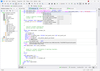
- Custom text edit boxes now offer HTML syntax highlighting and auto completion of HTML tags
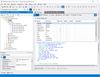
- New Office 2007 style interface with ribbon bar, quick access toolbar, and ApexSQL Doc button has been introduced
- New Resources ribbon bar has been introduced for quick access to Help page, Support forum, Training page, FAQs, Knowledge base, Troubleshooting, Contact and Get Updates dialog boxes
- New standard Project Management dialog has been introduced
- Project Management dialog now shows recently used projects or projects stored in any folder of choice
- Projects can be Pinned/Un-Pined to Recent Projects list on Project Management dialog
- Project description can be edited directly from Project Management dialog
- 'Show on Startup' option has been added to Project Management dialog box
- Startup Action options group has been added to Options dialog to control Project Management dialog behavior. Available choices are 'Show Project Management dialog', 'Show last opened project' and 'None'
- Project Defaults can now be defined for newly created projects
- Project options can now be saved as current user defaults settings
- Project options can now be reset either to current user or to ApexSQL defaults
- Each project option has now an associated tooltip with description
- New Object Filter Editor allows to filter objects based on 'Exclude if' or 'Include if' conditions
- New Object Filter Editor can use the following comparison operators: 'Equal', 'Not Equal', 'Between', 'Not between', 'Contains', 'Not contains', 'Begins with', 'Ends with', 'Any of' and 'None of' and the following logical operators: 'And', 'And not', 'Or' and 'Or not'
- Main window status bar has been redesigned and now shows numbers of selected databases and SSIS packages and output format
- New tooltip balloons have been added to data source bars of main window status bar
- Options dialog has been redesigned with new Office 2007 button bar
- Application can now be presented in 3 color schemes: Blue, Silver and Black
- The following connection options have been added to Add/Edit SQL Server dialog: 'Execution timeout' and 'Encrypt connection'
- The following new switches have been added to CLI: /fso [/ft_stoplist_options] - Specifies Fulltext Stoplist documenting options
What's New in ApexSQL Doc 2008.08?
- The following CLI switches now accept IP addresses (surrounded with square brackets) in addition to data source names: /server, /database_engines, /integration_service_packages, /sql_server_packages
- Modules section of assembly documentation now show assembly methods along with where they're usage
ApexSQL Doc is an Industry leading Documentation tool for Microsoft SQL Server. It offers you the ability to instantly produce rich and detailed documentation in a variety of formats. Using a combination of a sophisticated wizard based interface, scores of customizable options and 3 choices of documentation output, HTML, Compiled Help File (.chm) or HTML 2.0 (.hxs).
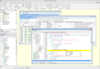
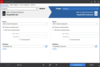
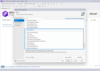
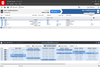
ApexSQL Doc offers a sophisticated Office2003 style Wizard based interface to allow you to easily walk through the steps of creating database documentation. Or you can run ApexSQL Doc unattended vs a powerful Command Line Interface.
- Document multiple databases at once but still be able to include or exclude individual objects
- Extensive Command Line Interface
- Include Dependency diagrams in your documentation
- Custom tags, embedded customizable, text blocks and literally scores of customizable options
- Support for both HTML and CHM output
- VS2005 style, Collapsible regions and HTML 2.0 (hxs) support
ApexSQL Doc Features:
- [NEW] HTML 2.0 Support
- [NEW] VS2005 style / Collapsible Regions
- Option to display Object Dependencies graphically
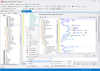
- Wizard style interface with Graphical treeview control makes navigation quick and easy
- Command Line Interface with scores of switches included in the base price of the product. No extra charges
- Proprietarily Dependency analysis improves accuracy compared to native SQL Server system tables
- Custom Tags allow for extending the documentation paradigm to object scripts. Embed comments, descriptions, documentation in the scripts of objects themselves and ApexSQL Doc will display it
- Two options of Standard and Visual Studio 2005 style. Both include support for Collapsible Regions
- Custom Text for Headers and Footers include a variety of run-time tags (i.e. author, server name, owner etc)
- Powerful Regular Expression based filter allows documentation down to the individual object level
Support
What support options are available?
ApexSQL offers support via their Support Forums as well as Phone support and Priority for email/support forum requests for customers who have purchased a Maintenance Contract for Support and Upgrades.