VSoft releases Automise V3.0

Latest version includes new actions, better performance and IDE improvements.
Octobre 21, 2009
Édition

Automise is a Windows automation tool for system administrators and IT professionals that reduces the need for writing script to empower anyone to automate Windows. Automate with Automise to free yourself from repetitive tasks and provide faster, more reliable and consistent results. With Automise it's easy to create and maintain an automation project with drag-and-drop in its graphical interface. Once finished, anyone can run a project with a single click, keystroke or automatically on a schedule and save time with the power to run tasks automatically.

Updates in V3.0

Core Improvements

  • Windows PowerShell & IronPython
    PowerShell and IronPython are now supported alongside VBScript and JavaScript as Automise scripting languages. This means that any action can be extended with PowerShell or Python script events, and it is also possible to create PowerShell and Python based custom actions with ActionStudio.
  • Action Logging
    Action log output is now tagged and color-coded according to Errors, Warnings, Success and Information. It is possible to filter the log display in the IDE according to these output tags (for example, to show only Error & Warning output.)
  • Hierarchical Logging
    Actions now produce hierarchical log output, so related messages are grouped together in the log tree.
  • Performance
    Automise is now faster to start up, and runtime performance has dramatically improved. Live logging performance has also increased markedly over previous versions.
  • Improved Output Quality
    All frequently used actions have been visited and revamped, with a view to improving the quality and usefulness of log output.
  • Automatic Descriptions
    Automatic descriptions for all commonly used actions have been revisited and improved. This make it easy to create a self-documenting project.
  • Action Output Monitors
    The new Action Output Monitor feature allows you to watch for particular patterns of log output from an action. The action's behaviour can be modified depending on the output, or specific messages can be captured or suppressed from the action log.
  • Error Dialog Monitor
    This new feature allows you to monitor a third party application for error dialogs popped up while running an action. Dialogs can be automatically dismissed, as appropriate. This is useful when working with poorly-written third party tools that display dialogs when running in an automated mode.
  • New user info file
    The various user-specific .atd,.atw,.atp files used in previous versions have been converted into one common .atpinf file, with all user-specific data for the project. This file also contains information on the current layout of the project tree, which makes the project file more version-control friendly.

IDE Improvements

  • IDE Action Types and Options Filter
    The IDE Action Types view has been heavily revamped with a new, smarter, search system. This makes it easier to find the action that you're looking for. The same new view has been added to the Options dialog.
  • IDE Welcome Page
    The new Welcome Page provides quick and easy startup, introductory information, and quick navigation to commonly used starting points.
  • IDE Redesign
    The layout of the Run Status and Run History tabs have been rearranged for improved usability and performance. It is now possible to watch the Run Status and the project layout at the same time.
  • Live Logging Improvements
    Enabling live logging while the project is running now shows any existing output from the current running action.
  • Validation
    Action validation errors are now hyperlinks to the source of the failure (action or option pages.)
  • Easy Scripting of Action Properties
    Selecting any action property in the Properties tab (formerly called the Action Inspector) now automatically displays the fragment of script used to access that property from an action script event.
  • Project Author and Notes
    The Project Tree has new fields for project author and any notes about the project.  These fields are displayed in the Project Information node, as well as on the Welcome Page in the recent projects section.
  • Project Information in Project Tree
    The Project Tree now includes a project information node that provides detailed information about the current project. 
  • Variable Groups
    Variables can now be grouped for easier management.
  • Variable Suggestion
    Press F12 while editing any action property field to automatically see a list of suggested variables to substitute for hard-coded strings. This feature makes it much easier to create a robust and maintainable project.
  • Global Script Editor Enhancements
    Find and Replace has been added to the Global Script Editor as well as many other usability enhancements like better resizing of the window, works with dual monitor setups better, and if no changes are made to the script then Escape and Cancel will close the window without prompting.
  • Batch Project Upgrade
    For Automise users that have dozens or even hundreds of projects in older formats, the new batch project upgrade dialog will enable you to upgrade old projects automatically.

New Actions

  • SFTP actions
    New actions are now available for transfering files securefly over SFTP.
  • CSV Field Iterator
    Iterate the fields of a CSV (or similar) file.
  • IIS 7 Actions
    New actions for managing Application Pools and websites on IIS 7 servers.
  • Simple Math Action
    An action to perform simple maths as part of your project, including addition, subtraction, modulus, factorial, logarithm and sine etc.
  • VMWare
    New actions for VMWare Server
  • Web Service Actions
    New actions for querying and receiving data from Web Services.

Improved Actions

  • Run Action as User
    All actions now have a "Run Action as User" field to allow you to run each action as a specific user.
  • Export Log Action
    Can now export a log fragment instead of a whole log.

ActionStudio

  • Custom Action Property Sets
    Custom actions defined in ActionStudio can now define their own Property Set types. It is also possible for custom actions to access built-in Property Set types.
  • Custom Action File Sets
    Custom actions defined in ActionStudio can now access File Set information and file lists.
  • New .NET Custom Action API
    Automise 3 ships with a new API for creating .NET custom actions. The new API makes it quicker and easier than ever to create custom actions with ActionStudio and .NET
  • Find & Replace
    Find & Replace has been added to ActionStudio in the script editor to easily search for and replace text.
  • Windows PowerShell
    PowerShell has been added to ActionStudio as a scripting language for developing custom actions.
  • IronPython
    IronPython has also been added to ActionStudio as a scripting language for developing custom actions.
  • Search Keywords
    Actions can now define extra search keywords which is used by the Automise IDE when a user searches for actions.  For example, a action called "Delay" could define keywords "Wait" and "Pause" for easier searching.
  • Iterator Actions
    A third type of action, Iterator has been added alongside Standard and Execute Program.  The Iterator action type allows the development of Iterator actions that run multiple times (including their child actions) for each value in a list.

About VSoft Technologies

VSoft Technologies is passionate about software - especially about creating something that is easy to use, very powerful, and which our customers just love. The company has been in business since 1996, and in that time has developed two great automation products based on the same proven technology. If you are a software developer, FinalBuilder will help you get that product onto the market by automating your build processes. For other IT Professionals, Automise can free you from repetitive tasks and make them faster and more reliable through the power of visual Windows automation.
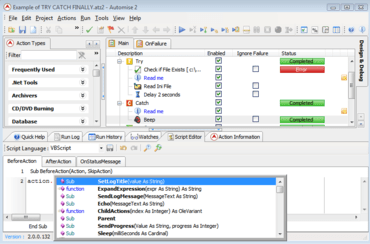
Editing a BeforeAction in VBScript.

Automise

Outil visuel d’automatisation de tâche pour l’administration de Windows.

Vous avez une question ?

Discutez en direct avec l'un de nos spécialiste des licences VSoft Technologies .