ExpressNavigationPack 16.2.2

Ajoute un nouveau contrôle de codes-barres, plus un éditeur de jetons modernes et un nouvel éditeur de contrôle de plage de données.
Janvier 18, 2017
Nouvelle Version

Fonctionnalités

Editors

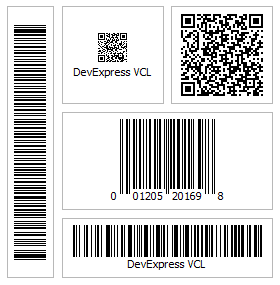
  • New Barcode Control - v16.2 introduces a new Barcode Control that allows you to generate barcode images within your VCL application. The initial version supports the following barcode symbologies QRCode, Code 11, Code 128, Code 39, Code 39 Extended, Code 93, Code 93 Extended, EAN-8,  EAN-13, Interleaved 2 of 5, MSI, UPC-A and  UPC-E. Unbound, data-aware, standalone, and in-place versions of the Barcode Control are available.
  • New Token Editor - This release ships with a new advanced text editor inspired by behaviors found in modern mail clients such as Microsoft Outlook and Google Gmail. Unbound, data-aware, standalone, and in-place versions of the Token editor are available.
  • New Range Control Editor - The Range Control is designed to help end-users select intervals and data ranges. When integrated with the DevExpress VCL Scheduler Control, it behaves like a timeline track bar, and allows quick timeline navigation and selection of date intervals.
  • Grid Control
  • Selectable Filter Operators in Filter Row Cells - With this release, you can help end-users filter grid data faster, by selecting a required filter operator directly from Filter Row cells.
  • Merged Column Grouping - This release introduces a new data grouping mode that enables you and your end-users merge grouping columns, allowing for a more compact row list. Pressing and holding the Ctrl key while dropping a column header adjacent to another one located in the Group By box merges the two columns.
  • Data-Aware Export to Excel - The new data-aware export is optimized for subsequent analysis of grid data within Microsoft Excel. The following data shaping options that are applied within the grid control are retained in the output XLS and XLSX documents.
  • Scrollable Group Content in Layout Views - With v16.2, you can limit the card size in Layout Views and enable card content scrolling using scrollbars. This functionality is useful in cards containing multiple elements.

Layout Control

  • Group Content Scrolling Enhancements
    • The content of a layout group can now be scrolled by dragging a layout element over the layout group's scrollbar.
    • End-users can now use the mouse wheel to scroll the content of a layout group that displays a vertical scrollbar while hovering over this group in a focused layout control.
New Barcode control.

ExpressNavigationPack

Incluez des fonctionnalités de ruban, de barre d’outils, de mise en page et de skin à vos applications VCL.

Vous avez une question ?

Discutez en direct avec l'un de nos spécialiste des licences DevExpress .