UltraEdit v25.10

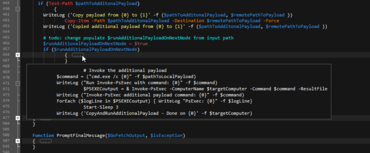
Inclut de nouvelles améliorations de pliage de code, notamment « l'aperçu de code » lors du survol.
Juin 14, 2018
Nouvelle Version

Fonctionnalités

  • Code folding enhancements
    • "Peek" at folded code (hover over "..." to see preview of collapsed text in a tooltip).
    • Ctrl + Click on folding node to expand / collapse all sub-nodes of that node.
    • Alt + Click on folding node to expand / collapse all folding nodes in the active file.
    • Expand / collapse code from any line within folding section (not just first line).
  • Full Unicode support in wordfiles
    • Create wordfiles containing Unicode characters.
    • Wordfiles can be saved as ANSI, UTF-8, or UTF-16, with or without BOM.
    • Use Unicode characters in keywords, comment characters, indent/unindent strings, brace matching, more...
  • New "/Word Select Include" wordfiles setting for overriding delimiters for navigating / selecting
    • Allows you to set override default delimiters on a per-language basis.
    • For example, /Word Select Include = $ would cause the "$" symbol to be included when double-clicking a word to select.
    • This would also cause Ctrl + Left / Right Arrow to skip "$" (instead of stopping on it).
  • Delimiter based sort
    • Specify delimiter to sort by field (instead of specific column numbers).
    • Makes IP address sort possible.
  • Faster brace / tag matching in source with very long lines.
  • "Filter on selection" switches to "Clear filter" when toggled on.
UltraEdit adds new code folding enhancements.

UltraEdit Core

Éditeur de texte et outil de comparaison puissant et fiable.

UltraEdit Core est également disponible en :

Vous avez une question ?

Discutez en direct avec l'un de nos spécialiste des licences UltraEdit .