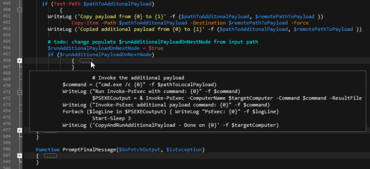
Améliore le pliage de code et prend en charge Unicode dans les fichiers Word.
Juillet 20, 2018
Nouvelle Version
Fonctionnalités
- Code folding enhancements
- "Peek" at folded code (hover over "..." to see preview of collapsed text in a tooltip).
- Ctrl + Click on folding node to expand / collapse all sub-nodes of that node.
- Alt + Click on folding node to expand / collapse all folding nodes in the active file.
- Expand / collapse code from any line within folding section (not just first line).
- Full Unicode support in wordfiles
- Create wordfiles containing Unicode characters.
- Wordfiles can be saved as ANSI, UTF-8, or UTF-16, with or without BOM.
- Use Unicode characters in keywords, comment characters, indent/unindent strings, brace matching, more...
- New "/Word Select Include" wordfiles setting for overriding delimiters for navigating / selecting
- Allows you to set override default delimiters on a per-language basis.
- For example, /Word Select Include = $ would cause the "$" symbol to be included when double-clicking a word to select.
- This would also cause Ctrl + Left / Right Arrow to skip "$" (instead of stopping on it).
- Delimiter based sort
- Specify delimiter to sort by field (instead of specific column numbers).
- Makes IP address sort possible.
- Faster brace / tag matching in source with very long lines.
- "Filter on selection" switches to "Clear filter" when toggled on.
- Double-clicking soft wrapped word selects entire word (beyond soft wrap).
Création et modification de contenu, collaboration autour de projets, gestion du changement, recherches avancées et transferts sécurisés des fichiers.

Distributeur officiel depuis 2013