SQL Prompt Pro v9.3

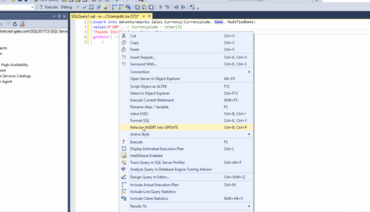
Refactoriser maintenant les instructions INSERT en instructions UPDATE.
Septembre 27, 2018
Nouvelle Version

Fonctionnalités

  • You can now refactor INSERT statements into UPDATE statements, making it easier to update the data in your tables.
    • This can be triggered by either right clicking in the script window and selecting the command, or by using the keyboard shortcut Ctrl+B, Ctrl+P.
    • The refactoring automatically adds a default WHERE clause, which you can customize to suit your needs.
  • You can now go directly to the Product Learning section of the Redgate Hub from within SQL Prompt.
    • Click SQL Prompt > Help > Product Learning to find how-to guides, in-depth technical articles and videos to help you uncover 'hidden gems' and make the most out of SQL Prompt.
  • SQL Prompt documentation now contains a list of all keyboard shortcuts available within the product.
  • When problems occur during formatting, the formatting actions that were successfully executed and those that were skipped are now displayed along with the failures.

Correctifs

  • SP-7208 : Fixed insert semicolon refactoring when merge statement was used as table source.
Refactor INSERT statements into UPDATE statements with SQL Prompt.

SQL Prompt Pro

Saisie automatique du code et mise en page intelligentes pour MS SQL Server.

SQL Prompt Pro est également disponible en :

Vous avez une question ?

Discutez en direct avec l'un de nos spécialiste des licences Redgate Software .