Telerik DevCraft Ultimate comprend Test Studio R3 version 2018

Ajout de fonctions d'exécution de tests et d'analyse des défaillances pour permettre des gains de productivité.
Octobre 8, 2018
Nouvelle Version

Fonctionnalités

New in Telerik Test Studio R3 2018:

  • Added Screen Recording option in Test Lists to generate videos of the test runs.
  • New Test List execution option to re-run failed tests for local and remote runs (Rerun Failed Tests).
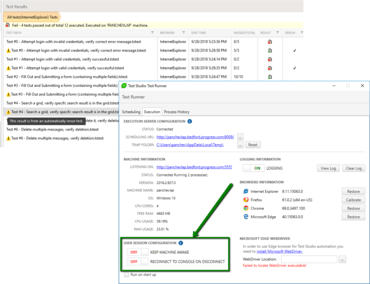
  • Keep Machine Awake option implemented in Execution Client to ensure machine is not locked.
  • Reconnect To Console On Disconnect option implemented in Execution Client when remote session is disconnected.
  • New option implemented for JS Browser dialogs matches to be configurable and updated independently from the product.
  • Added ability to verify JS console errors in browsers.
  • Find.All method to support expressions that have a hierarchal dependency.
  • Scheduling: Persist notification settings per project after sending an Email for Scheduled Runs.
  • Support for latest Visual Studio 2017 updates up to 15.8.6.
  • New Firefox and Chrome execution extensions for 2018.3 published in Web Stores.
  • Local test list execution closes all running selected execution browsers before the run option (KillBrowsersBeforeStart).
  • Implemented the ability to change the whole URL in the upcoming requests to handle redirects in Load Tests.
  • Extend the Custom Dynamic Target feature in Load Tests with partial search in Headers and Cookie to get values from the source step.
  • Support for Firefox ESR.

Correctifs

Updates in Telerik Test Studio R3 2018:
  • Fixed:
    • API Test as Step: Execution fails when variables contain spaces.
    • Browsers: Firefox 60 calibration fix for Download dialog.
    • Browsers: Fixing JS Browsers highlighting when selecting elements from the Elements Explorer.
    • Browsers: Locate in DOM from Elements Explorer context menu doesn't work in JS Browsers.
    • Browsers: Annotations in browsers are misaligned on scaled monitors.
    • Browsers: execution of simulate real click step does not work on scaled monitors.
    • Browsers: problem with SetCookie in Firefox.
    • Browsers: Capture browser step does not work properly with maximized Chrome on second monitor.
    • Browsers: Chrome 68 execution fails for Alert, Confirm and Prompt dialogs.
    • Coded Steps: Copy and paste of coded steps is not working if the code is modified externally.
    • Execution Client: 'Run on startup' option in Win7 sets wrong value for the registry key.
    • Execution Client: Load Agent and Controller are shown as not finalized in Test Studio Test Runner UI.
    • Find Expression Builder: Filter Suggestions show dropdown for element query type.
    • Framework: Find by Content fails.
    • Framework: Find by NodeIndexPath fails.
    • Load Test UI: Field type Url not displayed in Custom Dynamic Targets.
    • Load Test UI: user labels in load test settings are not shown correctly.
    • Licensing: fixed problem in Runtime edition license check opening Visual Studio.
    • Load Test UI: product crashes trying to open Load test profile with missing datasource.
    • Project Settings: fix product error on fresh install when no notification settings are available.
    • Recording: fix for specific problem in merging elements during Firefox recording.
    • Recording: IE crashes while recording against customer application with iFrames.
    • Recording: Element is scrolled to bottom on every record action in JS recorders.
    • Recording: Run from here/Run selected opening Popup doesn't update DOM in JS recorders.
    • Source Control Integration: manually adding a file (test or code) to the project folder not added to source control.
    • Source Control Integration: Add Existing Code File in a source-controlled project does not create a pending change for the code file.
    • Translators: Ajax DatePicker translator step execution problem fixed.
    • VS plugin: VS 2017 freeze when opening resolve failure dialog.
    • VS plugin: adding API test as step throws error.
    • WPF: execution of real click steps and annotations in WPF applications on scaled monitors.
    • WPF: Special character in WPF window caption not escaped in Pages.g.cs.
    • Test Studio for APIs: API Test fails to execute any third consecutive request to the same domain.
    • Test Studio for APIsAPI execution returns error when a single non-http step is executed after a GET http request.
  • Changed:
    • Scheduling Client Execution tab UI.
    • Disable DPI awareness of all Test Studio executables to fix scaling issues.
    • Offsets of recorded desktop clicks for specific controls like audio and video players.
    • The Uid property in element wrappers is changed to string.
    • Log the whole exception when SmtpClient.SendAsync fails during Scheduling Send Mail operation.
    • Persist changed MongoDB executable path in Scheduling Configuration.
    • ArtOfTest.Runner help file updated and show log error if parsing of Config file fails.
    • Close all Firefox running instances before execution/recording with that browser.
    • Load Test: display all added dynamic targets (automatic and custom) in the load step binding parameters list.
    • Test Studio C# Demo project for NUnit.
Automatic Re-Run of Failed Tests, Test Studio Execution Client to Keep the User Session on a Remote Machine

Telerik DevCraft Ultimate

Collection d’outils de développement logiciel compatibles avec toutes les plateformes et technologies.

Vous avez une question ?

Discutez en direct avec l'un de nos spécialiste des licences Telerik .
