IDM All Access - Version d’octobre 2018

Ajout de la prise en charge de Markdown, d’un aperçu HTML en direct et d’un état Save pour UEStudio, et d’améliorations de l'interface utilisateur de UltraCompare.
Octobre 29, 2018
Nouvelle Version

Fonctionnalités

New in UEStudio v18.20

  • Markdown support
    • Preview Markdown files (via Coding » Live preview or Browser view).
    • Preview is compatible with GitHub Flavored Markdown (GFM).
    • Select different styles for Markdown rendering (or add your own).
    • Special Markdown syntax highlighting (with new MARKDOWN_LANG) language marker.
    • Support for embedded HTML highlighting.
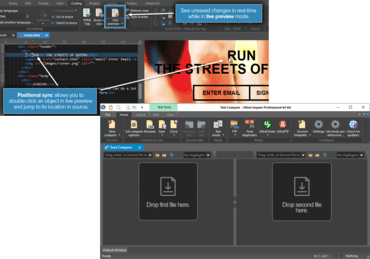
  • Live HTML preview
    • Split window with code view and browser view.
    • Code changes (saved and unsaved) are automatically updated in browser view.
    • Position sync: Double-click on element in preview to jump to its location in source.
    • Configure under Advanced » Settings » Editor » XML / HTML / Markdown.
    • Updated HTML rendering component to support modern HTML / CSS / JS.
    • Added support for copying (via Ctrl + C) selected text.
  • Git improvements
    • New / modified repository files shown at top of file list in both Explorer and Project pane.
    • Update / refresh remote branches from Branch Manager.
    • Resize Branch Manager columns.
    • Git options available in Workspace Manager's "Open" tab context menu.
    • Various performance improvements.
  • Save state
    • Close UEStudio without being prompted to save anything, then pick up where you left off – unsaved changes are restored.
    • Works for local, network, FTP, and even unsaved "Edit" files.
    • Prefer prompts to save? Disable this feature under Advanced » Settings » File handling » Session options.
  • Close unsaved Edit files with no prompt to save
    • This optional feature can be set under Advanced » Settings » File handling » Session options.
  • Improvements for IntelliTips / auto-complete.
  • Improved file tab handling on startup.
  • Changed default temporary file location.

New in UltraCompare v18.10

  • User interface enhancements
    • "Drop here" targets for all modes.
    • Increase / decrease font size for all modes.
    • Welcome page advertises all types of compares.
  • Set font for folder mode.
  • Automatic compare after both compare frames loaded (optional).
  • Updated browser view component for improved HTML / CSS rendering.
  • Improvements and fixes for:
    • Comparing FTP files from UE / UES.
    • Save result (text format).
    • Ignore whitespace.
    • Navigating differences.
    • Scrolling / scroll bar display.
    • 3-way text compare.
    • Inline editing.
    • Active line window.
    • Text compare via web URL.
    • Large / long text file compare.
    • Folder mode display with filters active.
New features added to UEStudio and UltraCompare.

UltraEdit Enterprise

Outils de gestion de données et d'édition totalement intégrés.

Vous avez une question ?

Discutez en direct avec l'un de nos spécialiste des licences UltraEdit .