PowerShell Studio 2019 (v5.6.159)

Ajout de nouveaux paramètres pour le programme d'installation du service, d’une nouvelle variable de retour pour les contrôles DataGridView, ainsi que d’une nouvelle commande de cache.
Février 27, 2019
Nouvelle Version

Fonctionnalités

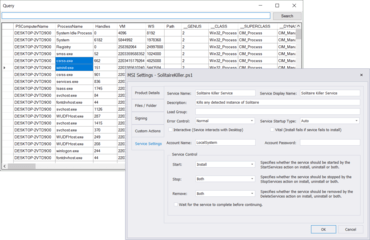
  • New Service Installer Settings
    • You now have more control over your service installer's behavior.
    • You can now specify which account the service will run under, and also control whether the service is stopped or started during installation.
    • You can enable the service to interact with the desktop via the installer.
    • Note: The Service Settings tab will only appear when the Project Type is set to Windows Service.
  • New DataGridView Return Variable
    • This build introduces a new return variable for the DataGridView in projects, when invoking a psf form file: $FormName_DataGridViewName_SelectedObjects
    • The SelectedObjects return variable will contain an array of the data bound objects pertaining to the selected rows / cells.
    • When you invoke the form in a project, PowerShell Studio will automatically generate the return variables.
    • Special Considerations
      • If you use a DataTable to bind to the DataGridView, then it will contain DataRowView objects for the SelectedObjects variable.
      • If you manually built the contents of the DataGridView, the SelectedObjects variable will contain null values.
  • Now includes two cache related commands:
    • Rebuild Local Cache
      • This command rebuilds the cache, including any new modules installed.
      • If you modified the cache with Cache Editor, PowerShell Studio will now prompt you before rebuilding the cache (Press Yes, to override the manual changes. / Press No, to cancel.) This safety check will help prevent accidentally undoing any manual changes made to the cache.
    • Reload Cache
      • This command will reload the cache without making any changes.
      • Use this command to reload the cache after making changes with the Cache Editor.
PowerShell Studio

PowerShell Studio

Environnement de génération de scripts intégré.

PowerShell Studio est également disponible en :

Vous avez une question ?

Discutez en direct avec l'un de nos spécialiste des licences SAPIEN Technologies .