Telerik UI for Xamarin R3 2019 (2019.3.119.410)

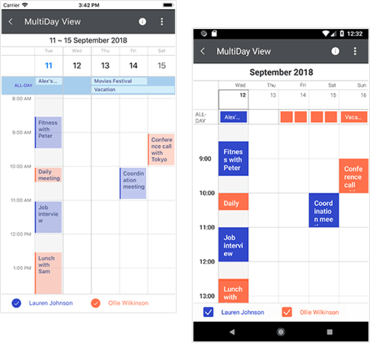
Ajoute la possibilité de définir et de styliser les heures de repos dans les vues DayView et MultiDayView du calendrier.
Novembre 19, 2019
Nouvelle Version

Fonctionnalités

  • Calendar
    • Added API to set and style non-working hours for DayView and MultiDayView.
  • DataForm
    • Implemented ability to get initially collapsed groups.
  • SideDrawer
    • Exposed TouchTargetThreshold property. Added a feature which allows users to control how far from the edge the gestures for opening the SideDrawer should be respected.

Correctifs

  • Calendar
    • [UWP] Appointments are not redrawn correctly when switching between DayView and MultiDayView.
  • Chart
    • RadChart's Zoom property could not be set from Xaml.
  • Common
    • Removed SkiaSharp-dependent assemblies from Lite NuGet package.
    • Microsoft Visual Studio hangs trying to open Xamarin Toolbox.
  • DataForm
    • [Android] DecimalEditor does not receive decimal separator comma.
    • [Android] Exception is thrown when value is set to DateTime property using StringToDateTime converter.
    • [iOS]: Editor header is cut off if the text is too long.
    • [UWP] Numeric and date editors are not aligned properly.
    • [UWP] PropertyValidationCompleted is not called in immediate validation mode.
    • [UWP] The NegativeFeedback is not showing when ValidateAll method is called.
  • DataGrid
    • Items that are replaced or moved are not accurately positioned when filtering is applied.
    • Items are filtering inaccurately when PropertyChanged is invoked by the visualized business object.
  • SDK Browser
    • Examples are empty when built with Xamarin.Forms 4.3.
  • TreeView
    • [iOS] Does not allow to be scrolled when MvvmCross is used.
Multi Day View Mode.

Telerik UI for Xamarin

Contrôles d’interface utilisateur Xamarin de qualité permettant un développement rapide et des performances supérieures.

Vous avez une question ?

Discutez en direct avec l'un de nos spécialiste des licences Telerik .