Stimulsoft BI Designer 2021.3

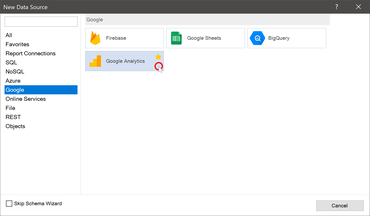
Ajoute un nouvel adaptateur de données pour se connecter à Google Analytics.
Mai 19, 2021
Nouvelle Version

Fonctionnalités

  • Added the possibility to predefine a checked state of items in the variables.
  • Added the "Eyedropper" tool to select a color from any report element.
  • Added a new data adapter for connecting to the Google Analytics service.
  • Added the Show Search option to the combobox element.
  • Added the View States property to the Chart Element which helps with switching between the different settings of the chart element.
  • An expression can now be specified in the Visible property of the table column in the table element.
  • Added the ability to restore a report after an unsuccessful close (crash) of the Stimulsoft BI Designer for Microsoft Windows applications.
  • Added an algorithm to search values in the "Culture" property.
  • Updated icons and logos for applications and services.
  • The sorting marker is now only displayed when sorting is enabled and the sorting column is specified.
  • Using images in the image element is now being detecting during the delete procedure.
  • Improved painting the drop down arrow.
  • Added the ability to customize the range of values for the icon of the "Indicator" element, in cases when it contains "Series".
  • Improved support for the data columns with relations in the variables.
Connect to Google Analytics

Stimulsoft Designer

Créez, modifiez et affichez des rapports ainsi que des tableaux de bord.

Stimulsoft Designer est également disponible en :

Vous avez une question ?

Discutez en direct avec l'un de nos spécialiste des licences Stimulsoft .