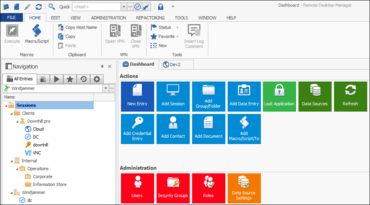
Remote Desktop Manager 2022

Le root entry du coffre prend désormais en charge les pièces jointes et la documentation.
Février 16, 2022
Nouvelle Version

Fonctionnalités

  • Added "My Privileged Account" feature.
  • Added a move permission on entries.
  • Added a setting to disable the user vault for specific users.
  • Added attachment and documentation support in vault root entry.
  • Added DVLS PAM dashboard.
  • Added Hudu credential entry type.
  • Added inherited VPN/SSH/Gateway.
  • Added Load OTP from image.
  • Added Local SSH Key manager.
  • Added multi vault Import/Export.
  • Added per user variables saved in My User Vault.
  • Added per vault variables.
  • Added Psono credential entry type.
  • Added support for the new Microsoft Windows Remote Desktop Client (msrdc).
  • Added support for vault templates.
  • Added system permission for Entry Security Analyzer.
  • Devolutions Online Database is now deprecated.
  • External add-ons will no longer be supported.
  • MySQL and MariaDB are now deprecated data source types. Password Hub Business, Microsoft SQL Server or with Microsoft SQL Server Express are now recommended.
  • Removed support for Microsoft Internet Explorer 32-bit.
  • Updated the rdm export format to v2 (Compatible with RDM 2021.2 and later).
  • Added custom user password expiration for SQL Server.
  • Added a "Disconnected tab behavior" option.
  • Added a Favorites section to the CyberArk Dashboard.
  • Added a new Extract Host Edit (Special Actions).
  • Added a new layer of default permissions in the system settings.
  • Added a warning when a vault contains more than 5000 entries.
  • Added an action Open When Available.
  • Added an indication of the configured tabs in entry properties.
  • Added an option to configure th default SSH key path.
  • Added an option to filter by field slug in Secret Server entries.
  • Added auto fill delay in OpenVPN.
  • Added automatic certificate expiration date extraction.
  • Added custom Call, Chat and Email protocol handler option for Contact entries.
  • Added disable saved password support to more session types.
  • Added Disable SmartScreen support to Edge embedded.
  • Added Duo 2FA support at application level.
  • Added embedded Edge support Confluence documentation tab.
  • Added folder double click action "None".
  • Added Ignore certificate error support to Edge embedded.
  • Added inherited and linked host support with DWL.
  • Added Keep Entry Name on refactoring with template.
  • Added keywords to Active Directory synchronizer for ease of searching.
  • Added login over SSH with a signed public key / private key.
  • Added master key prompt when restoring backup and the current master key is invalid.
  • Added more information to the password list "View password" logs.
  • Added more ribbon options (classic or simplified).
  • Added multi-select support for attachments.
  • Added new authentication method to Bitwarden credential entry.
  • Added new option "Disable Nagle's algorithm" for SSH Shell, SSH Tunnel and SSH Portforward.
  • Added on-the-fly font and color changes to SSH-Shell and Telnet.
  • Added parent names option for Tab Groups.
  • Added permissions at the System settings level, which you will then be able to inherit from the root.
  • Added PgAdmin 4 support.
  • Added Private session (incognito) support to Edge embedded.
  • Added profile usage for Google Chrome external.
  • Added root properties support for My User Vault.
  • Added Software to Advanced Search.
  • Added software to filter searches.
  • Added SQL Server custom user expiration to security dashboard.
  • Added support for folders in Secret Server credential search.
  • Added support for KDC proxy settings in RDP entries.
  • Added support for One time passwords in Passwordstate.
  • Added support for record types in Keeper.
  • Added support to both default paths Google Chrome.
  • Added the option to save 1Password Account settings locally and in memory.
  • Added the possibility to specify the status bar text color when you customize the back color.
  • Added the view and copy OTP actions to folders.
  • Added vault entry to Entry Information.
  • Added Vault templates which will be applied when creating a new vault.
  • Added WaitProgress in some areas.
  • Added warning for RDM/DVLS version mismatch.
  • Allow "auto assign license to new users" feature for more types of licenses.
  • Allow shared entry templates in any data source type.
  • Changed default value of "Change IDs" box in import window to avoid possible issues.
  • Export now allows for documents and attachments to be exported at the same time.
  • Improved documentation (markdown) performance.
  • Improved sending keystrokes to Cisco Anyconnect when sending special characters.
  • Improved SSH interactive prompt.
  • Improved the application lock screen.
  • Improved the security report.
  • Improved the tag view (sorted).
  • Improved UI for 1Password My Account Settings window.
  • Improved user management grid performance when caching is disabled.
  • Made the typing macro shortcuts use the "Copy Credentials" permissions.
  • Modified OTP generation requirements to need "Connect (execute)" or "View Password" to generate, instead of only "View Password".
  • Moved Type Clipboard to Home ribbon.
  • Open new update version available embedded as a tab instead of a dialog.
  • Removed the for Large Image/Details view in the navigation panel.
  • Removed the support for legacy favorite view.
  • Resolved Hub sensitives data before creating template group.
  • Simplified repository loading and fixed when no vaults available in Hub Business.
  • Updated embedded UltraVNC integration to the latest version (no longer deprecated).
Remote Desktop Manager

Remote Desktop Manager

Connexions distantes et mots de passe. Partout.

Vous avez une question ?

Discutez en direct avec l'un de nos spécialiste des licences Devolutions .