UltraEdit v2022.1

Inclut l’intégration WebView2 pour l’aperçu en direct, l’authentification SFTP à 2 facteurs et de nouvelles options de navigation des fichiers.
Août 10, 2022
Nouvelle Version

Fonctionnalités

  • Added an interactive login for SFTP (2FA support):
    • You can now connect to servers that require two-factor authentication (2FA) or time-based one-time passwords (TOTP).
    • Added new "Interactive login" account option (Advanced tab).
    • Added a single persistent connection which is used for 2FA accounts to prevent multiple 2FA prompts.
    • The connection stays alive during file editing to avoid further 2FA prompts.
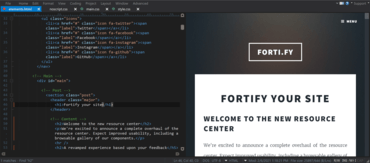
  • Improved Google Chrome (Edgium) rendering for browser view / live preview:
    • Upgraded HTML / Markdown preview to modern rendering engine.
    • Requires WebView2 browser component from Microsoft (included in Windows 11, available on Windows 10).
    • Added a fallback to older browser control for legacy rendering on systems not supporting WebView2.
  • Command palette expansions:
    • Added the ability to quick open any previously opened file.
    • Added the ability to quick open any file.
    • Added Go-to shorthand.
    • Templates are now included in command palette.
  • Syntax highlighting parser overhaul:
    • Syntax highlighting is now maintained when selecting.
    • Added support for block comments opened with same characters as line comments.
    • Added support for arbitrary string pairs (square brackets, backticks, etc.).
    • Added support for Perl quote-like string operators like qq(STRING).
    • Improved XML code highlighting with embedded CDATA sections.
  • HTML Tidy overhaul:
    • Updated HTML Tidy library to latest version.
    • Added a new HTML Tidy UI with dozens of additional options.
    • Added a new command and associated key mapping to run HTML Tidy.
  • Output window improvements and additions:
    • You can now add and remove any number of output windows.
    • Added the ability to rename output window tabs.
    • Added the ability to select and copy partial or whole lines in output window.
  • Other notable user experience improvements:
    • Added the ability to rename unsaved file tab.
    • User tools now automatically import embedded icon from external executable.
    • Re-engineered user clipboards now support selections of >4 GB (exceeding Microsoft Windows clipboard limitations).
    • "Add file to project" now uses regular File Open dialog.
    • Reformat JSON now automatically applies code highlighting.
    • Size column is now right-aligned in all FTP file lists.
Upgraded HTML previews with WebView2 in UltraEdit.

UltraEdit Core

Éditeur de texte et outil de comparaison puissant et fiable.

UltraEdit Core est également disponible en :

Vous avez une question ?

Discutez en direct avec l'un de nos spécialiste des licences UltraEdit .