QueryStorm 2.7.x
Released: May 31, 2022
Mises à jour de 2.7.x
2.7.8487.32462
Updated Mar 28, 2023
Features
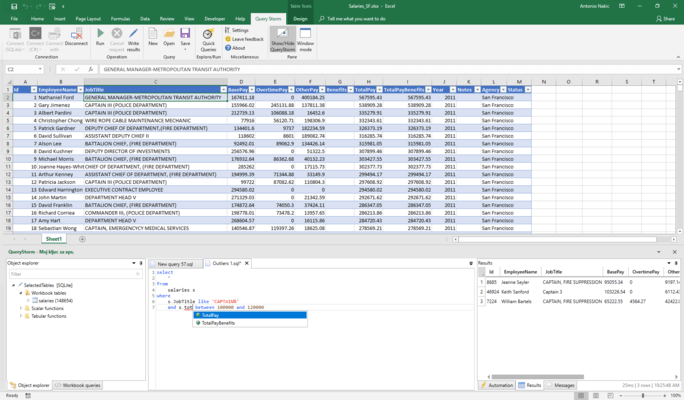
- QueryStorm GPT-powered Copilot - Added the new GPT-powered copilot for QueryStorm. This AI-driven feature lets you generate SQL code based on SQL comments.
- SQL Code Generation from Comments - With the copilot, you can now generate SQL code by simply writing a descriptive comment. The AI will understand your intent and generate the code accordingly. You can invoke the copilot when you press Ctrl+Enter while the cursor is on a single-line SQL comment. The generated code is placed between two comments, allowing you to easily identify the AI-generated content. Re-running the copilot will replace any previously generated code in this block with the new one.
- Context-Aware SQL Generation - The copilot is context-aware, which means it takes the schema of your database into consideration when generating SQL code. This allows it to create accurate and relevant code, tailored to your specific database.
- Multilingual Prompts - You can write prompts in most human languages, even if the language of the prompt doesn't match the language of the database schema.
- Configuring the copilot - The copilot requires that you configure it with an OpenAI API key. You can enter the API key in the General settings section.
- Added a new "About" Sheet for Workbooks with QueryStorm Code.
- This sheet serves to inform end users that the workbook contains QueryStorm code and provides instructions on what they need to do to run the code.
- The "About" sheet is automatically added by the IDE whenever a workbook containing QueryStorm code is saved. If the sheet is removed, it will be recreated. You can edit it and your edits will not be overwritten, though. Note that, unedited, the sheet includes GIFs and adds approximately 1.5MB to the size of the workbook (if the GIFs are retained).
- The automatic generation of the "About" sheet can be disabled in Settings/General settings.
- Other changes:
- Custom Microsoft Excel functions now support accepting 1-D arrays as parameters.
- Note: This will not work for end users who have the older versions of the runtime.
2.7.8439.23800
Updated Feb 8, 2023
Fixes
- Editing scripts was impossible after closing and reopening them.
- Phantom "lib" and "bin" files were appearing in extension projects after build.
- Failing async functions were crashing Excel instead of returning an error and logging the details.
- Workbook apps that have settings were bugged in multiple ways.
- Workbook variables now have a specific type (e.g. "double", "string"... instead of "object").
- Sporadic deadlocks were occurring when using the {@some_table} directive.
- Sporadic deadlocks were occurring when closing workbook apps.
- Code generation templates for {query} preprocessor directive were broken if more than one parameter was declared.
- Workbook events were firing before their values were updated via data-binding (e.g. an event handler method might react to a cell change, but the event would get fired before data-bound properties were updated resulting in the event handler using stale data).
2.7.8416.27485
Updated Jan 16, 2023
Fixes
- Fixes to logic that detects new tables and table changes.
2.7.8358.17658
Updated Nov 19, 2022
Features
- Updated to latest version of SQLite (supports right and full joins).
Fixes
- Breaking change - This version includes an update to the SQLite engine. Existing workbooks and apps that use SQLite should have their project.config modified.
- Updating a ListObject no longer overwrites formula columns.
- Several user interface issues (white font on white background in flyouts, text alignment in several places).
- Issue when deleting tabular rows.
- The code explorer was not detecting external file changes.
- Excel functions that accept CallerInfo (e.g. Windy.Query) were broken.
2.7.8355.18354
Updated Nov 16, 2022
Features
- SQL scripts that use the '{query()}' preprocessor directive now generate a 'Run(...)' method that returns a tabular and, optionally (in case there are results in the grid during save), an additional 'RunWithStronglyTypedResults(...)' method that returns the strongly typed results.
Fixes
- Fixed a bug with the data context was preventing loading large tables so workbooks with large tables were not visible to QueryStorm at all.
2.7.8347.16320
Updated Nov 8, 2022
Fixes
- A phantom file was showing up in the code explorer for SQL scripts that have {query/function/handler} directives, but only in extension (machine-level) projects.
- Resizing the log window in the QueryStorm runtime was freezing the UI.
- The runtime was reporting the wrong version number in the log messages.
- Updated the ExcelDNA library to ensure all antivirus vendors are clearing the QueryStorm runtime installer.
2.7.8343.23135
Updated Nov 4, 2022
Features
- Navigate caret position history in the editor using Alt+LeftArrow (back) and Alt+RightArrow (forward).
- Copying results from the results grid no longer includes the column headers.
Fixes
- Fixed ngen support i.e. startup performance optimization (for per-machine installations).
- Fixed bug with SQLite queries with "OR" expressions in the "WHERE" clause.
- Switched to a newer version of ExcelDNA that addresses malware false positives.
2.7.8337.21111
Updated Oct 29, 2022
Fixes
- Fixed issue with Microsoft.Extensions.Logging.Abstractions package that was preventing load for apps that define configuration objects.
2.7.8330.38394
Updated Oct 22, 2022
Features
- Performance improvements for components that are bound to workbook tables.
- Data contexts now have an event that fires when a variable's data changes.
- Reorganized app shortcuts and added a template for generating shortcut classes.
- Updated several 3rd party libraries to the latest version.
- Version number can now be read from the QueryStorm.Tools assembly and is now logged to the log window.
Fixes
- Fixes across the board to the integrated debugger.
- Fixed deadlock when recompiling a project that contains a function that is in use in an open workbook.
- Fixed writing result as Excel table (reapplying filters and inserting into empty table).
- Fixed log window in QueryStorm runtime (it would not start in cases where multiple Excel windows were open once the first one is closed).
- Bug fixes and performance improvements in SQLite engine when working with Excel tables.
- Code explorer reorganized slightly and several bugs fixed.
2.7.8201.15774
Updated Jun 15, 2022
Fixes
- Added missing 32-bit IDE .exe file (for launching the external IDE app from 32 bit version of Microsoft Excel).
- SQLite table indexes were not being used in correlated queries, so these queries were slow to run.
- SQLite was not handling empty result sets correctly.
- The CancellationToken in the ProgressDialog was not working correctly when used inside of a loop.
2.7.8194.15084
Updated Jun 8, 2022
Features
- IDE:
- Significant code editor performance improvements for both C# and SQL code (more responsive while editing large files, faster autocomplete).
- Significantly improved C# auto-formatting performance for large files.
- Runtime:
- Improved overall querying performance of Microsoft Excel (and other) tables.
Fixes
- IDE fixes:
- Results grid sorting and copy-paste now work again (was broken in previous version).
- Fixed templates for generating code-behind files for SQL scripts for both C# and VB.NET.
- Runtime fixes:
- Performance issue fixed when writing values cell-by-cell into Excel. Each write was causing the workbook data context to refresh which was causing severe performance problems.
- Resolved a threading issue that caused extension apps to interact with Excel on the wrong (non-UI) thread.
2.7.8186.15420
Updated May 31, 2022
Features
- IDE:
- Overhauled Tabular class (now ITabular interface).
- Added support for additional data context types: Google Sheets and monday.com.
- Added basic support for using XAML for defining the UI in apps.
- Runtime and libraries:
- dialogService now has an OpenProgressDialog method that displays the progress of an async operation and allows the user to cancel the operation.
- Async component event handlers can now automatically get a progressObserver.
- Added a new library for creating "connector" apps that allow "binding" Microsoft Excel tables with external data.
- Added the ability to preserve app settings on rebuild but remove them on uninstall.
- Improved error handling when apps fail to load.
Fixes
- IDE:
- Various IDE fixes (error line selection, issues with multiple Excel windows open, C# code editor tooltips for generic types fixed).