EdrawMind v10.0.2

Include un nuovissimo design dell'interfaccia utente e un menu della barra multifunzione migliorato.
Settembre 7, 2022
Nuova versione

Funzionalità

  • Add frosted glass effect in all-new UI design.
  • Re-categorized functions in the ribbon menu.
  • "Help" is split into "Help Center" and "Account". Click "Help Center" in the upper right corner to find the software-related tutorial.
  • Click "File" > "Account" to check activation, deactivation, and update.
  • Find Gantt Chart Settings from "Advanced" > "Task".
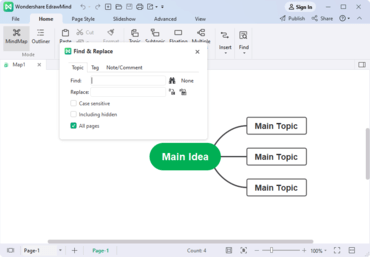
  • View "Find & Replace" and "Font Symbol" in "Home".
  • Select any topic in the map, and the mini toolbar will show up. You can quickly change the style, font, shape, and color of the topic. Click "More" to close the toolbar, and it will be hidden.
  • Brand new Task Pane with new categories.
  • Optimized file saving function and added support for Auto-save. You can turn off Auto-save or set the duration in "Options".
  • Added the ability to add the "All Pages" option in "Find & Replace", and the engine will show the search result found across all pages.
EdrawMind

EdrawMind

Strumento per mappe mentali e brainstorming.

Hai una domanda?

Chatta live con i nostri specialisti di gestione delle licenze di Edraw ora.