Cette page a été archivée et est n'est plus actualisée.

Nous ne fournissons plus ce produit.

Layer2 File Pal

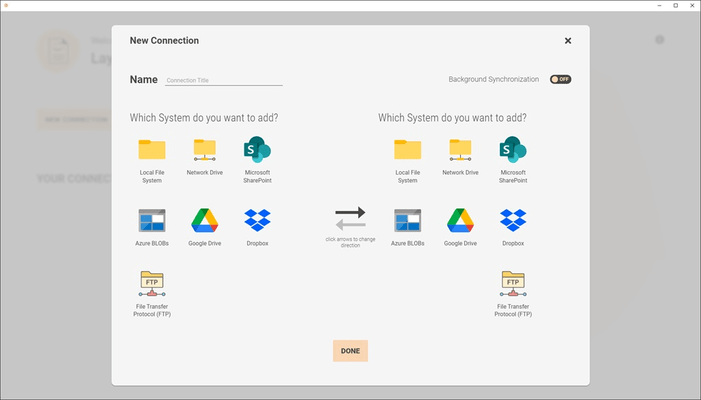
Synchronisation de documents et de fichiers entre le partage réseau (serveur de fichiers), le système de fichiers local, Teams et SharePoint.

Publié par Layer2
Distribué par ComponentSource depuis 2009
Version : 1.11.1.0 Mise à jour : Aug 4, 2023

Lancements de Layer2 File Pal

Released: Aug 4, 2023

Mises à jour de V1.11.1.0

Fonctionnalités

  • Improved logging.

Released: Jul 28, 2023

Mises à jour de V1.11.0.0

Correctifs

  • In some cases the configuration of the notification email did not work.
  • The usability has been improved for Laptops or screens with low resolution.
  • A SharePoint authentication was expiring after 14 days instead of only after 90 days without access.

Released: Jul 4, 2023

Mises à jour de V1.10.30.0

Fonctionnalités

  • It is now possible to filter the files and folders that are to be synchronized by specifying paths and extensions to be included or excluded.
  • The connection view now shows an icon that indicates whether deletions are enabled or disabled for this synchronization.

Released: May 3, 2023

Mises à jour de V1.10.7.0

Correctifs

  • Sometimes changing the library selection for a given SharePoint configuration did not work correctly.

Released: Apr 26, 2023

Mises à jour de V1.10.6.0

Fonctionnalités

  • Microsoft Azure Files has been added as an available system.
  • You can now get email notifications for connection errors and a daily summary.

Correctifs

  • In some cases the setup aborted without showing an error due to timeouts.

Released: Feb 2, 2023

Mises à jour de V1.9.0.0

Fonctionnalités

  • You can now see how many files have been read, and how many operations are currently being carried out, during a synchronization.
  • When a synchronization has stopped because of the deletion protection threshold, it is now possible to switch off deletion protection for the current connection.
  • The toggle switch which activates background synchronization now has a tooltip, which explains what activating does.

Correctifs

  • Sometimes the status icons on the main page did not reflect the...

Released: Jan 20, 2023

Mises à jour de V1.8.0.0

Fonctionnalités

  • There is now a connection option to disable or enable deletion during synchronization. When a new connection is created, deletion is initially disabled.
  • It is now possible to see which files were skipped due to an error.
  • When providing a Sharing Link (which points to a file) for a Teams connection, a validation message is now shown which states that a folder is expected.
  • Dates and times are now displayed in an easier to read format. (i.e. 2 minutes ago).
  • During a synchronization...

Released: Oct 26, 2022

Mises à jour de V1.7.0.0

Fonctionnalités

  • Added the ability to specify a specific folder for Microsoft SharePoint.
  • During a synchronization, activity is now indicated by a pulse animation.

Correctifs

  • Canceling a SharePoint authentication through the login screen led to an error.
  • In some cases the installation aborted unexpectedly.

Released: Aug 16, 2022

Mises à jour de V1.6.2.0

Correctifs

  • In some cases the installation did not succeed and was rolled back without any notice. This has been fixed.

Released: Aug 12, 2022

Mises à jour de V1.6.1.0

Fonctionnalités

  • Added support for Microsoft SharePoint 2013.
  • If you try to change the already selected SharePoint library in one of your configurations, you can now discard the change attempt and keep the previously chosen value by clicking on the back arrow at the top of the SharePoint configuration view ("discard changes").
  • System configuration for Microsoft Teams can now handle folder sharing links.
  • Your SharePoint URL is now automatically detected after login and no longer needs to be...