À propos de MindFusion.Diagramming for Xamarin

Contrôle d'organigramme Xamarin.Forms optimisé pour la programmation sous Android et iOS.

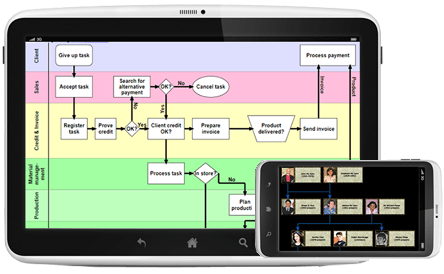
MindFusion.Diagramming for Xamarin helps you create diagramming applications for iOS and Android. Diagram items are easy to select with a single finger tap and large diagrams are smoothly scrolled even on the tiniest screens. MindFusion.Diagramming for Xamarin ships with 100+ predefined flowchart shapes and you can organize the shapes in layers, put them into containers or arrange them in hierarchies.

Mindfusion.Diagramming for Xamarin Features

  • Redistribution is royalty free.
  • Implements the Document/View architecture.
  • Can be purchased with source code.
  • Written in C#.

User Interaction

  • Several user interaction modes.
  • Scrolling and zooming.
  • Panning.
  • Alignment to grid.
  • Multiple selection.
  • Docking points can be defined for nodes.

Programming

  • Programmatic access to all diagram elements.
  • Numerous properties for customizing appearance and behavior.
  • Numerous utility methods.
  • Path finding and cycle detection.
  • Rich event set.

Diagram Elements

  • More than 100 predefined node shapes.
  • Ability to define custom shapes and shape libraries.
  • Rotation of shapes at arbitrary angles.
  • Container nodes.
  • Tables with unlimited number of rows and columns.
  • Table cells can span several columns and rows.
  • Sections of table rows can be expanded or collapsed.
  • Display hierarchical data in TreeView nodes.
  • Links can comprise multiple segments.
  • Link segments can be straight lines or curves.
  • Display multiple labels per link.
  • Support for custom node and link types.
  • Assign diagram items to layers.

Appearance

  • Styles and themes.
  • Nodes can display images and text.
  • Various text alignment styles.
  • Customizable fonts and colors.
  • Custom painting of nodes.
  • Shadows.
  • Z-order.
  • Rich choice of pen and brush styles.
  • Transparent nodes.
  • Invisible nodes.
  • Node effects.
  • Background lane grid.

Automatic Layout

  • Spring-Embedder graph layout.
  • Directional tree layout.
  • Horizontal/vertical binary tree layout.
  • Radial tree layout.
  • Fractal tree layout.
  • Layered graph layout.
  • Grid layout.
  • Simulated Annealing graph layout.
  • One-way graph layout.
  • Orthogonal graph layout.
  • Circular graph layout.
  • Orthogonal link router.
  • Source code flowchart layout.
  • Decision flowchart layout.
  • Process diagrams layout.
  • Tree map layout.
  • Swimlane diagrams layout.
  • Topological graph layout.
  • Triangular graph layout.
  • Cascading graph layout.
  • Hierarchical graph layout.
  • Multi-level graph layout.
  • Automatic link routing.

Behavior

  • Lock diagram elements.
  • Read-only mode supported.
  • Tables can be scrolled.
  • Collapse and expand hierarchy branches.
  • In-place text editing.
  • Dynamic positioning of links relative to connected nodes.

Link Diagram Items

  • Nodes to nodes.
  • Table rows to table rows.
  • Nodes to table rows.
  • Unconnected links.

Hierarchical Grouping

  • Attaching nodes to other nodes.
  • Attaching nodes to link control points.
  • Attaching nodes to link segments.