
SOS Intake
Create professional intake forms that connect directly to business systems.
Publié par SnapOn Software (formerly KWIZ)
Distribué par ComponentSource depuis 2009
Prix à partir de : $ 1,470.00
Create professional intake forms that connect directly to business systems.
Publié par SnapOn Software (formerly KWIZ)
Distribué par ComponentSource depuis 2009
Prix à partir de : $ 1,470.00
Create professional intake forms that connect directly to business systems.
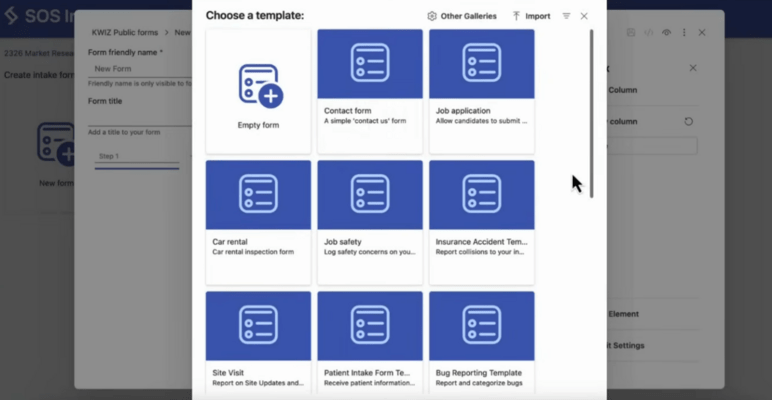
SOS Intake is a cross-platform intake forms solution that helps organizations create professional public forms for Microsoft 365 and Salesforce environments. It enables business users and administrators to capture information, documents, and requests through anonymous-access forms that write directly to enterprise systems, reducing manual handling and supporting faster deployment.
No-Code Form Creation
Create and publish professional intake forms without coding knowledge or developer involvement. The platform provides a business-friendly approach to form design, helping teams build data collection processes quickly while maintaining a polished and consistent user experience.
Public And Anonymous Access Forms
Support external users with public-facing forms that can be accessed without authentication. This makes it suitable for collecting requests, submissions, applications, and other information from customers, partners, vendors, and members of the public
Direct Microsoft 365 Integration
Connect forms directly to Microsoft 365 environments. Submitted information can be written to SharePoint lists, allowing organizations to capture and manage data within existing business systems and governance frameworks.
Power Automate Workflow Connectivity
Use submitted form data to initiate Power Automate workflows automatically. This enables organizations to route requests, trigger approvals, perform notifications, and support business processes based on incoming submissions.
Microsoft Teams Notifications
Send notifications to Microsoft Teams channels when forms are submitted. Teams can stay informed about new requests and updates, helping users respond to information as it arrives and coordinate follow-up actions.
Native Salesforce Data Capture
Integrate directly with Salesforce environments to create records in Salesforce objects automatically. Form submissions are captured within the platform without requiring manual transfer of information between systems.
Real-Time Data Synchronization
Keep submitted information synchronized with connected business systems as data is collected. This approach helps maintain current records and reduces delays associated with manual processing or intermediary handling.
Document And Image Upload Support
Allow users to upload documents and images as part of the submission process. Forms can capture supporting files alongside structured data, making it easier to gather complete information in a single interaction.
Automatic QR Code Generation
Generate QR codes for forms automatically to simplify access from mobile devices and physical locations. Users can scan a code and submit information through the associated form without additional navigation steps.
Tél : (888) 850 9911
Fax : +1 770 250 6199


