Released: Feb 8, 2017
Mises à jour de v1.0
Fonctionnalités
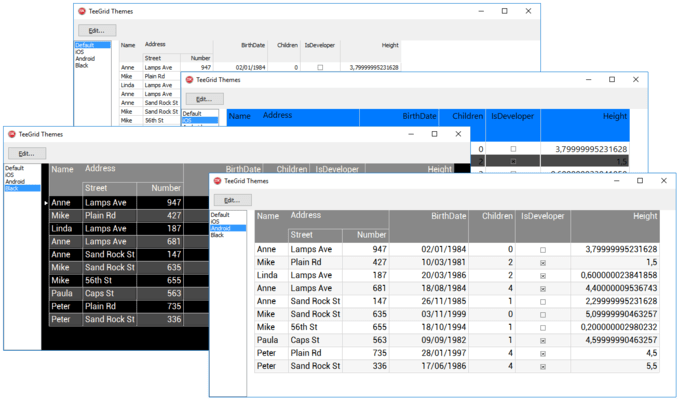
Fully compatible with VCL and FMX, TeeGrid offers you the means to take common core code for gridding on Microsoft Windows, Android and Apple iOS/OSX.
- Huge data - capable of handling a very big number of cells. For example 1 billion cells (1000 columns by 1 million rows).
- Virtual data - TVirtualData or derived class to automatically create columns and provide cell values.
- TStringGrid emulation - TeeGrid can be used like a TStringGrid with a TStringsData object.
- Sub-columns (any column can have children columns)
- Per-column formatting (font, back fill, stroke, text alignment)
- Individual row heights (per-row custom height)
- Row groups - Any row can be expanded to show its detail sub-grid rows. The grid Data class must support master-detail relationships.
- Totals and SubTotals - Automatic summary "grid bands" can be added to a header or footer, also for "detail" subgrids.
- Row "Sub-Bands" - Any row might display a grid band above the row. The "band" can be anything, from a simple TTitleBand to a complex group of bands or rows.
- Custom cell rendering - Default class for cell rendering is TCellRender. Other classes can be used or created to override the default behaviour, like for example to show check-boxes in columns with boolean (True/False) values.
- Cell text format (float, date-time formatting strings).
- Column Visible and Expanded (for sub-columns).
- Automatic column width (or fixed, in pixels or % percent of grid width).
- Column mouse drag resizing.
- Automatic scroll bars visibility - Scrollbars are automatically displayed when necessary. In Firemonkey they can be customized.
- Column ordering - Columns and sub-columns can be re-positioned.
- Grid Header formatting (font, back fill, stroke).
- Grid Header mouse-hover.
- Grid "indicator" column (left-most column with symbol for current row).
- Row highlighting (mouse-hover and selected row formatting).
- Multi-cell range selection (by mouse and arrow keys).
- Copy selected cells to clipboard in CSV format, pressing Ctrl+C or Ctrl+Insert key and also by code.
- Full selected row highlight.
- Grid and Columns ReadOnly.
- Custom Grid editors.
- Rows and Columns lines separators (stroke settings).
- Cell mouse-hover (highlights cell under mouse cursor).
- All coordinates as floats - For sub-pixel finetuning, Firemonkey only. VCL always rounds to integer pixels.
- Alternate row background filling (back brush, stroke settings).


 (1)
(1)