Category News

Migliora la creazione di report con gli oggetti visivi degli indicatori

Marzo 26, 2026
Aggiungi indicatori ai report per fornire informazioni visive chiare e in tempo reale che semplificano i dati complessi e mettono in evidenza le prestazioni rispetto agli obiettivi.

Adding gauges to reports means incorporating visual indicators such as dial or meter style graphics that display key metrics against defined ranges or targets, making performance instantly understandable at a glance. This approach enhances report clarity by transforming complex or dense data into intuitive visuals, helping users quickly assess whether values fall within acceptable, warning, or critical thresholds. As a result, gauges support faster, more informed decision making, improve stakeholder communication, and create more engaging, user friendly reports. Common use cases include tracking sales performance against quotas, monitoring system health or uptime, visualizing budget utilization, and displaying KPI progress in executive dashboards where quick insights are essential.

Several .NET WPF Reporting controls include Gauges including:

  • DevExpress Reporting lets you embed customizable gauge controls in reports to visualize KPIs, enabling clear performance tracking and faster data driven decisions.
  • Telerik Reporting allows you to incorporate interactive gauges into reports, presenting real time metrics with intuitive visuals that enhance clarity and user engagement.
  • List & Label Enterprise Reporting Edition by combit facilitates adding gauge elements to reports, helping users highlight key values, thresholds, and performance trends effectively.
  • Stimulsoft Reports.WPF enables you to design rich reports with gauge components, delivering precise visual feedback on metrics for improved monitoring and analysis.

For an in-depth analysis of features and price, visit our comparison of .NET WPF Reporting Controls.

Compare .NET WPF Reporting Controls

Abilita il trasferimento dati sicuro con SSH

Marzo 26, 2026
Integra la comunicazione SSH crittografata nelle applicazioni, consentendo un accesso remoto sicuro e uno scambio di dati con il minimo sforzo di implementazione.

SSH (Secure Shell) support in a .NET communication component refers to the ability to establish and manage encrypted, authenticated connections using the SSH protocol. This can enable capabilities such as remote command execution, shell access, port forwarding, and, where supported, secure file transfer through protocols such as SFTP or SCP. For software developers, it reduces the need to implement low-level cryptographic and networking functions directly, while relying on established SSH mechanisms for confidentiality, integrity, and authentication. It is particularly useful for scenarios such as remote server administration, secure transfers, and tunneling, helping applications protect sensitive data over untrusted networks.

Several .NET Core communications and messaging components offer SSH support including:

  • SecureBlackbox .NET Edition by /n software lets you integrate SSH connectivity, enabling encrypted communication and reliable remote command execution.
  • Rebex SSH Shell adds terminal access, scripting, and tunneling for .NET applications, helping developers handle interactive SSH sessions across systems securely.
  • PowerTCP SSH and SFTP for .NET by Dart Communications facilitates SSH-enabled communication by providing secure channels for remote access and data exchange.
  • SocketTools .NET Edition by Catalyst Development Corp. allows you to incorporate SSH support for secure connections, supporting encrypted sessions and remote operations.

For an in-depth analysis of features and price, visit our comparison of .NET Core comms & messaging components.

Compare .NET Core Comms & Messaging Components

Cattura le annotazioni con l'uso di inchiostro digitale a mano libera nei PDF

Marzo 26, 2026
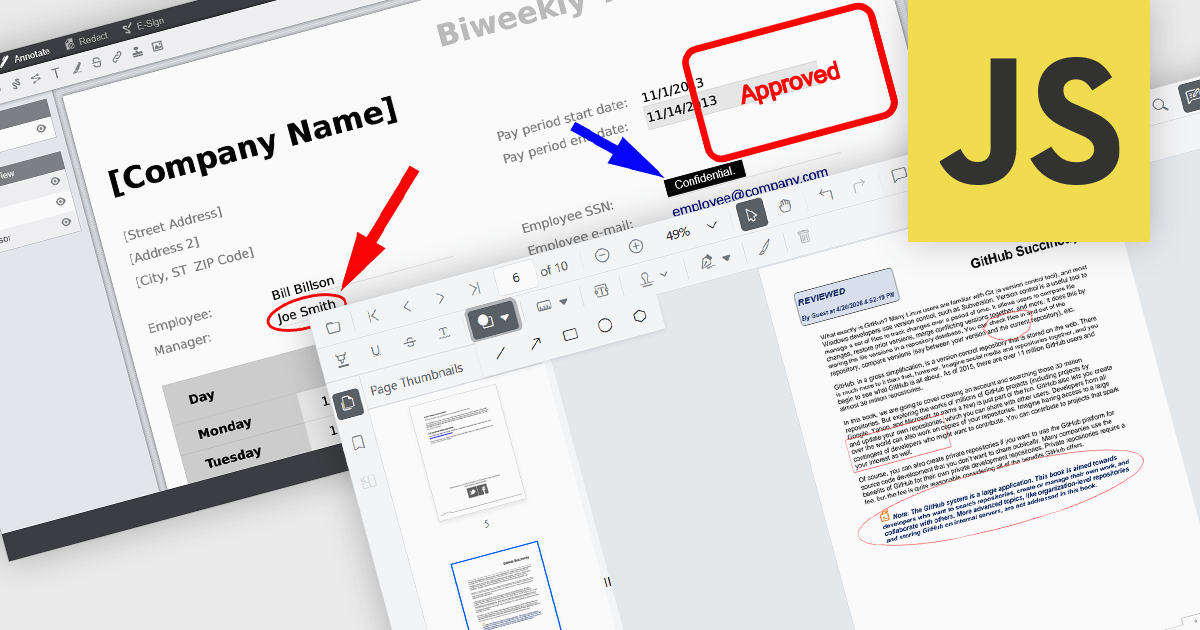
Crea app che supportano note scritte a mano nei file PDF, permettendo agli utenti di annotare i documenti direttamente usando strumenti quali stilo, tocco o mouse.

Freehand ink annotation support in a PDF component enables applications to capture and render freehand drawings directly on a PDF document, typically using input from a mouse, stylus, or touch device. It allows users to write, sketch, highlight, or mark up content in a natural way, with the annotations stored as standard PDF ink annotations that remain part of the document. For software developers, this capability adds interactive review and collaboration features to applications such as document viewers and form-processing systems, allowing users to provide visual feedback, sign documents, or annotate content without altering the original PDF structure.

Several .NET PDF components feature support for freehand ink annotations including:

  • Document Solutions for PDF (by MESCIUS) allows you to record freehand ink strokes and store them as standard PDF annotations for review scenarios.
  • DevExpress PDF Document API for .NET (part of DevExpress Office File API) lets you create, edit, and flatten Ink annotations for freehand PDF markup workflows.
  • PDF4NET (by PDF4DEV Solutions) facilitates drawing and preserving freehand ink annotations in PDFs, supporting stylus and touch input.
  • Syncfusion ASP.NET Core PDF (part of Syncfusion Essential Studio Enterprise) enables developers to capture and render freehand ink annotations in PDFs.

For an in-depth analysis of features and price, visit our comparison of .NET PDF components.

Compare .NET PDF Components

Accelera lo sviluppo SQL con l'assistenza AI

Marzo 26, 2026
KeepTool 17 collabora con OpenAI, Claude, Gemini o Llama per generare e perfezionare il codice del database durante lo sviluppo.

KeepTool is designed to enhance database management and development for Oracle databases. It offers a range of tools, including a database browser, SQL editor, PL/SQL debugger, ER diagrammer, and database comparison utility. These tools help database administrators, developers, and end-users to efficiently navigate, analyze, and modify database structures, write and execute SQL queries, debug PL/SQL code, and manage database changes. KeepTool's intuitive interface and features improve database tasks, improving productivity and reducing errors.

The KeepTool 17 release introduces an AI Assistant, bringing support for multiple artificial intelligence (AI) engines including OpenAI, Claude, Gemini, and Llama. This capability allows developers and database professionals to create, modify, and optimize SQL and PL/SQL code with contextual assistance. By integrating AI directly into the development environment, it provides a flexible and efficient way to handle routine coding tasks, explore alternative query structures, and enhance overall database development practices.

To see a full list of what's new in 17, see our release notes.

KeepTool is licensed on a perpetual basis and is available as a workstation or network license. A workstation license is bound to your computer and a network license is bound to a license server within your network. See our KeepTool licensing page for full details.

KeepTool is available in the following editions:

Pianifica i progetti facilmente con gli strumenti Gantt integrati

Marzo 25, 2026
Blazorise 2.0.3 aggiunge un componente Gantt che consente la creazione di sequenze temporali interattive dei progetti con supporto alla gerarchia di modifica e capacità di pianificazione.

Blazorise is a versatile component library that empowers developers to build modern and feature-rich web applications using Blazor, a client-side web development framework from Microsoft. It offers a comprehensive collection of user interface components, including buttons, forms, charts, and navigation elements, all built with accessibility and responsiveness in mind.

The Blazorise 2.0.3 update introduces a Gantt component that enables developers to implement advanced project planning and timeline visualization directly within their applications, reducing the need for custom development or third party tools while supporting complex scheduling scenarios through features such as task editing, hierarchical data structures, dependency management, filtering, and drag and drop interactions, all within a consistent and theme aligned UI framework.

To see a full list of what’s new in version 2.0.3, see our release notes.

Blazorise is licensed per developer and includes a 1 year subscription for updates and support. Professional, Enterprise, and Enterprise Plus editions are available, each offering tailored levels of support and service to meet varying business needs. See our Blazorise licensing page for full details.

For more information, visit our Blazorise product page.