A proposito di dbForge Data Generator for SQL Server

Genera dati di test realistici istantanei per i database.

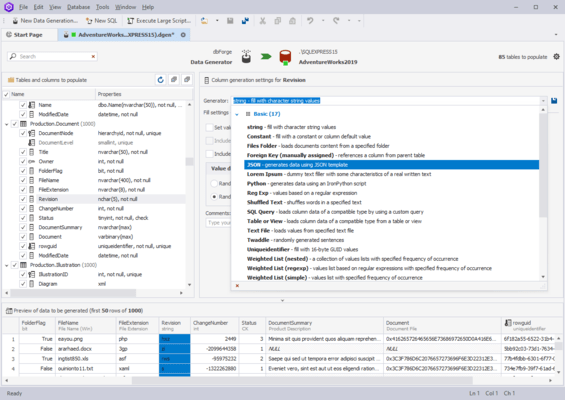
dbForge Data Generator for SQL Server allows you to implement new standards for the SQL tables population with test data. The visual data generation tool includes 200+ SQL data generators with flexible configuration. Adjusted to the users’ specific needs, the Data Generator allows for manual control over the creation of foreign key data. The column-intelligent data generation ensures that the data in one column are based on another column’s data.

dbForge Data Generator for SQL Server Feature Highlights:

  • Integrated AI Assistant - dbForge Data Generator includes an integrated AI Assistant that will completely reinvent your experience of SQL development with the following features.
    • Context-aware query generation
    • Conversion of natural language to SQL
    • Query optimization
    • SQL explanations and troubleshooting
    • Error analysis and clarifications
    • AI chat
    • Web search
  • Basic generators - dbForge Data Generator comprises a collection of 15+ basic random data generators that can be individually customized to match your requirements.
    • Check Constraint
    • Constant
    • Datetime
    • Foreign Key
    • JSON
    • Regular Expression
    • Shuffled Text
    • SQL Query
    • String
    • Table or View
    • Text File
    • Weighted List
  • Meaningful generators - If you need something more complex, you get 200+ meaningful generators that produce realistic data for your tables.
    • IDs
    • Postal codes
    • Phone numbers
    • Birth dates
    • Countries
    • Credit card numbers
    • Emails
    • Social insurance numbers
    • First & last names
    • Product categories
    • Random numbers
    • ...and more
  • User-defined generators - If you need even greater flexibility, you can easily create, save, and share custom-tailored generators that will perfectly meet your specific data generation tasks. Moreover, you won't need to reconfigure existing generators over and over again.
  • Support for all column data types - Data Generator supports a massive range of column data types, including but not limited to the following.
    • GEOGRAPHY
    • GEOMETRY
    • HIERARCHYID
    • DATETIME2
    • DATETIMEOFFSET
    • XML
  • Automation - If you want to have Data Generator as part of your database development process, you will definitely benefit from its automation features.
    • Save your data generation settings to reusable projects
    • Run data generation from the command line
    • Save your data population settings to command-line execution files (.bat) and run them whenever you need
    • Schedule the execution of .bat files with Windows Scheduler
    • Integrate Data Generator, along with other dbForge tools, into your database DevOps