
Syncfusion Essential Chart for Windows Forms
Add rich, interactive financial and business charts to your Windows Forms applications.
Pubblicato da Syncfusion
Distribuito da ComponentSource dal 2002
Add rich, interactive financial and business charts to your Windows Forms applications.
Pubblicato da Syncfusion
Distribuito da ComponentSource dal 2002
This product is no longer sold individually, but is available within Syncfusion Essential Studio Enterprise Edition and one of Syncfusion’s 9 platform-dedicated suites.
Syncfusion Essential Chart for Windows Forms is a data visualization tool that helps you generate professional graphs and charts. It supports a large variety of chart types and comes with an object-oriented application programming interface (API). Syncfusion Essential Chart for Windows Forms comes with a rich style architecture, which separates the display styles from the data model, providing flexibility in the appearance definition for each display element. Styles form the core of the chart control, providing extensive customization. They can be inherited from parent charts, making complex formatting relatively easy.
Syncfusion Essential Chart for Windows Forms General Features
Syncfusion Essential Chart for Windows Forms Chart Types
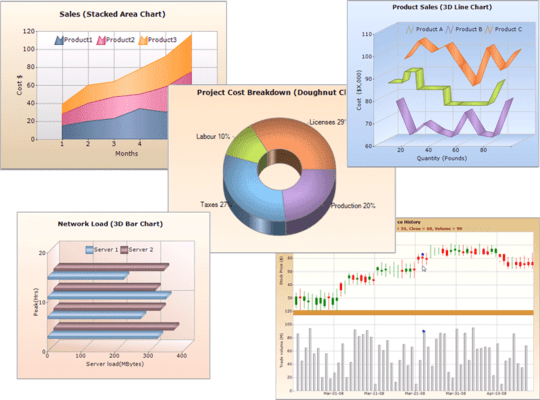
Essential Chart offers many chart types, ranging from simple column charts to complex financial charts, which can be easily configured to suit the needs of any user. All charts, except radar and polar charts, can be rendered in 3-D mode.
Syncfusion Essential Chart for Windows Forms Axis Features
By default, the chart control comes with two primary axes: X and Y. The chart control's framework also provides complete support for the inclusion of multiple x- and y-axes.
Syncfusion Essential Chart for Windows Forms Export Options
Essential Chart supports exporting the chart control into various formats. Users can also print chart data.
Syncfusion Essential Chart for Windows Forms Alter Series Data and Style
The chart control comes with a rich styles architecture, which separates the display styles from the data model, providing flexibility in the appearance definition for each display element. Styles form the core of the chart control, providing extensive customization. They can be inherited from parent charts, making complex formatting relatively easy.
Syncfusion Essential Chart for Windows Forms Chart Data
Essential Chart can handle data in different ways. You can simply add data points to a series and let the chart manage it; alternatively, you can use the built-in ChartDataBindModel and specify the column names containing the X and Y values to easily bind data to a data set. For added flexibility, implement the simple IChartSeriesModel interface and plug in your custom model.
Syncfusion Essential Chart for Windows Forms Chart Appearance
A chart's visual appearance can be customized by setting the properties for individual chart elements. The rich styles architecture available for the chart control provides formatting options at point-level as well as series-level.
Syncfusion Essential Chart for Windows Forms Title and Data Legend Appearance
A chart legend, which is a symbol-based caption, is rendered for each series in a chart by default. There is also support for adding custom legends as well as plenty of appearance customization options. A chart title can also be fully customized, including but not limited to the font, color, size, position, and alignment.
Syncfusion Essential Chart for Windows Forms Interactive Elements
User interaction adds to the appeal of any control. Keeping this in mind, the chart control has been designed to be completely user friendly and easily applicable to user interactions.
Tel: (888) 850 9911
Fax: +1 770 250 6199


