NetAdvantage for Windows Forms enhances WinRibbon

Version 2011 Volume 1 adds new ribbon end user customization support.
6월 10, 2011
기능 릴리스

Infragistics NetAdvantage for Windows Forms provides developers with UI controls to rapidly build and style high-fidelity line of business application user interfaces with the look and feel of Microsoft Office. With Infragistics NetAdvantage for Windows Forms developers receive every control (data grids, trees, toolbars, calendars, editors, charts, gauges, scenic ribbons and more) needed to create superior user experiences with stability, performance and robustness. NetAdvantage for Windows Forms includes an annual subscription to developer support, source code, all updates and upgrades, documentation and samples.

Updates in 2011 Volume 1

  • Microsoft Word Library – NEW! - The new Word Library gives you the ability to create and work with Microsoft Word® document files.  The library features the ability to write out styled text, hyperlinks, images, tables and shapes.  In addition, it provides you with document-specific features that allow you to specify the page size, margins, page breaks, and set header/footer information.  You can easily integrate this library into your Windows Forms applications.
  • WinGridWordWriter – NEW! - This is a new lightweight component that enables you to stream the WinGrid™ to a Microsoft Word document. Its implementation makes creating a Word document as simple as writing only a couple of lines of code.
  • WinFormattedTextWordWriter – NEW!
  • This control provides you with quick and easy export capabilities of content within the WinFormattedTextEditor or the WinFormattedLinkLabel controls to a Word document.
  • IG Theme – NEW! - The IG Theme is an Infragistics Style Library (.isl) working with the Application Styling Framework to give you a complete visual theme, permitting the creation of modern applications without relying on the Microsoft Office brand.
  • Ribbon End User Customizations – NEW! - Knowledge workers continually look to customize their work experience so that they can be more productive.  Developers can be challenged by the seemingly conflicting requirements all of these customizations allow, but when using the Ribbon it enables these end user customizations out-of-the-box so you don’t have to.  You can let your application’s end users customize tabs, groups and items to give them complete control over the application’s user experience.

About Infragistics

Infragistics has been a market leader in the presentation layer components industry for over 18 years. With a comprehensive portfolio of multi-platform Enterprise Software products and services, it has achieved global reach in nearly every Fortune 2000 company. Infragistics empowers developers to build and style great application user interfaces for Windows Forms, ASP.NET, WPF and JSF, and additionally offers user interface test tools, support, training and consulting services.
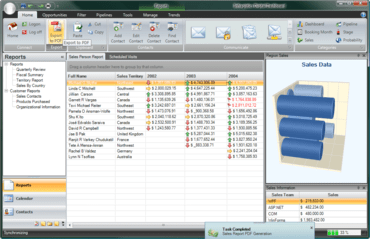
Financial reports created using Infragistics NetAdvantage for Windows Forms.

Infragistics Ultimate UI for Windows Forms

100개 이상의 Windows Forms UI 컨트롤 세트를 통해 우수한 환경을 제공하는 디자인이 가능한 사용자 인터페이스를 신속하게 빌드 할 수 있습니다.

궁금한 점이 있으세요?

Infragistics 사 제품 라이선스 담당자와 라이브 채팅
