

공식 공급 업체
200 이상의 소프트웨어 개발처와 판매 계약을 맺은 공인 디스트리뷰터로서 합법적인 라이선스를 제공합니다.
모든 브랜드 보기.
ReSharper has already made a reputation for itself as a tool for managing complexity, and in ReSharper 7 we are proud to introduce two new refactorings that make the task of managing complex and unwieldy code a little bit easier.
Extract Class
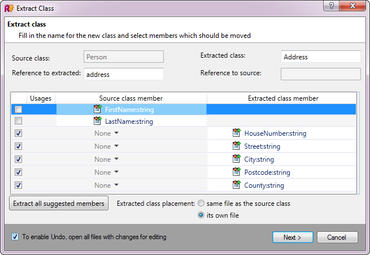
What do you do when a class gets too big? Chances are, you try to break it up into smaller classes. This process is common enough for ReSharper to support it via the aptly named Extract Class refactoring. The idea is simple: decide which members need to be extracted, figure out how to manage usage issues (if any), and ReSharper does all the work.
Here’s an example: a Person class that has lots of address details that are better kept in a separate class. To give the various address properties a separate class, we can fire off the refactoring either from the context menu or, for example, by selecting the relevant properties in the Solution Explorer and using the Refactor This menu.
전화 : 00798 14 800 6332
팩스 : +1 770 250 6199


