Actipro WPF Studio 2017.1 build 0650

두개의 새로운 트리 컨트롤 및 재설계된 PropertyGrid 컨트롤을 추가합니다.
3월 23, 2017
신규 버전

기능

Docking/MDI

  • Updated hosted floated docking windows to center over the dock site.
  • Updated double-clicks on a docked tool window container title bar to float the container.

Editors

  • All controls rewritten to be faster, more lightweight in terms of elements, and use a common codebase with the UWP Editors.
  • New ByteEditBox, DateEditBox, Int16EditBox, SingleEditBox, and TimeEditBox controls added.
  • New and improved drop-down picker controls for each edit box created.
  • Updated EnumEditBox with improved keyboard and focus handling.
  • Updated EnumEditBox, EnumPicker, and EnumListBox to all support hiding specific enum values via EditorBrowsable(EditorBrowsableState.Never).
  • See the Editors 'Converting to 2017.1' topic in the documentation for details on handling breaking changes.

Grids

  • First product release, including new tree controls and a rearchitected PropertyGrid control that is lightning fast and extremely customizable.
  • TreeListBox is a single-column tree control similar to the Visual Studio Solution Explorer tree control.
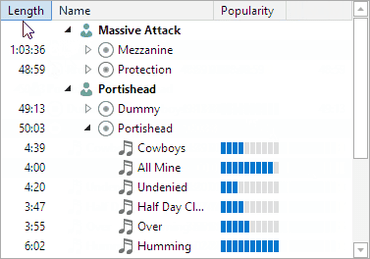
  • TreeListView is a multi-column variant of TreeListBox that renders similar to a standard ListView but has additional features.
  • PropertyGrid allows for all the properties of one or more objects to be displayed and edited, optionally using categories.
  • See the Grids 'Converting to 2017.1' topic in the documentation for details on handling breaking changes.

Themes

  • Added the WindowChrome.TitleBarTextAlignment property that allows for changing the title alignment, such as to center-aligned.
New TreeListView control.

Actipro WPF Studio

WPF를 위한 프로페셔널 유저 인터페이스 컨트롤 및 컴포넌트 세트.

궁금한 점이 있으세요?

Actipro Software 사 제품 라이선스 담당자와 라이브 채팅