새 Swift 언어 기능을 위한 서포트, 용법 액션(usage actions)에서의 신규 Create 및 에디터 내의 Emoji 서포트를 추가합니다.
3월 29, 2017
신규 버전
기능
Swift
Language support - AppCode 2017.1 brings long-awaited improvements in Objective-C/Swift translation, support for nullability audited regions and lots of the latest Swift 3 features.
Create from usage - Generate new classes, structs, protocols or enums together with needed initializers right from their usages in your code.
Override/Implement - Override or implement multiple methods at once – now even faster thanks to a UI showing Swift members hierarchically and more accurate code generation.
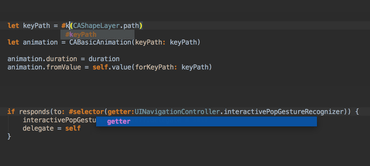
Completion - Benefit from function completion, which now takes into account parameter names in function signatures.
Structure view - See all the //TODO, //FIXME and //MARK comment tags in the Structure view and File Structure popup .
C++ support
C++14 - AppCode 2017.1 delivers support for the following C++14 features: auto return type, generic lambdas, variable templates and generalized lambda captures.
C++17 - AppCode supports C++17 with nested namespaces.
Convert to auto intention - For the sake of code readability and accuracy, AppCode now suggests to modernize your C++ code by converting variable type to auto. As this feature should be used carefully across your code base, it’s implemented as a non-intrusive intention.
General improvements - Improved AppCode's parser and code analysis to make it even more accurate.
IDE
Build messages - Filter compiler messages in your application – select the necessary message types via the Filter messages button on the left-hand side of the Build Messages tool window.
Xcode-like breakpoints - Welcome a new option, Drag to the editor area, available in Preferences | Build, Execution, Deployment | Debugger | Remove breakpoint. Click a breakpoint in your code to disable it, or drag a breakpoint into the editor area to remove it.
Emoji support - Insert emojis into your source code easily with the native emoji chooser and have them correctly rendered in the AppCode editor and IDE windows.
Find in path - Change Find in Path settings faster with all of them gathered on a single pane.
Remote hosts - Upload your project sources to the remote server painlessly, by using the Remote Hosts Access plugin bundled in AppCode.
Includes improvements in Objective-C/Swift translation.