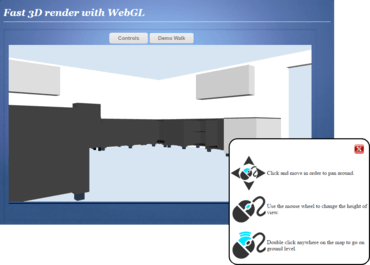
Supports WebGL (Web Graphics Library) material images with WebGL render mode.
Supports WebGL section clip.
Supports draw hatch boundary with scriptCommand hatch.
Adjusts scaling size when zoom-in, zoom-out with mouse actions.
A new event vdSelectionModified fires for every entity the user selects.
Reduces the file size of the produced vds file when exporting polylines with different segment widths.
Adjusts the scaling sensitivity for user action scale when the mouse is moving, in order to keep scaling entities inside mouse position and reference point.
New arguments have been added in vdcanvas.vdSelectionModified method so users can cancel the selection by code whenever they want.
Added a new property UndoStack to allow the removal of previous undo records from the history/undo collection.
Added the ability to count the number of currently selected items.
Added a new property vdrawObj.ActiveAction().parse("") that parses the passed command string and finishes the action.
Added the ability to exclude entities from save.
New ActionDraw event displays custom user shapes.
Added the ability to add dimension in Web Control.
ActionScaleMode works when user inserts block reference.
Added the ability to merge several documents into one.
It is now possible to identify which snap point was clicked for an action.
수정사항
Fixed - Drawing solid fill polygons with a large number of points takes too much time in WebGL.
Fixed - ScriptCommand finish callback does not fire in all cases.
Fixed - GroupsManager.AddItem method throws an exception.