CodeRush Ultimate 17.1.4

탐색, 리팩터링 및 코드 공급자를 향상시킵니다.
6월 14, 2017
신규 버전

기능

CodeRush for Roslyn

Navigation

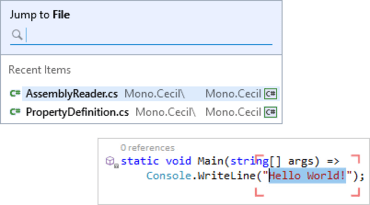
  • Drop Marker is enhanced, gaining the ability to mark and restore selections (in addition to caret positions). Useful when you have the selection you want but then realize you need to do something else first before you modify/cut/copy/delete the selection. Just drop a marker, move the caret to wherever you want to be, and when you’re ready press Escape to restore the selection. Also useful for presenters who want to need do quickly highlight code.
  • Jump to File and Jump to Symbol both gain a new Recent Items section.

Refactorings and Code Providers

  • DevExpress have widened the accessibility of many refactorings and code providers, making them available when the caret is anywhere on the line containing the relevant code you want to change. Providers with broader accessibility include:
    • Collapse/Expand.
    • Compress/Expand ternary expression.
    • Flatten Conditional.
    • Reverse conditional.
    • Use Expression Body.

Unit Testing

  • In this release DevExpress have excluded the PhantomJS library from the install, allowing you to specify the path to your preferred PhantomJS library. If the PhantomJS library is not found, the Jasmine Test Runner prompts you to install it through npm or NuGet.

Code Generation

  • You can now choose where you’d like CodeRush to place newly-generated type declarations. Locations include: Above the active type, Below the active type, or In a newly-created file.
  • You can now configure naming conventions for generic types.
Jump to File and Jump to Symbol both gain a new Recent Items section.

CodeRush Ultimate

더 나은 코드를 더 신속하게 만듭니다.

궁금한 점이 있으세요?

DevExpress 사 제품 라이선스 담당자와 라이브 채팅