UEStudio Suite v17.10

JSON 구문 강조, JSON 관리자, 접힌 코드 (folded code) 강조 및 성능 향상을 포함합니다.
7월 28, 2017
신규 버전

기능

Updates in UEStudio v17.10

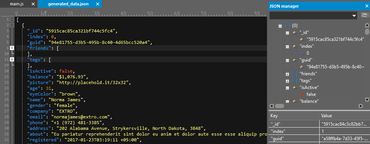
  • JSON (JavaScript Object Notation) manager
    • Provides tree-style view of JSON data (based upon .json file extension).
    • Set key as object identifier (context menu).
    • Copy, cut, paste, and duplicate JSON objects and keys.
    • See table of key / value data for selected object.
    • Expand / collapse all nodes.
    • Drag-and-drop JSON objects / keys to move them.
    • Format, compress, and re-parse active JSON file.
  • Folded code highlighting
    • Folding control turns solid when section is collapsed.
    • Background coloring for first line of folded code.
    • Configure colors for the above in Theme Manager.
  • JSON reformatter (Coding tab) to reformat, reindent, and compress JSON.
  • JSON wordfile / syntax highlighting (special internal handling for key/value pairs).
  • Greatly improved performance with Document Map, especially in large files.
  • Greatly improved performance with Line Change Indicator (LCI), especially in large files.

수정사항

  • Addressed all issues related to LCI.
UEStudio JSON manager.

UEStudio Suite

콘텐츠를 작성 및 수정하고, 프로젝트에서 공동 작업하고, 변경을 관리하며, 파워 검색을 수행하고 안전하게 파일을 전송합니다.

궁금한 점이 있으세요?

UltraEdit 사 제품 라이선스 담당자와 라이브 채팅