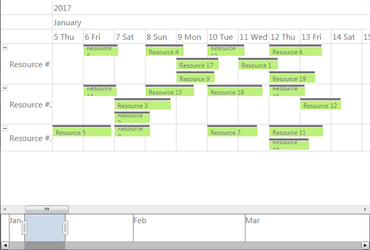
새로운 RangeSelector 컴포넌트로 Resource 보기에 타임라인을 생성할 수 있습니다.
기능
MindFusion.Charting
- Funnel Chart - Funnel charts are often used to represent the stages of a process and show relative values or measurements associated with each stage.
- Miscellaneous
- Set ShowCrosshairs to display crosshairs in RealTimeChart.
- InnerLabelAlignment property of BarSeries lets you customize label alignment in bars.
- ClearMeshSelection method lets you clear selected meshes in 3D charts.
MindFusion.Diagramming
- Flip shapes - The shape of a ShapeNode can be flipped horizontally or vertically.
- Fluent API - Extension methods in MindFusion.Diagramming.Wpf.Fluent and MindFusion.Diagramming.Wpf.Layout.Fluent namespaces let you initialize objects using fluent programming style.
- ShapeListBox control - Displays a list of Shape icons along with their DisplayName. It lets users drag-and-drop a Shape to the diagram's canvas to create a new ShapeNode.
- DiagramLink improvements
- AllowSplitLinks now works for Bezier links too. Users can insert a new Bezier segment by dragging any point (other than a control point) of a selected link. Adjacent segments can be merged back into a single one by dragging a tangent control point (square adjustment handle) onto a pass-through control point (round adjustment handle).
- IntermediateShape shapes are now rendered at correct position for Spline links.
- RerouteLinks.WhileModifying now works when multiple nodes are being dragged, either due to selection or grouping.
- Fix for link visibility issues when folding nested containers.
- The component no longer keeps a separate segmentCount field, removing a common source of errors. The SegmentCount property now calculates its value from ControlPoints elements. The UpdateFromPoints(updateGroups, updateSegments) overload has been removed too.
- SegmentCount setter no longer refuses changing number of segments if auto-routing is enabled or the link is a self-loop.
- The new Spline element of LinkShape enumeration draws links as interpolating splines that pass through all of their control points:
- Shape formula improvements
- The LocationForNode method of ShapeControlPoint returns current position of the control point for a node.
- The UpdateShapeControlPoints method of ShapeNode lets you update the node appearance after adding new control points to a Shape.
- ControlPoints are now saved in shape libraries.
MindFusion.Scheduling
- RangeSelector integration - The Calendar control can integrate with the new RangeSelector component in order to implement a timeline in the Resource view. The new ResourceTimeline sample illustrates this integration.
- MindFusion.Spreadsheet
- Improved XLSX Import and Export - The ExcelExporter and ExcelImporter classes are now several times faster than before and the results are more accurate.
RangeSelector integration.
WPF 애플리케이션에 다이어그램, 일정, 레포트, 가상 키보드, 차트 및 계기를 추가합니다.
궁금한 점이 있으세요?
MindFusion Group 사 제품 라이선스 담당자와 라이브 채팅

2003 이래 공식 유통업체