홈 / 뉴스 / Syncfusion Essential Studio Windows Forms 2017 Volume 3
Syncfusion Essential Studio Windows Forms 2017 Volume 3
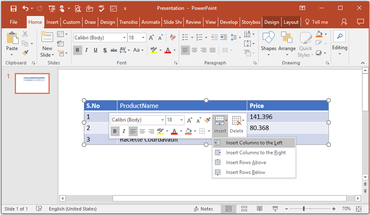
이제 Presentation 컨트롤을 사용하여 PowerPoint 프레젠테이션의 테이블에 열을 삽입 할 수 있습니다.
8월 16, 2017
신규 버전
기능
DocIO
Content Control Support - DocIO now allows creating and modifying content controls in Word documents and provides a way to design documents with the following features:
Create a form-like user interface.
Prevent users from editing the contents of a content control.
Bind content to XML data.
Word-to-PDF Enhancements
DocIO now allows converting Word documents to PDF in Azure websites.
DocIO now allows converting Word documents with rotated images to PDF as they are originally formatted.
DocIO now allows converting Word documents with mirror margins to PDF as they are originally formatted.
Advanced Message Box
Customization - Support has been added for customizing the font in message box elements like the header, details, and buttons.
PDF
Compress existing PDF document - Reduce file size of existing PDF documents.
Tagged PDF - Provide accessibility support by allowing users to create PDF/Universal Accessibility (PDF/UA) or section 508 compliant PDF documents.
Presentation
Support to insert columns - Presentation now allows inserting columns in tables in PowerPoint presentations.
PDF and image conversion enhancements - Presentation now allows PowerPoint presentations with rotated and nested group shapes to be precisely converted to PDF or image formats.
XlsIO
Filter Enhancements - XlsIO now allows the user to sort filtered data by text, number, cell color, and font color. It provides the ability to filter data based on custom text filter.
Insert columns in tables in PowerPoint presentations.