Infragistics Ultimate UI for Window Forms 17.2

경량의 고성능 Category 및 Funnel 차트를 추가합니다.
11월 15, 2017
신규 버전

기능

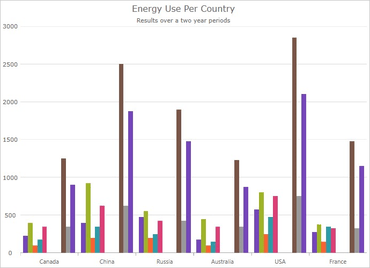
  • UltraCategoryChart - The UltraCategoryChart is a lightweight, high performance chart that can be easily configured to display category data using an extremely simple and intuitive API. All you need to do is bind your data (a collection or a collection of collections) and the chart takes care of everything else.
  • UltraFunnelChart - A funnel chart displays quantities as percentages of a whole, much like a pie chart. Funnel charts are commonly used to display quantitative data in relation to stages of a process. For example, a funnel chart might display expenses of a product from the manufacturing stage to the actual sale of that product.
  • UltraBulletGraph - Visualize data in the form of a bullet graph. Linear by design, it provides a simple and concise view of a primary measure compared against a scale and, optionally, some other measure.
  • UltraLinearGauge - Visualize data in the form of a linear gauge. Provides a simple and concise view of a primary value compared against a scale and one or more comparative ranges.
  • UltraSparkline - A lightweight charting control intended for rendering in a small-scale layout such as a grid cell. It can also be rendered stand-alone.
  • New Barcode Controls - Code 39, EAN\UPC, Interleaved 2 of 5, Intelligent Mail, GS1 DataBar, Royal Mail, PDF 417 and Maxi Code.
  • UltraGrid - Editors in ColumnHeaders - You can now embed any editor that inherits from EmbeddableEditorBase into a column, group, or band headers on the UltraGrid.
A column series displayed in the Category chart.

Infragistics Ultimate UI for Windows Forms

100개 이상의 Windows Forms UI 컨트롤 세트를 통해 우수한 환경을 제공하는 디자인이 가능한 사용자 인터페이스를 신속하게 빌드 할 수 있습니다.

궁금한 점이 있으세요?

Infragistics 사 제품 라이선스 담당자와 라이브 채팅